

Professional Cloud Network Engineer Free Sample Questions

20 free sample questions308 in the full practice test Other version: GCP-PCNE(153)

Try simulator

PCNE Sample Questions

  1. Question 1

    You need to establish network connectivity between three Virtual Private Cloud networks, Sales, Marketing, and Finance, so that users can access resources in all three VPCs. You configure VPC peering between the Sales VPC and the Finance VPC. You also configure VPC peering between the Marketing VPC and the Finance VPC. After you complete the configuration, some users cannot connect to resources in the Sales VPC and the Marketing VPC. You want to resolve the problem.

    What should you do?

    Answer and explanation

    Correct answer: A

    A
  2. Question 2

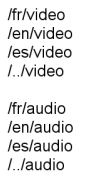
    Your company’s Google Cloud-deployed, streaming application supports multiple languages. The application development team has asked you how they should support splitting audio and video traffic to different backend Google Cloud storage buckets. They want to use URL maps and minimize operational overhead. They are currently using the following directory structure:

    Which solution should you recommend?

    Question 2 image
    Answer and explanation

    Correct answer: D

    D

  3. Question 3

    You want to deploy a VPN Gateway to connect your on-premises network to GCP. You are using a non BGP-capable on-premises VPN device. You want to minimize downtime and operational overhead when your network grows. The device supports only IKEv2, and you want to follow Google-recommended practices.

    What should you do?

    Answer and explanation

    Correct answer: D

  4. Question 4

    You are disabling DNSSEC for one of your Cloud DNS-managed zones. You removed the DS records from your zone file, waited for them to expire from the cache, and disabled DNSSEC for the zone. You receive reports that DNSSEC validating resolves are unable to resolve names in your zone.

    What should you do?

    Answer and explanation

    Correct answer: C

    Explanation:
    Before disabling DNSSEC for a managed zone you want to use, you must deactivate DNSSEC at your domain registrar to ensure that DNSSEC-validating resolvers can still resolve names in the zone. -- Reference: https://cloud.google.com/dns/docs/dnssec-config

  5. Question 5

    Your on-premises data center has 2 routers connected to your GCP through a VPN on each router. All applications are working correctly; however, all of the traffic is passing across a single VPN instead of being load- balanced across the 2 connections as desired.

    During troubleshooting you find:

    • Each on-premises router is configured with the same ASN.
    • Each on-premises router is configured with the same routes and priorities.
    • Both on-premises routers are configured with a VPN connected to a single Cloud Router.
    • The VPN logs have no-proposal-chosen lines when the VPNs are connecting.
    • BGP session is not established between one on-premises router and the Cloud Router.

    What is the most likely cause of this problem?

    Answer and explanation

    Correct answer: C

    C

  6. Question 6

    You want to configure load balancing for an internet-facing, standard voice-over-IP (VOIP) application.

    Which type of load balancer should you use?

    Answer and explanation

    Correct answer: C

    C

  7. Question 7

    You want to create a service in GCP using IPv6.

    What should you do?

    Answer and explanation

    Correct answer: B

    B

  8. Question 8

    You have created an HTTP(S) load balanced service. You need to verify that your backend instances are responding properly.

    How should you configure the health check?

    Answer and explanation

    Correct answer: B

  9. Question 9

    You created a VPC network named Retail in auto mode. You want to create a VPC network named Distribution and peer it with the Retail VPC.

    How should you configure the Distribution VPC?

    Answer and explanation

    Correct answer: B

  10. Question 10

    You are migrating to Cloud DNS and want to import your BIND zone file.

    Which command should you use?

    Answer and explanation

    Correct answer: C

    Explanation:
    Once you have the exported file from your other provider, you can use the gcloud dns record-sets import command to import it into your managed zone.
    To import record-sets, you use the dns record-sets import command. The -zone-file-format flag tells importto expect a BIND zone formatted file. If you omit this flag, import expects a YAML-formatted records file. -- Reference: https://medium.eom/@prashantapaudel/gcp-certification-series-2-4-planning-and-configuring-network-resources-8045ac2cc2ac

Register free for 10 more questions

Or unlock all 308 PCNE questions with explanations, timed mode and flashcards.