

Most Salesforce Admin candidates do not fail because they “didn’t study enough.” They fail because they studied the wrong things first, then tried to patch gaps late with random quizzes.
A good salesforce admin practice exam score comes from mastering a handful of foundations that show up everywhere: how data is structured, who can see it, how users interact with it, and how changes are automated and reported.
Start with the exam blueprint (so you do not guess)
Before you open Trailhead modules or watch videos, anchor your study to the official objectives.
- Use the official Salesforce Certified Administrator exam outline as your source of truth, then map every study session to an objective. Salesforce keeps the current guide on its certification site (look for “Exam Guide”): Salesforce Administrator certification.
This prevents a common mistake: over-studying “cool” features that are lightly tested, while under-studying fundamentals that appear in many scenario questions.
What to study first (in the order that pays off fastest)
If you are starting from scratch (or restarting after a stalled attempt), prioritize these topics in sequence. Each one unlocks the next.
1) Data model basics (objects, fields, relationships)
Everything in Salesforce Admin work sits on the data model. If you can reason about objects and relationships, you can answer a surprising share of scenario questions.
Focus on:
- Standard vs custom objects (when you use each)
- Field types and the consequences (text vs picklist, checkbox, formula, lookup, master-detail)
- Relationship behavior (record ownership, roll-up summaries, cascade effects)
- Record lifecycle basics (create, edit, delete, undelete, required fields)
What “mastery” looks like for the practice exam:
- You can choose the correct relationship type for a business requirement.
- You can predict what happens to child records when a parent record changes.
- You can spot when a requirement is really a data model issue, not an automation issue.
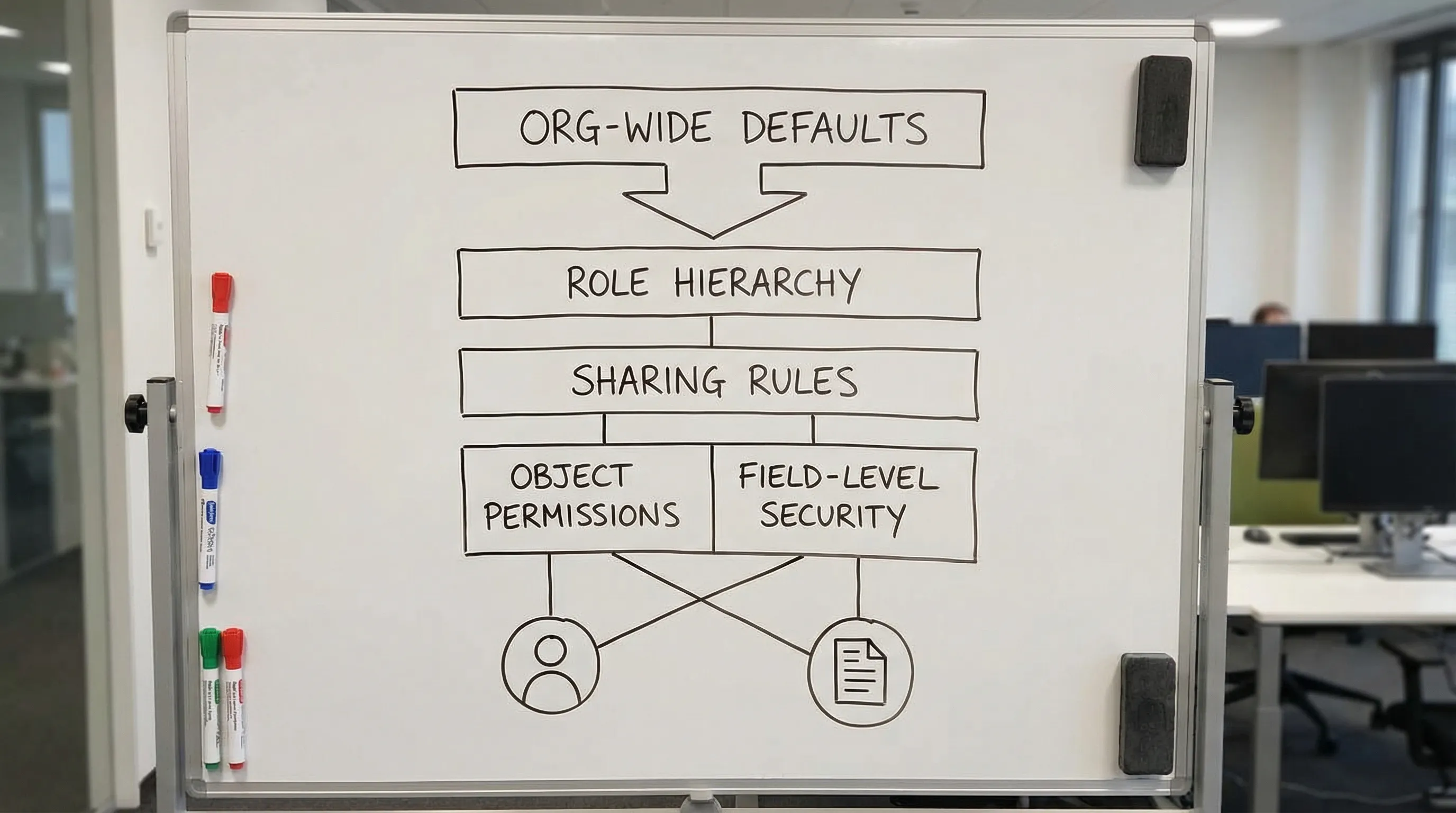
2) Security model (the most common source of trick questions)
Security is layered, and Salesforce loves to test whether you understand how layers combine.
Start with the core layers:
- Authentication and login access concepts (high level)
- Object-level access (profiles and permission sets)
- Field-level security
- Record-level access (org-wide defaults, role hierarchy, sharing rules, manual sharing)
Then practice the “security reasoning” pattern:
- “Can they see the record?” (record access)
- “Can they see the field?” (field access)
- “Can they edit it?” (permissions plus sharing)
Common traps candidates hit early:
- Confusing profiles vs permission sets (baseline vs additive access)
- Mixing up role hierarchy behavior with sharing rules
- Assuming admins should “just make them System Administrator” (almost never the right answer)
3) UI and configuration fundamentals (Object Manager + Lightning App Builder)
Once you understand data and security, you need to control how users interact with that data.
Prioritize:
- Page layouts and Lightning record pages (what each controls)
- Record types and business processes (when needed, when overkill)
- Apps, tabs, and navigation (user experience basics)
- Validation rules (data quality, preventing bad inputs)
This is where many “what should an admin do?” questions live. They are often really testing whether you pick the simplest configuration that meets the requirement.
4) Automation fundamentals (Flow first, then rules you still see)
Automation questions can be high-scoring, but only if your foundations are solid.
Study Flow with a “decision tree” mindset:
- When to use record-triggered vs scheduled vs screen flows
- Entry criteria and order of operations at a conceptual level
- Handling updates without recursion (thinking, not memorizing)
Also know what older orgs still contain (because it shows up in questions):
- Approval processes
- Validation rules (yes, not “automation,” but often paired)
Practical advice: do not try to memorize every automation feature first. Learn how to translate a requirement into:
- “What should trigger this?”
- “What records does it touch?”
- “What should happen if conditions change later?”
5) Reports and dashboards (analytics that admins actually ship)
Reporting is a frequent, time-consuming weakness because it feels straightforward until a question tests edge cases.
Start with:
- Report types (standard vs custom report types, what they include)
- Row-level visibility impact (why users can see different report results)
- Dashboard running user concept (high level)
- Summary vs matrix reports (and when each is appropriate)
A lot of missed questions are not “reporting knowledge,” they are security plus reporting combined.
A quick priority map you can follow
Use this table as your “what to study first” checklist. It is intentionally practical, not exhaustive.
| Study block | Why it comes first | Be able to do this on practice questions | Common way it is tested |
|---|---|---|---|
| Data model | Everything depends on clean structure | Pick correct field and relationship types | Scenarios about roll-ups, ownership, required data |
| Security | High frequency and high trick rate | Explain access step-by-step (object, field, record) | “Why can user A not see/edit X?” |
| UI + configuration | Translates requirements into setup | Choose the simplest tool (layout, record type, validation) | “How do you enforce or display this?” |
| Automation (Flow) | Big scoring area after foundations | Select the right flow type and logic approach | “Automate X when Y happens, without breaking Z” |
| Reports + dashboards | Often combined with security | Choose report type and interpret visibility | “Why do report results differ?” |
Build a small hands-on lab (so concepts stick)
Even though the exam is multiple choice, Salesforce Admin questions reward real setup experience.
Use a free practice environment such as a Trailhead Playground or a Developer Edition org, then recreate mini-scenarios:
- Create a custom object, add fields, and build relationships
- Set org-wide defaults, create roles, then test sharing with two users
- Build a record-triggered flow that updates a field under specific conditions
- Create two report types and compare what users can see
If you like keeping an “error log” or a lightweight study dashboard accessible anywhere, you can host a simple notes app or tracker on a VPS. A provider like high-speed VPS hosting from PetroSky can be a practical option for always-on personal tooling (for example, a private wiki or a spreadsheet-like tracker), but keep your Salesforce hands-on work inside Salesforce environments.
How to use a Salesforce Admin practice exam without wasting it
A practice exam is not just a score, it is a diagnostic instrument. The best candidates use it to decide what to study next.
Use a short diagnostic first
Early on, take a smaller mixed set (not necessarily a full simulation) to identify your weakest objective clusters.
Review the results by tagging each miss:
- Knowledge gap (you did not know the concept)
- Misread (you missed a keyword like “least effort” or “most secure”)
- Process error (you changed an answer without evidence)
Then drill by objective, not by mood
After diagnosis, study in focused blocks aligned to the exam guide, then retest that same block with fresh questions.
This is where Planet Cert practice tests help because you can practice by topic and build repetition around the objectives you are missing, rather than endlessly re-reading notes.
Switch to full simulations when your accuracy is stable
Full exams are most valuable once:
- You are not “surprised” by whole categories of questions
- Your timing is consistent
- You can explain why the correct answer is correct, not just recognize it
When you are ready, use a realistic simulator experience so you practice pacing and stamina, not just recall. Planet Cert practice exams are designed for this type of repeatable exam rehearsal.

What high-scoring candidates do differently in week one
Not more hours, better sequencing.
- They write a one-page “security reasoning” script (OWD, roles, sharing, object perms, field perms) and apply it to every access question.
- They stop chasing advanced features early and instead master relationships, record types, and permissions.
- They keep an error log and revisit it every 2 to 3 days.
- They do small hands-on builds that match common scenarios, then answer questions about what they built.
If you want a complete schedule after you have prioritized correctly, pair this article with the Planet Cert Salesforce-focused plan here: Planet Cert Salesforce Admin practice tests plan for 2026.
Frequently Asked Questions
What should I study first for a Salesforce admin practice exam? Start with the data model (objects, fields, relationships), then the security model (profiles, permission sets, sharing), then UI configuration, automation (Flow), and finally reports and dashboards.
Is Flow the most important topic for the Salesforce Admin exam? Flow is important, but it is easier to score well on Flow questions after you understand data relationships, permissions, and how requirements translate into configuration.
Do I need hands-on practice to pass, or are practice questions enough? Practice questions build exam skill, but hands-on setup helps you understand scenarios and avoid guessing. A small Trailhead Playground lab improves retention and accuracy.
How many practice exams should I take before the real exam? Take enough to stabilize your score and timing, and to ensure you are not seeing “new” topic areas. Many candidates benefit from multiple full simulations plus targeted quizzes between them.
Why do I miss security questions even when I know the terms? Most misses come from not applying the security layers in order. Train yourself to reason from org-wide defaults to roles and sharing, then confirm object and field permissions.
What is the best way to review missed questions? Write down why you missed it (knowledge gap, misread, or process error), restudy the objective, then retest with new questions until you can explain the logic confidently.
Get exam-ready with realistic practice
If you are serious about passing on your first attempt, build your foundation with targeted drills, then prove readiness with timed simulations. Planet Cert practice test questions and the web-based exam simulator are built to help you practice like it is exam day, with expert-verified questions, explanations, and regularly updated materials.
Explore Planet Cert Salesforce Admin practice exams and start with a diagnostic set, then use your results to decide exactly what to study next: PlanetCert.

Discussion
Question Comments
0 comments·0 participantsSign in to leave a comment and access more free questions.