
Enterprise Advanced Routing and Services (ENARSI) Free Sample Questions

Create a free account to browse all 20 sample questions. The full practice test includes 383 questions. Use the simulator for timed and flashcard mode.

Try Simulator

300-410 Sample Questions

  1. Question 1

    Q1

    You are the network administrator for a corporate organization. You changed the BGP configuration, then executed the following command on the rtrA router:

    clear ip bgp 172.161.18.5 soft out

    What is the result of this command?

    Show answer & explanation

    Correct answer: C

    Explanation:
    The outbound TCP session between rtrA and 172.161.18.5 is cleared as a result of the given command. The given command is a variation of the clear ip bgp command.
    The clear ip bgp command allows you to clear and reset the sessions or routing updates in BGP routers so that changes in the BGP configuration can take effect. You can use this command to clear and reset the sessions for all neighbors, a specific neighbor, or a group of neighbors. Use an asterisk (*) or the group name instead of the IP address to apply the command on all the neighbors of a router or a particular peer group, respectively.
    For example, if you execute the clear ip bgp * command, all the sessions currently active are cleared and reset. If you use the clear ip bgp 172.161.18.5 command on rtrA, the current session between rtrA and its neighbor 172.161.18.5 is cleared and reset. Such a reset of sessions is known as hard reset. When hard resets are performed, the neighbor relationship is broken and must be reestablished.
    The soft keyword, which is optional, indicates a soft reset. This keyword allows you to clear the BGP table without resetting the session. If you do not use this keyword, the sessions are cleared and then reset with a hard reset.
    The out keyword specifies that the command should be applied to only outbound sessions. If you use the in keyword, the command is applied to only inbound sessions.
    The outbound TCP session between rtrA and 172.161.18.5 is not cleared and reset by the given command. If the clear ip bgp 172.161.18.5 out command was used, then the outbound session between rtrA and 172.161.18.5 would be both cleared and reset.
    The inbound TCP session between rtrA and 172.161.18.5 is not cleared and reset by the given command. If the clear ip bgp 172.161.18.5 in command were used, then the inbound TCP session between rtrA and 172.161.18.5 would be cleared and then reset.
    The inbound TCP session between rtrA and 172.161.18.5 is not cleared by the given command. If the in keyword were used instead of the out keyword in the given command, the outbound TCP session between the rtrA and 172.161.18.5 would be cleared.
    Objective: Layer 3 Technologies Sub-Objective: Describe, configure, and verify BGP peer relationships and authentication -- References: Cisco IOS IP Routing: BGP Command Reference > clear ip bgp

  2. Question 2

    Q2

    Which command can you use to verify that interfaces have been configured in the correct areas and to show timer intervals and neighbor adjacencies for OSPF?

    Show answer & explanation

    Correct answer: E

    The show ip ospf interface command displays comprehensive OSPF interface information including area assignments, timer intervals (hello and dead timers), and neighbor adjacencies. This command is specifically designed to verify interface area configurations and show the operational OSPF parameters. The other commands serve different purposes: show ip ospf provides general OSPF process information, show ip route displays routing table entries, show ip protocol shows routing protocol configurations, and show ip ospf database displays LSA database contents without interface-specific details.

  3. Question 3

    Q3

    Routed0 is an area system border router (ASBR). The interfaces on Router 10 are configured as below:

    S0/0 10.0.0.0/8
    S0/1 172.16.0.0/8
    FaO/0 192.168.5.0/24 Fa0/1 192.168.6.0/24

    You would like Router 10 to advertise the 192.168.5.0/24 and the 192.168.6.0/24 networks over OSPF in its Type 5 link-state advertisements (LSAs).

    What command set would instruct the router to do this?

    Show answer & explanation

    Correct answer: B

    Explanation:
    By default, Type 5 link-state advertisements (LSAs) do not include directly connected networks. To alter this behavior, you must execute the redistribute connected command in OSPF configuration mode. This command instructs the router to include these local interfaces in its advertisements, as follows:
    RTAIO(config)# router ospf 1 RTAIO(config-router)# redistribute connected
    You should not execute the command set that includes the redistribute static command. This instructs the router to advertise any statically defined routes that have been configured, instead of those that are local to the router.
    You should not execute the command set that includes RTAIO(config)# redistribute connected. The redistribute connected command is shown being executed at the wrong command prompt, and will generate an error message. It must be executed in the OSPF configuration mode and not global configuration mode.
    You should not execute the following command set:
    RTAIO(config)# router ospf 1 RTAIO(config-router)# network 192.168.5.0 0.0.0.0 area 1 RTAIO(config-router)# network 192.168.6.0 0.0.0.0 area 1
    The network commands will cause the networks to receive updates from the router, but do not allow them to be advertised in Type 5 LSAs.
    Objective: Layer 3 Technologies Sub-Objective: Configure and verify redistribution between any routing protocols or routing sources -- References: Cisco > Home > Support > Technology Support > IP > IP Routing > Design > Design Technotes > Redistributing Connected Networks into OSPF

  4. Question 4

    Q4

    You have been alerted that TCP traffic leaving an interface has been reduced to near zero, while UDP traffic is steadily increasing at the same time.

    What is this behavior called and what causes it?

    Show answer & explanation

    Correct answer: C

    Explanation:
    This behavior is called starvation and is caused by improper configuration of QoS queues. When TCP and UDP flows are assigned to the same QoS queue, they compete with one another. This is not a fair competition because the TCP packets will react to packet drops by throttling back TCP traffic, while UDP packets are oblivious to drops and will take up the slack created by the diminishing TCP traffic. The results from mixing UDP and TCP traffic in the same queue are: • Starvation • Latency • Lower throughput
    While it is true that jitter can be caused by a lack of QoS, jitter is not what is being described in the scenario. Jitter is the variation in latency as measured in the variability over time of the packet latency across a network. This phenomenon seriously impacts time-sensitive traffic, such as VoIP, and can be prevented by placing this traffic in a high-priority QoS queue.
    While latency can be caused by the maximum transmission unit (MTU) in the network, this is not a case of latency, although latency may be one of the perceived effects of starvation. Latency is the delay in reception of packets. The MTU is the largest packet size allowed to be transmitted, and an MTU that is set too large can result in latency.
    While windowing can be caused by network congestion, this is not a case of windowing. This is a technique used to adjust the number of packets that can acknowledged at once by a receiving computer in a transmission. In times of congestion the window, or number of packets that can be acknowledged at a time, will be small. Later, when congestion goes down, the window size can be increased.
    Objective: Network Principles Sub-Objective: Describe UDP operations -- References: Design Guide > Service Provider Quality of Service > CE Guidelines for Collapsing Enterprise Classes > Mixing TCP with UDP

  5. Question 5

    Q5Multiple answers

    Which of the following statements are TRUE about manually configured IPV4-to-IP6 tunnels and GRE tunnels? (Choose two.)

    Show answer & explanation

    Correct answers: A, D

    Manually configured IPv4-to-IPv6 tunnels use the tunnel mode ipv6ip command to encapsulate IPv6 packets within IPv4 headers, while GRE tunnels use the tunnel mode gre ip command for Generic Routing Encapsulation. Additionally, manually configured tunnels are designed specifically for IPv6 transport and only support IPv6 as the passenger protocol, whereas GRE tunnels can carry multiple passenger protocols including IPv4, IPv6, IPX, and others. The other statements are incorrect because manually configured tunnels do not support IPv6 IGPs (they are point-to-point), and both tunnel types can forward IPv6 multicast traffic when properly configured.

    Manually configured IPv4-to-IPv6 tunnels are purpose-built for IPv6 transport and only support IPv6 as the passenger protocol, while GRE tunnels support multiple passenger protocols including IPv4, IPv6, IPX, AppleTalk, and others due to their generic encapsulation design. The tunnel mode configuration also differs: manual tunnels use tunnel mode ipv6ip while GRE tunnels use tunnel mode gre ip. The incorrect options state that manual tunnels support IPv6 IGPs (they are point-to-point only) and that they block IPv6 multicasts (both tunnel types can forward multicast when configured properly).

  6. Question 6

    Q6

    Which show command displays entries in a router's Border Gateway Protocol (BGP) table?

    Show answer & explanation

    Correct answer: A

    The show ip bgp command displays the BGP routing table entries, including network prefixes, next-hop addresses, AS paths, and other BGP path attributes. This is the standard command to view BGP table contents and learned routes. The other options are incorrect: show ip bgp table and show ip bgp topology are not valid Cisco IOS commands, while show ip bgp summary displays BGP neighbor relationships and session status rather than actual BGP table entries.

  7. Question 7

    Q7

    When an EIGRP router starts, it sends a hello packet out of all interfaces.

    Which type of packet do neighboring routers send in response?

    Show answer & explanation

    Correct answer: D

    Explanation:
    When an EIGRP router starts, it sends hello packets out of each interface. Neighboring routers respond with update packets. These update packets are sent reliably, and must be acknowledged with an ACK packet from the EIGRP router.
    EIGRP makes neighbor relationships simple. If a router hears a hello from a new neighbor, it sends that neighbor updates for all routes that it knows. This is different from Open Shortest Path First (OSPF), which has a complex series of rules governing how neighbor relationships are formed and how databases are synchronized. When changes to the network occur in OSPF, updates packets route reliable change information only to the affected routes.
    Queries and replies in EIGRP only occur when a router loses a route to a network and is actively seeking a replacement route.
    Objective: Layer 3 Technologies Sub-Objective: Describe EIGRP packet types -- References: Internetworking Technology Handbook > Enhanced Interior Gateway Routing Protocol (EIGRP) > EIGRP Packet Types

  8. Question 8

    Q8Multiple answers

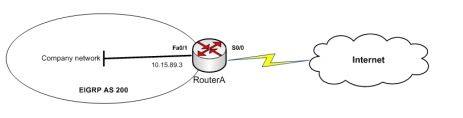
    You manage the company network, as shown in the network diagram below:

    You executed the following command on RouterA:

    routerA(config)# ip route 0.0.0.0 0.0.0.0 S0/0
    routerA(config)# router eigrp 200 routerA(config-router)# redistribute static metric 1000 1 255 1 1500

    Which of the following statements are TRUE about the given set of commands? (Choose two.)

    Question 8 image
    Show answer & explanation

    Correct answers: A, C

    A, C -- Explanation:
    The given set of commands creates a static default route on RouterA and redistributes this route into the EIGRP company network. The ip route 0.0.0.0 0.0.0.0 S0/0 command executed in the global configuration mode creates a static default route on the router. The ip route command allows you to specify a static route. The redistribute static metric 1000 1 255 1 1500 command then redistributes the static default route into the EIGRP autonomous system (AS) 200. This implies that the EIGRP network identifies the default route as an external route, and traffic to all unknown destination subnets will be diverted to the default route.
    Alternatively, default routes can be advertised into EIGRP networks by either of the following methods: • Using the network 0.0.0.0 command on the router • Using the ip summary-address eigrp 200 0.0.0.0 0.0.0.0 command on the router
    A summary default route is not created on RouterA in the scenario. If the ip summary-address eigrp 200 0.0.0.0 0.0.0.0 command was used on RouterA, then a summary default route would be created.
    The summary default route points to the 0.0.0.0 network with the nullO interface as the next-hop interface. Summary default routes are helpful for providing remote networks with a default route.
    The default route is advertised to the EIGRP network because the redistribute command was executed. This command is used to advertise the default route to the EIGRP network.
    Objective: Layer 3 Technologies Sub-Objective: Configure and verify default routing -- References: Cisco > Support > Technology Support > IP > IP Routing > Design > Design TechNotes > Configuring a Gateway of Last Resort Using IP Commands Cisco > Support > Technology Support > IP > IP Routing > Technology Information > Technology White Paper > Enhanced Interior Gateway Routing Protocol

  9. Question 9

    Q9

    Which show command displays the status of all of a router's Border Gateway Protocol (BGP) connections in a concise format?

    Show answer & explanation

    Correct answer: B

    The show ip bgp summary command displays the status of all BGP neighbor connections in a concise tabular format, showing neighbor IP addresses, AS numbers, connection states, up/down time, and prefix counts. This command provides a quick overview of all BGP sessions and their current status. The other options are incorrect: show ip bgp displays the BGP routing table rather than connection status, show ip bgp connections is not a valid command, and show ip bgp neighbors summary has incorrect syntax.

  10. Question 10

    Q10

    Your company has a policy of creating all configurations in text files,
    checking the files, and then applying the configurations to the devices. Your assistant has presented you with the following partial configuration that she plans to execute on a router:

    interface S0/0/1
    ipv6 address 2001:610:FFFF:1::1/64

    ipv6 ospf 100 area 0
    ipv6 router ospf 100 router-id 10.1.1.6

    The configuration is supposed to accomplish the following:

    • Enable IPv6 routing
    • Assign a router ID
    • Assign an IPv6 address to the interface
    • Place the interface in OSPF area 0

    Which step does this configuration NOT complete?

    Show answer & explanation

    Correct answer: A

    Explanation:
    The configuration indicates all steps are complete except for globally enabling IPv6 routing. If that had been done, the configuration output would have reflected it under the interface as follows:
    interface S0/0/1 ipv6 address 2001:610:FFFF:1::1/64 ipv6 ospf 100 area 0 ipv6 enable ipv6 router ospf 100 router-id 10.1.1.6
    Prior to configuring OSPFv3 on an interface, it must be enabled globally. OSPFv3 is an OSPF version specific to IPv6. The following commands will globally enable OSPF v3. It will then be reflected by the ipv6 enable statement under the interface when viewing the configuration as shown in the fourth line of the output above.
    Router5(config)# ipv6 unicast-routing Router5(config)# ipv6 ospf 100 Router5(config-rtr)# router-id 10.1.1.6
    The problem is not the router ID. The configuration in the scenario does assign a router ID, as indicated by these lines:
    ipv6 router ospf 100 router-id 10.1.1.6
    The problem is not the IPv6 address. The configuration does assign an IPv6 address to the interface, as indicated by these lines:
    interface S0/0/1 ipv6 address2001:610:FFFF:1::1/64
    OSPF area 0 is not the problem. The configuration does place the interface in OSPF area 0, as indicated by these lines

Register free to unlock 10 more sample questions

Create a free account to continue with the rest of the 300-410 sample set.

Lifetime One

Own this practice test forever.

$79.99
$75.99
one-time
  • Full access to 383 questions
  • Study, Timed & Flashcard Modes
  • All past and future versions i
  • Detailed Explanations
  • Study Tracking & Past Attempts
  • Brainy AI Assistant
  • Lifetime updates

Two

Any 2 exams per month.

$20.00/exam
$39.99
/month
  • 2 active exam slots
  • Study, Timed & Flashcard Modes
  • All past and future versions i
  • Detailed Explanations
  • Study Tracking & Past Attempts
  • 1,000 Brainy AI Credits
  • Cancel anytime

Premium Twelve

Any 12 exams over 3 months.

$15.00/exam
$179.99
/3 months
  • 4 active exam slots
  • Study, Timed & Flashcard Modes
  • All past and future versions i
  • Detailed Explanations
  • Study Tracking & Past Attempts
  • 15,000 Brainy AI Credits
  • Dedicated support
  • Friend seat included — full access

Trusted by professionals at

NvidiaSupabaseGitHubOpenAITursoClerkClaude AIAmazon



