
AWS Cloud Practitioner Exam Fee 2026: Current Price and Retake Costs
When Simon sat down to finally book his AWS Certified Cloud Practitioner exam last month, he already knew the broad strokes of the cloud concepts — he’d been using AWS at work for nearly a year. What tripped him up was the bill. He’d seen “$100” mentioned in a forum, but his bank statement showed £92.85 after conversion and tax, and he’d already bought a study guide for £35. The real question nagging him: if he failed, would it cost another hundred? And was there a cheaper way to get in? Those are sensible questions for anyone eyeing an aws foundation certification, especially when you’re funding it from your own pocket. This article walks through the real numbers, the hidden details, and the practical moves that keep your certification budget under control.
What the CLF-C02 Costs in 2026
The AWS Certified Cloud Practitioner exam (CLF-C02) carries a flat $100 USD registration fee as of July 2026. That buys one timed, proctored sitting, whether you take it at a Pearson VUE test centre or online through OnVUE from home. No surcharge exists for online proctoring; the fee is identical regardless of delivery method.
The CLF-C02 is a 90‑minute, 65‑question multiple‑choice exam covering four domains: cloud concepts, security and compliance, technology and services, and billing and pricing. The $100 covers the attempt only — not study material, not a retake, not a printed certificate. If you pass, you’ll receive a digital badge, access to the AWS Certified global community, and a three‑year validity window before renewal becomes due. If you don’t pass, the full fee is gone and you pay again to retake.
Local sales tax, VAT, or GST may be added during checkout. Pearson VUE’s scheduling interface shows the final price before you confirm the payment, so the number you see is the number you pay. Candidates in the United Kingdom normally see a figure around £85–93 depending on the conversion rate, while those in India can expect roughly ₹8,200–8,600. The exam isn’t a flat $100 in every territory once currency and tax enter the conversation.
Regional Pricing and Currency Differences
AWS doesn’t publish a static country‑by‑country price table, but the fee is converted at the time of booking using a rate that typically tracks the mid‑market rate with a small buffer. That means your final cost can shift by a few dollars from one week to the next as exchange rates move.
A few real-world examples from mid‑2026 illustrate the range: candidates in the Eurozone often pay between €92 and €97, Australians roughly AU$148–156, and Canadian test‑takers about CA$135–145. All of those figures include local tax where applicable. If you’re studying on a tight budget and the exchange rate is moving against you, booking sooner rather than later can save a few pounds or euros.
One detail that surprises many candidates: you can choose to pay in USD even if your billing address is outside the United States, but you’ll need a payment method that doesn’t levy heavy foreign transaction fees. Some candidates deliberately use a USD‑denominated card to lock in the price, though that tactic only works if your bank’s conversion charges are low. For most, accepting the local‑currency price at checkout is simpler.
Retake Policy and the Real Cost of Failing
AWS enforces a strict 14‑day waiting period between failed attempts. That window starts the day after your exam; you won’t be able to schedule a new appointment inside it, even if you feel ready to retry the next morning. And the retake costs the full $100 — there is no reduced‑fee retake option for any foundational certification.
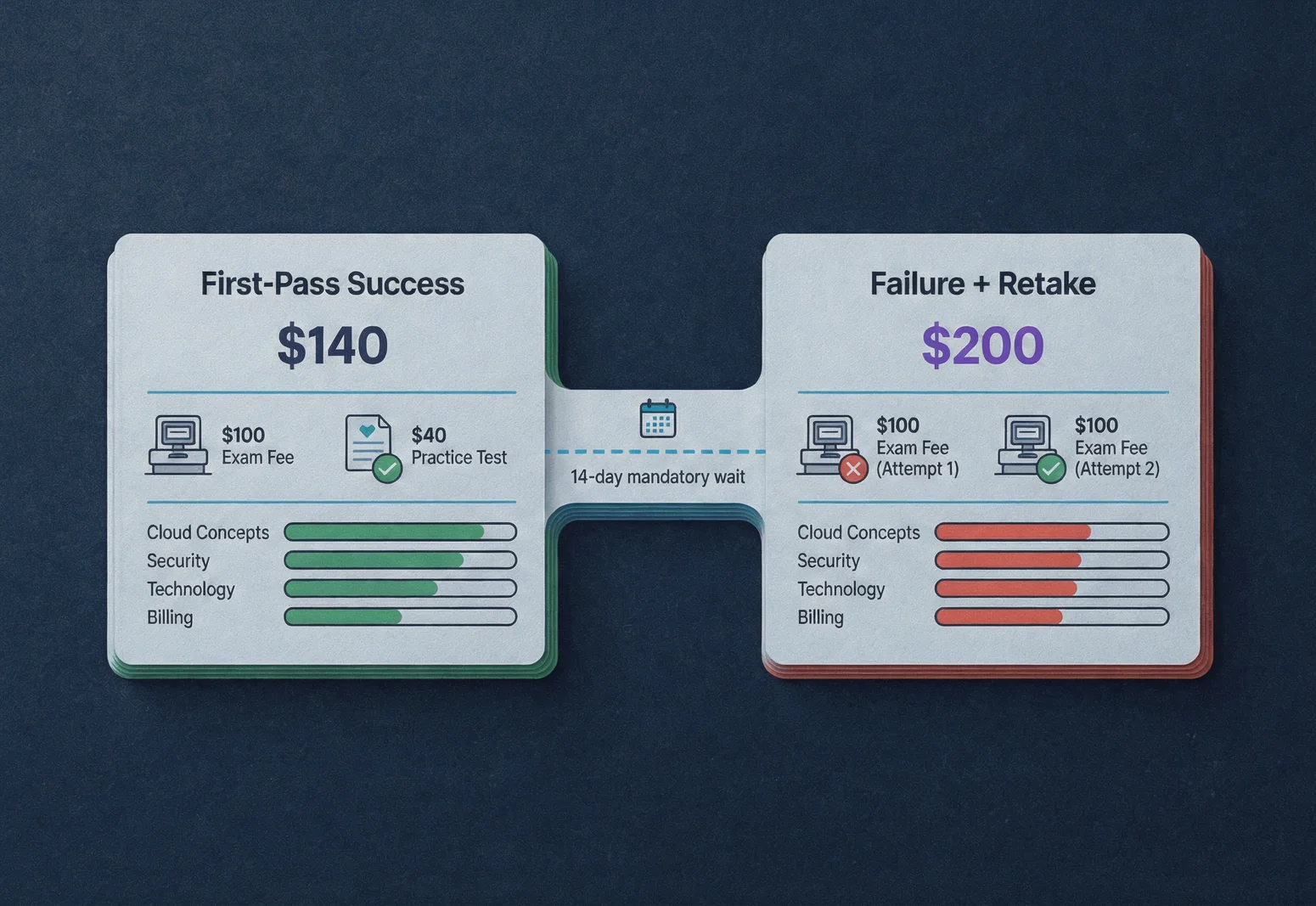
That means a single failure turns your certification cost into $200, ignoring any study material you’ve already bought. For someone early in an IT career, that’s a meaningful hit. It also pushes your timeline out by at least two weeks, which can delay job applications or promotion readiness.
The financial arithmetic is straightforward. If you spend $40 on a high‑quality practice test bank that gives you full‑length simulations with detailed answer explanations, and that investment helps you pass on the first attempt, your total cost lands around $140. If you skip the practice, fail, and retake, you’re at $200 plus the value of your lost time. Many candidates find that a realistic AWS Cloud Practitioner practice test that mirrors the exam’s timing, question style, and domain weighting makes the difference between a first‑pass pass and an expensive retake.
A quick story: Daniel, a help‑desk technician I mentored last quarter, failed his first CLF-C02 by a handful of questions. He’d only used free digital training and felt ready. After receiving his score report, he saw that the Security and Compliance domain was in the low 60s and Billing barely above 50%. He used the 14‑day wait to narrow his study to those two domains, drilling every evening with practice questions that provided full explanations. He retook the exam on day 15 and passed comfortably. The extra $100 stung, but because he used the report and focused practice, he didn’t waste the second fee.
Finding Vouchers, Discounts, and Free Attempts
AWS occasionally runs promotions that can lower your exam fee or even make it free. The most reliable source is live events: AWS re:Invent, regional Summits, and certain virtual training sessions have historically handed out voucher codes to attendees. These codes often cover the full exam fee or provide a 50% discount. If you’re planning to attend an event anyway, keep an eye out for certification voucher giveaways.
The AWS Skill Builder platform can also unlock discounts. Completing specific learning plans or earning digital badges — such as those introduced through the AWS Card Clash mobile game in April 2026 — has occasionally triggered exam discount eligibility. The mechanics change, so check the current offers in your Skill Builder account before committing to a paid voucher.
Employer sponsorship remains one of the quickest paths to a free attempt. If your organisation works with AWS and participates in the AWS Partner Network, ask your training manager whether exam vouchers are available through the partner programme. Many companies that run on AWS will cover the certification fee for staff who complete a structured study plan, because it directly benefits the business.
Third‑party voucher resellers sometimes offer a small discount, typically $10–20 off. Verify legitimacy carefully. AWS doesn’t endorse unauthorised resellers, and purchasing from an unknown source can leave you with a code that’s already been used. Stick to well‑established e‑learning platforms that provide a clear refund policy if a voucher fails.
A word of caution: don’t freeze your study plan waiting for a voucher. Voucher availability is unpredictable. If you have the budget, paying the fee and locking in a date creates a deadline that can motivate consistent study. You can still claim a reimbursement from your employer later should a voucher appear.
Building Your Total Certification Budget
The exam fee is only one line on the invoice. If you’re self‑funding, here’s how a sensible preparation plan stacks up financially in mid‑2026:
| Cost item | Typical range | Notes |
|---|---|---|
| AWS free digital training (Skill Builder) | $0 | Covers all four exam domains; sufficient as a foundation but rarely enough alone. |
| Third‑party video course (optional) | $0–$30 | Good for clarifying complex topics like billing and the shared responsibility model. |
| Official study guide (book) | $25–$40 | A one‑time purchase that many candidates find helpful for structured review. |
| Practice test bank with explanations | $20–$50 | The single most cost‑effective investment; look for timed simulators with full answer rationales. |
| Exam fee (first attempt) | $100 | Paid directly to Pearson VUE. |
| Contingency retake buffer | $0–$100 | Set this aside only if you’re risk‑averse; many candidates never need it. |
That places your total certification cost between $145 and $220 for a first‑pass success approach, with a retake buffer adding another $100 if you choose to carry it. The practice test bank is the item where I’ve seen consistent correlation with first‑attempt passes. Knowing you’ve already cleared an aws foundation certification means you’ll walk into Associate‑level exams with more confidence and less financial anxiety, so making the first attempt count is solid long‑term thinking.
Even on a tight budget, trimming the practice test phase is false economy. The retake penalty alone is double the cost of most quality prep tools, and the time lost is harder to measure but very real.
Common Booking Mistakes That Waste Your Exam Fee
Once the money is set aside, a few practical missteps can turn an exam appointment into a forfeited fee. Avoid these:
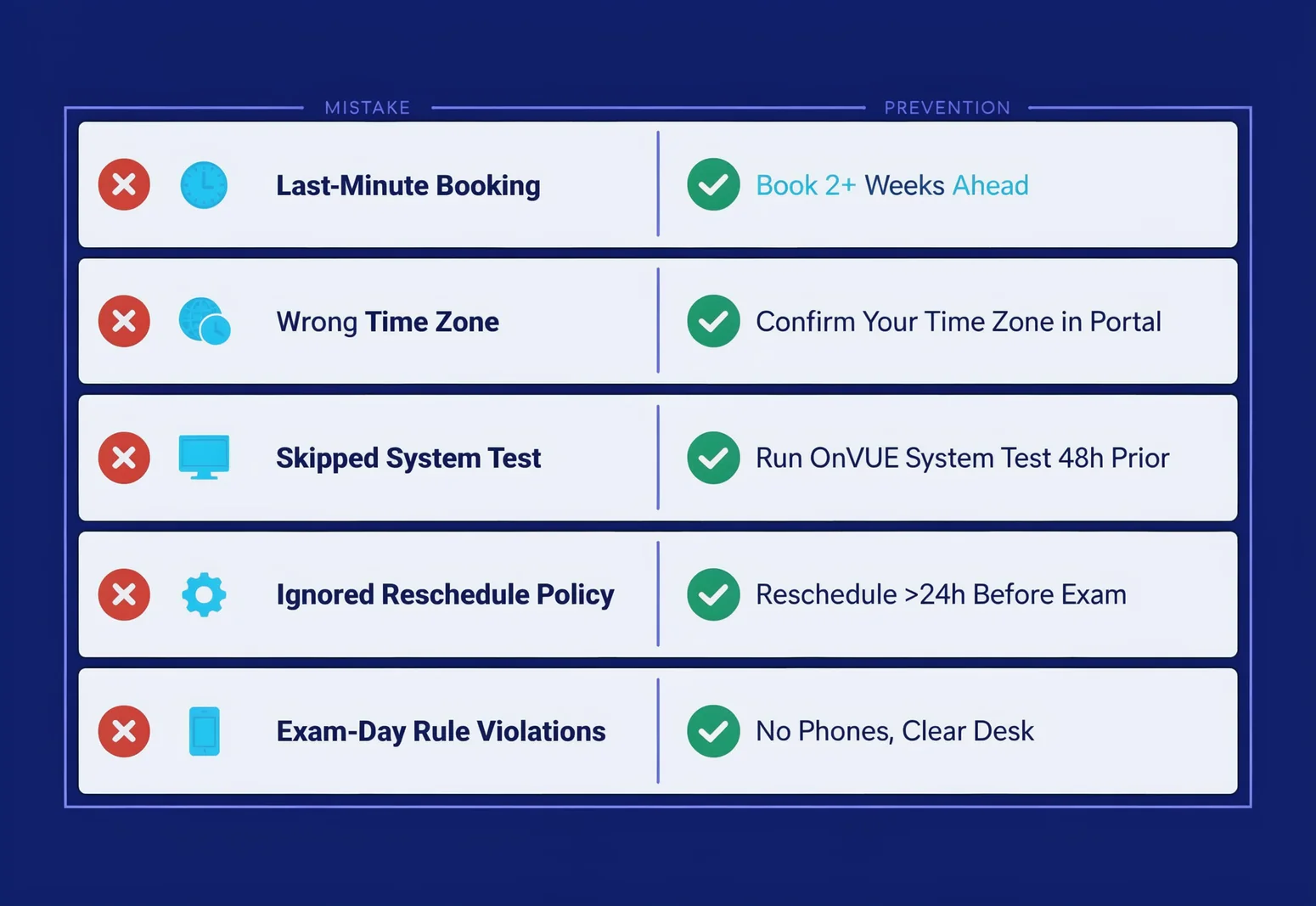
Scheduling at the last minute. Pearson VUE slots fill quickly at month‑end, especially if a voucher expiration is approaching. If you wait until a few days before your target date, you might not find a seat and could lose a soon‑to‑expire voucher. Book at least two weeks ahead and check availability the moment you receive a voucher code.
Overlooking the time zone. The scheduling interface uses your selected time zone, not necessarily your local clock. I’ve seen candidates book for 9:00 AM Pacific and show up at 9:00 AM Eastern — an automatic no‑show that costs the full fee. Double‑check the time zone confirmation email against your local time the night before.
Skipping the system test for online proctoring. OnVUE requires a system compatibility check at least 24 hours before the exam. If your machine fails, you may need to reschedule. Rescheduling is free up to 24 hours before the appointment; inside that window, it’s treated as a cancellation and you lose the fee. Run the test early.
Misreading the cancellation and reschedule policy. You can cancel or reschedule for free up to 24 hours before the appointment. After that, you’re locked in. A missed appointment means forfeiting the full fee with no refund. I’ve had candidates lose $100 simply because they forgot they’d booked an early‑morning slot.
Assuming exam‑day rules are flexible. The proctored environment is strict — no notes, no second screen, no phone. An accidental violation can invalidate your result, which counts as a fail and triggers the 14‑day wait plus a new $100 fee. Review the candidate agreement before you log in.
Understanding Your Score Report and Retaking with Purpose
After you finish the CLF-C02, you’ll get an immediate pass/fail notification on screen. Within a few days, you’ll receive a detailed score report by email that breaks down your performance across the four domains: Cloud Concepts, Security and Compliance, Technology, and Billing and Pricing.
If you passed, the report still identifies your weakest domain — that information is gold for building toward an Associate certification like Solutions Architect Associate or Developer Associate. Knowing that Billing dragged you down during the foundational exam tells you to shore up that area before you attempt a role‑based credential.
If you failed, the domain percentages tell you exactly where to invest your 14‑day wait. Let’s say Security comes in at 60% and Billing at 55%. Those are your priority zones. Pull up a practice test bank that lets you filter questions by domain and drill those areas daily. At the end of the first week, take a full‑length simulated exam to check whether the percentages are moving. If they’ve risen into the 70s, you’re on track. If not, adjust your study material — maybe the free digital training wasn’t detailed enough on those topics.
Don’t neglect the strong domains completely. Confidence erosion after a fail is real; a short refresher every three days keeps your knowledge solid across the board. Treat those 14 days like a focused micro‑sprint, not a waiting room.
If you’re using a preparatory platform that offers a pass guarantee or a free extension upon failing, that can soften the financial blow and the psychological weight of a retake. Many candidates who use a robust AWS Cloud Practitioner practice test that closely mimics the exam’s structure discover that the detailed explanations make the difference between a narrow miss and a clear pass on the second attempt.
Before You Book: A Quick Readiness Checklist
Spending five minutes on these checks before you commit your $100 can prevent a wasted attempt:
- Have you taken at least two full‑length timed simulations under exam‑like conditions (no breaks, no notes, 90‑minute timer), and scored 80% or above on each?
- Have you reviewed the 2026 AWS Cloud Practitioner exam changes to confirm the current domain weights and any new topics? Domain shifts can rearrange where your study hours should go.
- Do you understand the shared responsibility model, the AWS Free Tier limits, and the difference between Cost Explorer and AWS Budgets? Those areas are frequently tested and easy to mix up.
- Have you run the OnVUE system test (if online) or confirmed your test centre appointment details, including the correct time zone and required ID documents?
If you can answer yes to all four, you’re ready to book with confidence. If not, invest a few more days in targeted preparation — it’s far cheaper than a retake.
Resources to Continue Your Preparation
- AWS Cloud Practitioner practice test
- 2026 AWS Cloud Practitioner exam changes
- Sample questions for cloud certifications
browse the relevant exam page and purchase a practice test
References
- AWS Certified Cloud Practitioner (CLF — This exam guide includes weightings, content domains, and task statements for the exam. This guide does not provide a comprehensive list of the content on the ... # AWS Certified
- AWS Certification Exam — # AWS Certification Exam Guides ... AWS Certification validates cloud expertise to help professionals highlight in-demand skills and organizations build effective, innovative

Discussion
Question Comments
0 comments·0 participantsSign in to leave a comment and access more free questions.