

Cisco 100-150 Exam Topics and Objectives Explained
Two months before his scheduled test date, Marcus realised he could recite the OSI model in his sleep but couldn't explain why two devices in the same security group still couldn't ping each other. Flashcards had betrayed him—what he needed was the reasoning behind each networking rule, the kind of reasoning the Cisco 100-150 exam topics objectives are built to assess. This article walks you through every official domain point, translating the blueprint into plain explanations of what Cisco expects, why it matters on the test, and how the knowledge shows up on the job.
What the 100-150 CCST Networking Exam Actually Tests
The 100-150 is Cisco's entry-level networking certification, called the Cisco Certified Support Technician (CCST). According to the official CCST Networking page, it validates foundational knowledge of how networks operate—the devices, media, and protocols that keep office and home networks running. Importantly, Cisco positions it as a first step toward CCNA 200-301, so the scope deliberately balances theory with the kind of tasks a level‑one support technician handles daily.
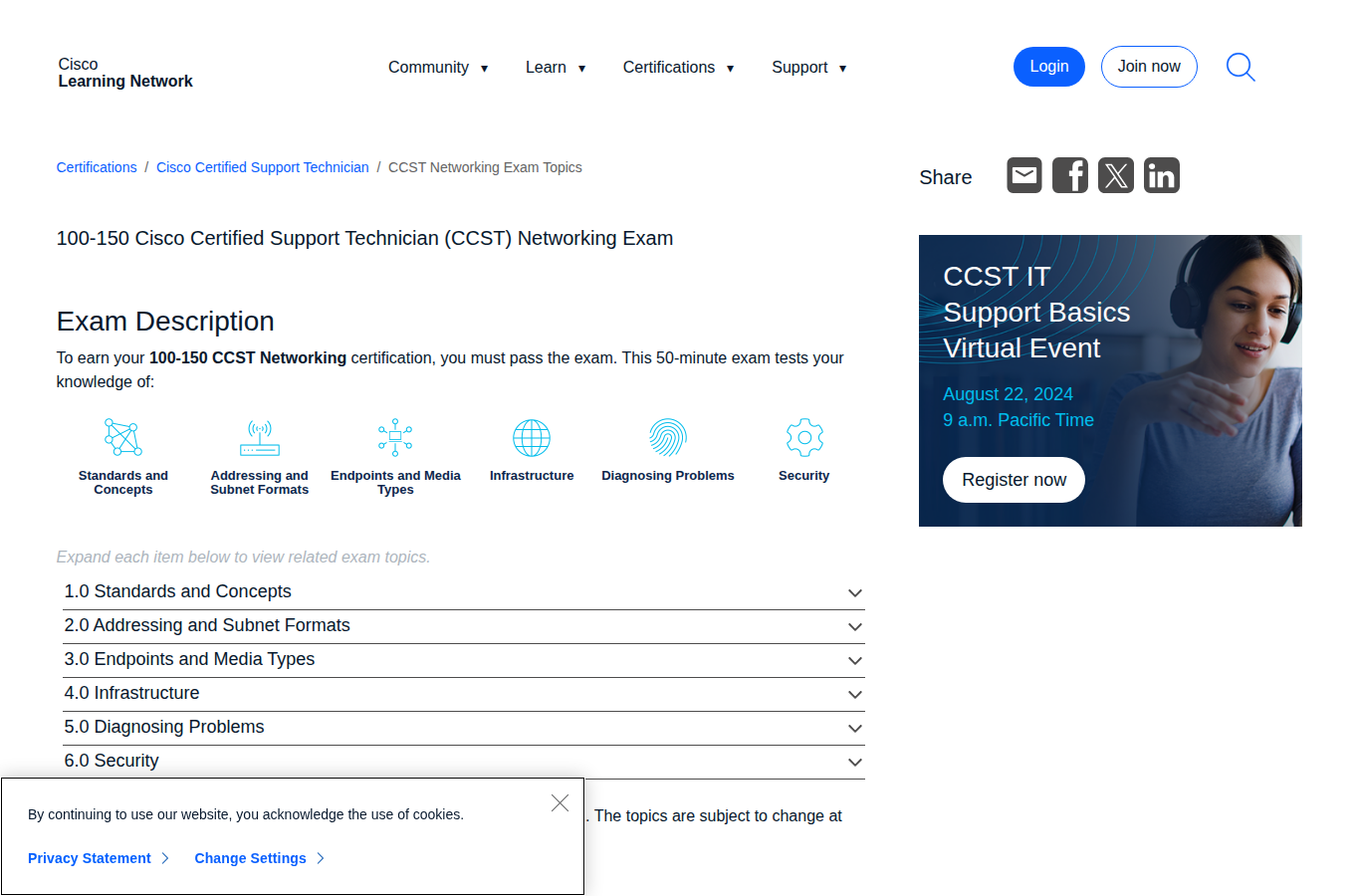
The exam blueprint breaks into six domains, each published with precise objectives on the Cisco Learning Network:
- 1.0 Standards and Concepts — network models, bandwidth vs. throughput, network types, cloud models, and common applications.
- 2.0 Addressing and Subnet Formats — IPv4, IPv6, private/public addressing, and basic subnetting.
- 3.0 Endpoints and Media Types — cabling, connectors, wireless vs. wired technologies, and endpoint connectivity checks.
- 4.0 Infrastructure — switches, routers, access points, DHCP, DNS, and basic CLI commands.
- 5.0 Diagnosing Problems — structured troubleshooting methodology and tool output interpretation.
- 6.0 Security — firewalls, authentication, access control, and fundamental threat mitigation.
You won't encounter routing protocols like OSPF, VLAN configuration, or deep packet analysis here. The exam targets what a help‑desk technician needs for a Monday morning ticket—not what a CCNP designs in a data centre. Understanding that boundary helps you avoid over‑studying and keeps your practice focused.
Domain 1: Standards and Concepts – The Foundation
This domain confirms you speak the networking language. The models, terminology, and classification systems it covers underpin everything that follows.
TCP/IP and OSI Models
You're expected to map protocols to their correct layers—ARP, IP, TCP, HTTP—and describe how data moves through the stack. The exam often asks you to compare the two models explicitly, so be ready for a drag-and-drop that places the TCP/IP four‑layer model next to the OSI seven‑layer model. Knowing that frames operate at Layer 2 while packets are Layer 3 is the entry ticket; understanding why a switch can forward a frame without looking at the IP header (and a router can't) is what earns the mark. When you review a few 100-150 sample questions, you'll spot the gap between recognising an acronym and applying it in a scenario.
Bandwidth, Throughput, and Network Types
Differentiating bandwidth and throughput trips up many candidates because the definitions sound similar. Bandwidth is the theoretical maximum of a link (think a 1 Gbps Ethernet port), while throughput is the actual data rate you measure after overhead and congestion take their cut. The 100-150 likes to embed this distinction inside a troubleshooting prompt—for example, a user complains of slow file transfers even though the link light shows 1 Gbps, and you need to explain why.
The six network types (LAN, WAN, MAN, CAN, PAN, WLAN) require you to match each to its typical geographic span, ownership model, and common technologies. A LAN likely uses Ethernet and private switches inside a single building; a WAN relies on an ISP to bridge distant sites; a WLAN covers wireless access within a home or office. The key is connecting the business scenario to the right category, not merely defining each acronym.
Cloud and Applications
The official exam topics include cloud comparison (public, private, hybrid) and service models (SaaS, PaaS, IaaS). You might be asked which model suits a team that needs a hosted development platform without buying servers, or what type of cloud a global retailer that uses both its own data centre and AWS is running. Cisco ties this to remote and hybrid work patterns, so expect questions that link a business need—like giving a distributed workforce access to email—to a specific cloud category.
Common network applications (HTTP, DNS, DHCP, SMTP, FTP) appear here with their transport protocols and default port numbers. You need to know that DNS uses UDP port 53 (with TCP for zone transfers) and that DHCP operates on UDP ports 67 and 68, because the exam will ask you to pick the right protocol/port pair when a specific service is mentioned.
Domain 2: Addressing and Subnet Formats
Most early‑career technicians find IP addressing the steepest part of the exam, but the level the 100-150 requires is more practical than mathematical.
You'll compare private addresses (the RFC 1918 ranges: 10.0.0.0/8, 172.16.0.0/12, 192.168.0.0/16) with public routable space and recognise when NAT must be involved. A typical question presents an address like 172.30.5.10 and asks whether it can reach the internet without address translation; the answer depends on whether it falls inside the 172.16.0.0/12 block.
IPv4 subnetting on this exam stays in the shallows. You'll identify the network and host portions of a dotted‑decimal address, interpret CIDR notation ( e.g., /24, /26, /28), decide whether two IPs share a subnet, and select the correct default gateway. Internalising the powers‑of‑two table until you can spot /24 (256 addresses), /26 (64 addresses), and /30 (4 addresses, used for point‑to‑point links) on sight answers roughly a quarter of the subnetting items you'll face.
IPv6 content is about format recognition. You won't design an addressing scheme, but you must know what a valid address looks like, understand that a /64 prefix is the standard for end sites, and distinguish global unicast (2000::/3) from link‑local (fe80::/10). The Cisco Learning Network lists this as "identify IPv6 addresses and prefix formats", so keep your study at that depth.
Domain 3: Endpoints and Media Types
Domain 3 moves from theory to the cables, connectors, wireless technologies, and endpoint devices that a field tech touches every day.
Cabling and Connectors
You'll need to differentiate UTP categories (Cat5e, Cat6), fibre (single‑mode vs. multimode), and console cables. The exam may show a connector image or a table of pinouts and ask which cable connects a switch to a router, a PC to a switch, or an access point to a controller. Know the physical difference between RJ‑45, LC, and SFP connectors; that alone can net you a few quick marks.
Wi‑Fi, cellular, and wired technologies are compared head‑to‑head under the objectives. That means understanding frequency bands (2.4 GHz offers longer range but more interference, 5 GHz provides higher throughput but shorter reach), typical data rates, and when cellular serves as a primary link versus a backup WAN connection.
Endpoint Devices and Connectivity Checks
Endpoint devices span laptops, desktops, servers, printers, IP phones, and IoT sensors. The real test of this section, though, is demonstrating how to set up and check connectivity on five different operating systems: Windows, Linux, Mac OS, Android, and Apple iOS. That means executing and interpreting ipconfig /all, ifconfig, ip addr, and the graphical network settings on a mobile device. Practise these steps on a couple of VMs or an old laptop—the muscle memory helps even when you're reading a command‑output question.
A classic exam scenario shows a PC with the IP address 169.254.x.x and asks what's wrong. The answer (DHCP server unreachable) appears in the address assignment style, not in a pop‑up error message. Being able to spot APIPA ranges instantly is what separates a prepared candidate from someone still decoding the address.
Domain 4: Infrastructure
Infrastructure coverage keeps the scope small but insists you can trace how a packet moves through the devices that make up a small network.
You'll identify switches, routers, wireless access points, and firewalls by their roles—a switch forwards based on MAC addresses inside a LAN, a router moves packets between networks, an access point bridges wireless clients to the wired LAN, and a firewall filters traffic by IP, port, and application. The exam often embeds these roles inside a trouble ticket: a floor of users loses internet after a power flicker, and you need to decide whether to check the upstream router, the DHCP server, or the switch uplink.
Basic device interaction appears through CLI commands like show ip interface brief or ping, presented as output on the screen. You won't write complex configurations, but you will interpret what the output says—for example, recognising that an interface in "administratively down" state means it was manually disabled, while "down/down" indicates a cable or Layer‑1 problem. DHCP and DNS are treated as services, so expect questions about what a client receives in a DHCP lease (IP, mask, gateway, DNS servers) and how DNS recursion works when a browser resolves a hostname.
If you're still piecing together how a frame learns a MAC address on one port and forwards it on another, a timed session with a full 100-150 practice test will push you past theory into application, which is where the exam lives.
Domain 5: Diagnosing Problems
Diagnosis on the 100-150 follows a structured, repeatable methodology, not a lucky guess.
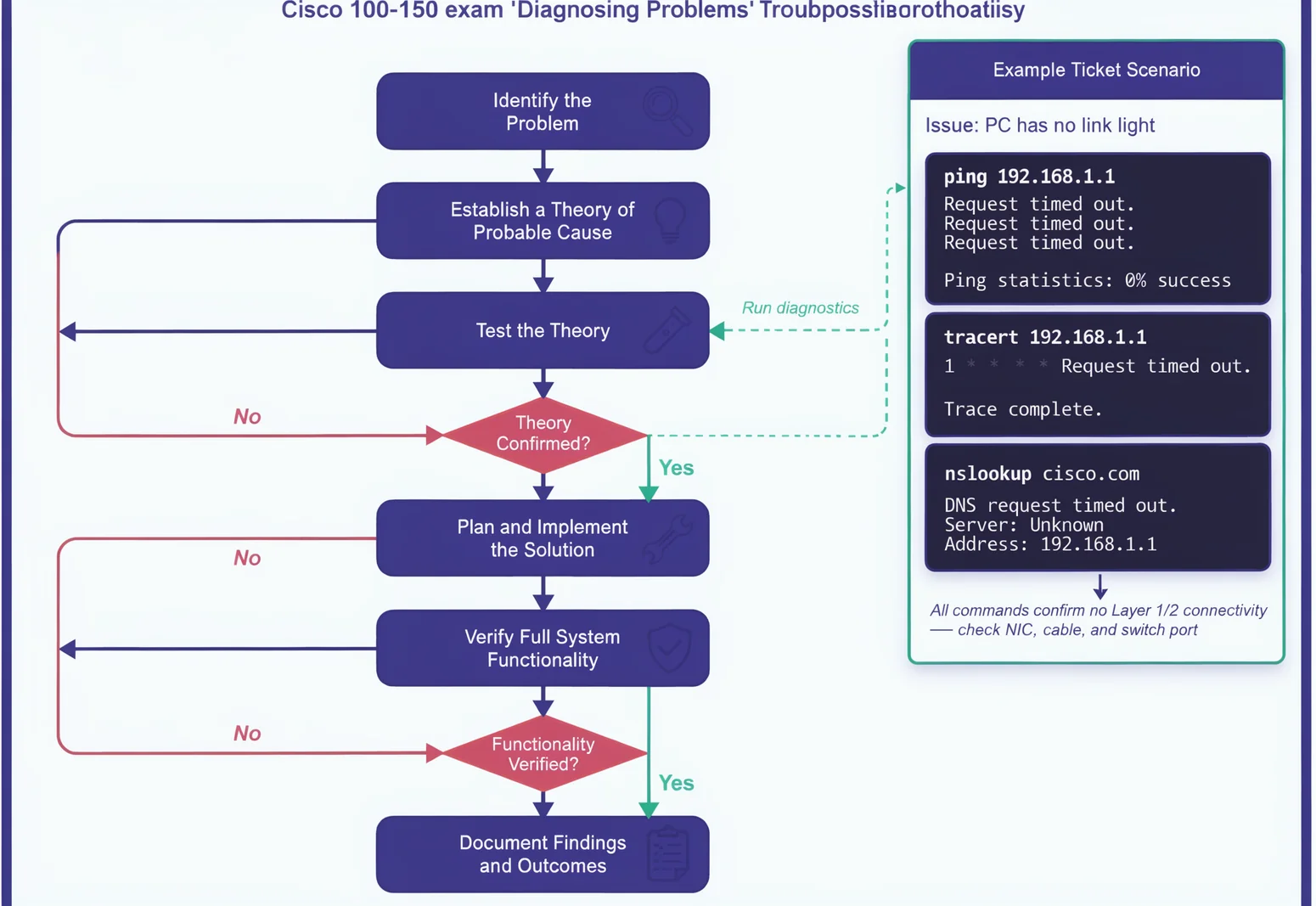
The objectives list a step‑by‑step approach: identify the problem, establish a probable cause, test the theory, plan and implement a solution, verify functionality, and document findings. In exam terms, you'll see scenarios like a PC with no link light, a host that receives a duplicate IP, or a WAN link that comes up but drops half the traffic after a configuration change. Each step expects you to choose the right next action from a list, such as pinging the default gateway before calling the ISP.
Command‑line tools form the practical core. You'll use ping to test reachability, traceroute (tracert on Windows) to map the path, ipconfig to inspect the client stack, and nslookup to verify DNS records. The exam leans heavily on interpreting output. If a successful ping to 8.8.8.8 fails when you use the hostname google.com, the root cause is almost certainly DNS, and the right next step is to verify the configured name servers. Internalising that pattern saves you time and avoids the trap of testing the physical layer when the problem sits at Layer 7.
Domain 6: Security Fundamentals
Security on the 100-150 stays at the level a small‑office administrator needs—basic controls, not enterprise policies.
You'll cover host‑based and network‑based firewalls, and you'll interpret the effect of a filtering rule. For instance, blocking inbound TCP port 22 while allowing port 443 creates a web‑accessible server that rejects SSH, a posture the exam might ask you to justify without asking you to write the ACL syntax itself. Authentication topics include password complexity, multi‑factor authentication, and the principle of least privilege, often linked to home‑router defaults like changing the admin credentials and disabling WPS.
Common threats—malware, phishing, denial‑of‑service—are paired with straightforward countermeasures a technician can recommend: keep firmware and signatures current, disable unused services, enable WPA3 (or at least WPA2) encryption on wireless networks, and verify that guest traffic is isolated from the internal LAN. None of this demands a security analyst's depth; the exam wants to know you can spot a phishing attempt or a default password when you're closing a help‑desk ticket.
The Exam Experience and What to Expect
Cisco prices the 100-150 at $125 USD in most regions and delivers it through Pearson VUE—either online with a remote proctor or at a test centre. You'll have 50 minutes for a mix of multiple‑choice, drag‑and‑drop, and performance‑based items. The questions vary session to session, but the pace leaves roughly 40 seconds per item, so moving quickly through the straightforward ones is essential.
Performance‑based items might ask you to check connectivity between two simulated PCs or configure a basic wireless setting. These are not full‑scale labs; they test whether you can operate the common tools (command prompt, network settings panel, basic router GUI) to accomplish a single task. Because the timer is tight, flagging questions and returning at the end is a reliable strategy. Trust your first answer on definition‑based items and spend the review minutes on the drag‑and‑drops and performance tasks that require more thought.
Learn more → browse the relevant exam page and purchase a practice test.
Networking Questions You've Likely Asked Yourself
Is the 100-150 harder than the CompTIA Network+?
Network+ covers a broader set of topics, while the 100-150 stays tightly focused on entry‑level networking tasks from a Cisco perspective. If you already hold Network+, you'll recognise a lot of the material, but the performance‑based approach and Cisco‑specific viewpoint mean you still need dedicated preparation.
Do I need a physical lab?
Not a rack of routers. Cisco's Packet Tracer emulates every function the exam requires. Add a spare Ethernet cable and your home router's admin page, and you'll have enough hands‑on practice to master the objectives.
How does this connect to the other CCST exams?
Cisco offers three tracks: Networking (100‑150), Cybersecurity (100‑160), and IT Support (100‑140). The Networking exam is the most popular because it feeds directly into the CCNA. After you pass, the other two are worth exploring if your role leans toward security or help‑desk fundamentals.
When should I schedule the test?
When you can consistently score above 80% on full‑length practice tests under the same timer and question mix. Set a hard date; committing to a deadline usually turns a passive review into productive study.
Expanding Your Certification Path
browse the relevant exam page and purchase a practice test
Learn more
Discussion
Question Comments
0 comments·0 participantsSign in to leave a comment and access more free questions.