

Organizing IT Study Material with Chunking
Chunking is a simple way to make studying IT certifications less overwhelming. Instead of trying to memorize hundreds of isolated facts, you group related concepts into smaller, connected pieces. This method helps your brain process and retain information more effectively because it works with your memory’s natural limits - about 4 to 7 items at a time.
Here’s how it works:
- Break down large topics into smaller sections (e.g., group networking protocols by function or OSI layers).
- Focus on related concepts to form logical groups (e.g., common application ports like HTTP, HTTPS, FTP, SSH).
- Use tools like flashcards or study platforms to reinforce chunks with active recall and practice.
- Review regularly using spaced repetition to improve long-term memory.
For IT certifications like AWS, Cisco, or CompTIA, chunking simplifies complex material and helps you study smarter. Tools like Planet Cert and Brainy AI can help organize and reinforce your learning with structured study plans, flashcards, and personalized practice questions. By focusing on smaller, manageable chunks, you can retain more and feel more confident during exams.
Why Chunking Works for IT Certification Preparation
How Chunking Matches Your Brain's Memory Capacity
Studies reveal that your working memory can juggle only four to seven pieces of information at a time. This limitation becomes glaring when you're faced with something like an AWS architecture diagram packed with dozens of services or a networking chapter listing over 30 protocols. It's simply more than your brain can handle in one go.
Chunking helps overcome this limitation by grouping related details into a single, meaningful unit. For example, instead of memorizing HTTP (80), HTTPS (443), FTP (21), and SSH (22) as separate pieces, you can group them as "Common Application Layer Ports." This approach reduces the mental load, leaving more room for deeper understanding.
This method isn't just helpful - it mirrors how experts think. A seasoned network engineer, for instance, doesn't see a subnet mask as 32 individual binary digits. Instead, they instantly recognize it as a single network configuration. By organizing your study material into meaningful chunks, you're training your brain to build similar mental shortcuts.
Next, let's explore how chunking makes even the most complex IT topics easier to tackle.
Simplifying Complex Topics into Smaller Parts
Chunking also makes it easier to break down dense IT topics that might otherwise overwhelm you. Subjects like subnetting, Kubernetes orchestration, or Active Directory permissions can feel impossible to grasp when presented all at once. This overload shuts down your ability to retain useful information.
By organizing these topics into smaller, logical parts, chunking helps your brain not just memorize but also understand the relationships between concepts. This is especially important for exams, where scenario-based questions demand you connect the dots rather than recall isolated facts. Take subnetting, for example: it becomes far more manageable when divided into steps like binary conversion, distinguishing network versus host bits, CIDR notation, and subnet calculations. Each step builds on the previous one, creating a clear learning path.
Tools like Planet Cert make this process even smoother by helping you focus on specific areas of knowledge, making review sessions targeted and efficient.
sbb-itb-b03e171
Chunking: Learning Technique for Better Memory
How to Organize IT Study Material with Chunking
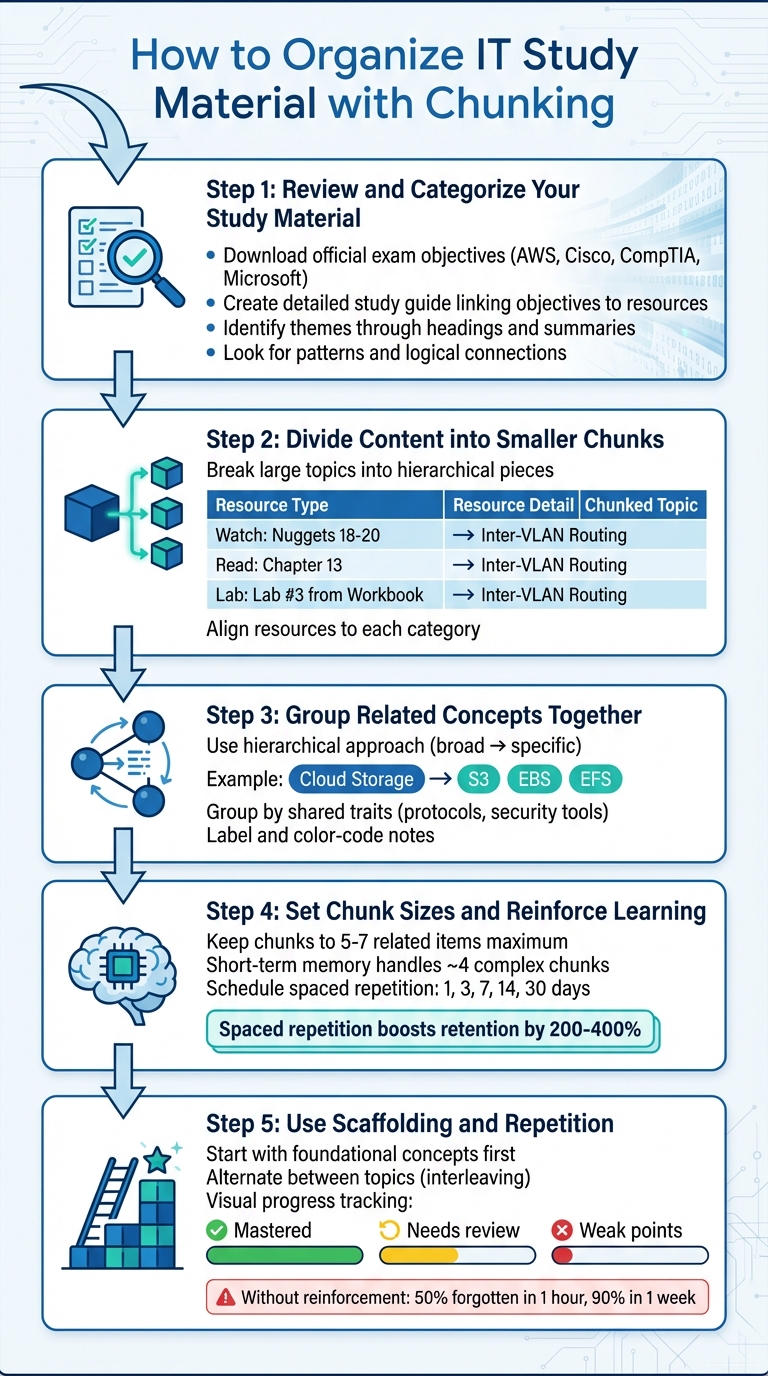
5-Step Chunking Method for IT Certification Study
Follow these steps to structure your IT study material effectively using chunking:
Step 1: Review and Categorize Your Study Material
Start by reviewing the official exam objectives provided by your certification body - whether it's AWS, Cisco, CompTIA, or Microsoft. These objectives act as your study blueprint, so download them to guide your preparation.
"The essential part of studying effectively for certifications is not necessarily studying harder, but studying smarter."
- Anders Fauskanger, CCNA Mentor
Next, create a detailed study guide that ties each exam objective to specific resources like video lessons, textbook sections, and hands-on labs. While scanning through your textbooks or whitepapers, pay attention to headings, highlighted text, and summaries to identify overarching themes. Gather all your materials - whether they’re notes, diagrams, or digital files - and look for patterns or logical connections to define your study categories [8, 13].
Step 2: Divide Content into Smaller Chunks
Break large topics into smaller, more manageable pieces. Think of it like building a hierarchy: start with broad categories, then drill down into subsections and key terms. For example, if you're tackling networking, divide it into areas like routing protocols, switching concepts, and security measures. Then, further break down routing protocols into topics like OSPF, EIGRP, and BGP.
For each topic, align your resources. For example, ensure that each category has a corresponding video to watch, a chapter to read, and a lab to complete. Here's how you might organize it:
| Study Activity | Resource Example | Objective Category |
|---|---|---|
| Watch | Nuggets 18-20 | Inter-VLAN Routing |
| Read | Chapter 13 | Inter-VLAN Routing |
| Lab | Lab #3 from Workbook | Inter-VLAN Routing |
Once divided, group related ideas into cohesive learning units for better comprehension.
Step 3: Group Related Concepts Together
Organizing related concepts together helps your brain store and retrieve information more effectively. Use a hierarchical approach: start with broad IT topics, like "Cloud Storage", and then break them into smaller subcategories such as "S3", "EBS", and "EFS". Look for shared traits to group items logically. For instance, you could organize networking protocols (TCP, UDP, ICMP) or security tools (NACLs, Security Groups) into their respective clusters.
To make these groups visually distinct, label and color-code your notes. This method helps condense large volumes of information into manageable chunks for your short-term memory [3, 8].
Step 4: Set Chunk Sizes and Reinforce Learning
Keep your chunks concise to avoid overwhelming your working memory. Ideally, each chunk should contain no more than 5 to 7 related items. Studies suggest that short-term memory can handle about 4 complex chunks at a time. Simplify dense material by summarizing long paragraphs into single sentences, making the content easier to absorb.
To reinforce what you’ve learned, schedule reviews at spaced intervals - such as after 1, 3, 7, 14, and 30 days. Research indicates that this spaced repetition method boosts retention by 200% to 400% compared to cramming.
Step 5: Use Scaffolding and Repetition
Begin with foundational concepts before diving into the finer details. For instance, before learning specific AWS services, ensure you grasp the basics of cloud computing and AWS's global infrastructure. This approach provides the context needed for deeper learning.
Alternate between topics during study sessions to enhance retention. For example, spend 30 minutes on networking followed by 30 minutes on security. This technique, known as interleaving, strengthens your memory and helps you distinguish between similar concepts.
Track your progress visually by marking your understanding: green for mastered topics, yellow for areas that need review, and red for weak points. Without consistent reinforcement, studies show that you can forget up to 50% of new information within an hour and 90% within a week. Visual tracking can help you stay on top of your progress and focus on areas that need improvement.
Using Planet Cert Study Tools with Chunking

Planet Cert takes the concept of chunking and integrates it into its study tools, creating a streamlined approach to exam preparation. With four study modes - Study, Flashcard, Review, and Exam Simulator - the platform helps you organize and retain information more effectively.
Study Mode and Flashcard Mode for Chunked Learning
In Study Mode, you can tackle exam topics at your own pace, with detailed explanations guiding you through the material. This mode works perfectly with chunking: break the exam objectives into 5 to 9 major sections, such as "Networking Fundamentals" or "Cloud Storage", and focus on one section at a time. By concentrating on smaller, manageable chunks, you avoid cognitive overload and absorb information more thoroughly.
Once you've worked through a chunk in Study Mode, Flashcard Mode helps reinforce your learning. Flashcards encourage active recall, requiring you to retrieve information from memory rather than passively reviewing it. This strengthens your understanding and builds long-term retention. To make the most of this tool, ensure each flashcard focuses on a single concept or fact, avoiding the pitfall of cramming multiple ideas into one card.
After mastering these chunks, Review Mode steps in to pinpoint areas that need extra attention.
Review Mode for Tracking Progress and Finding Weak Areas
Review Mode acts as a diagnostic tool, helping you identify gaps in your knowledge and zero in on weaker chunks. It provides immediate feedback on incorrect answers, complete with detailed explanations, so you can address misunderstandings and avoid mistaking familiarity for mastery.
This feature is especially helpful for IT certifications that emphasize scenario-based questions over simple term recognition. According to Planet Cert, students who consistently use their practice and review methods achieve a success rate of over 98%. You can track your performance across topics and focus on high-priority chunks - those areas where you struggle the most - during your daily reviews.
For even more tailored support, Brainy AI offers personalized tools to refine your chunking strategy.
Brainy AI for Custom Chunking Support
Brainy AI enhances your study process by creating custom practice questions and explanations tailored to your chunked study plan. Covering over 1,000 exams, including Google Cloud and Cisco certifications, Brainy AI breaks down complex topics into smaller, actionable steps through a process called scaffolding. This method makes challenging material feel more manageable.
You can use Brainy AI to generate a variety of question types - factual, conceptual, scenario-based, or comparative - helping you apply IT concepts in real-world exam scenarios. For instance, instead of simply memorizing AWS services, you could ask Brainy AI to create a scenario question like: "A company needs to store 500TB of archival data with infrequent access - which storage option is most cost-effective?" This approach transforms passive review into active learning, solidifying your understanding and exposing areas that need improvement.
Brainy AI also helps organize your study materials by generating structured outlines and mind maps from your notes. This saves time and allows you to focus on synthesizing information rather than sifting through scattered resources.
Conclusion
Chunking reshapes IT certification preparation by working in harmony with how your brain naturally processes information. Your working memory can handle about four chunks of data at a time, and only for around 10 seconds. By grouping related protocols, commands, or concepts into small, connected units, you make it easier to shift information into long-term memory.
Research shows that students using spaced practice with chunked material score an average of 5.32 points higher on exams compared to those who rely on cramming. Tools like diagrams or mind maps can further enhance these results. Without regular reinforcement, up to 90% of what you learn can fade within a week. However, combining chunking with spaced repetition can improve retention by 200–400%.
Planet Cert's suite of tools - Study, Flashcard, Review, and Brainy AI - helps you reinforce each chunk, monitor your progress, and customize practice sessions to fit your needs. This system ensures that every study session builds on the last, solidifying your understanding over time.
As neuroscientist Daniel Bor aptly explains:
"Chunking represents our ability to 'hack' the limits of our memory".
Start by breaking your exam objectives into key sections and strengthening each chunk with Planet Cert's tools. This method not only equips you for certification success but also enhances your ability to learn and retain knowledge throughout your life.
FAQs
How do I choose the right chunk size?
When deciding on the right chunk size, think about how complex the material is and how much there is to cover. Breaking down large topics into smaller, related groups makes them easier to understand - kind of like formatting a phone number as 555-123-4567. Each chunk should be easy to handle and meaningful, helping improve both memory and comprehension. The best size depends on how well you know the material and how much information your brain can comfortably process at once. Focus on creating clear, organized groups that are simple to absorb.
How do I chunk hands-on labs and commands?
To break down hands-on labs and commands effectively, try grouping related commands and procedures into logical, easy-to-handle sections. For instance, you could cluster all VLAN-related tasks - like creating VLANs, assigning ports, and setting up trunking - into one cohesive unit. Practicing these grouped commands repeatedly not only strengthens your understanding but also boosts your ability to recall them quickly. This approach helps minimize mental strain, makes patterns easier to spot, and prepares you to respond faster during exams or practical situations.
How can I use Planet Cert to review chunks faster?
To speed up your review process with Planet Cert, take advantage of Study Mode. This feature allows you to learn at your own pace while offering detailed explanations to deepen your understanding. If you're looking for a quicker way to revisit concepts, switch to Flashcard Mode, which is perfect for rapid review sessions. By pairing these modes with chunking - breaking material into smaller, digestible units - you can boost both your review speed and retention.
Related Blog Posts

Discussion
Question Comments
0 comments·0 participantsSign in to leave a comment and access more free questions.