

Common Certification Exam Questions Answered: Q&A for Test Prep
Passing IT certification exams can boost your salary by 10-30% and validate your expertise, but 65% of candidates fail on their first try. Why? Misreading questions, underestimating preparation time, and struggling with hands-on tasks are common pitfalls. This guide offers actionable strategies to improve your odds, including:
- Study for at least 110 hours, focusing on high-weight exam areas.
- Use spaced repetition to improve retention by 200–400%.
- Practice with mock exams and performance-based questions.
- Manage test anxiety with techniques like 4-7-8 breathing.
- Prepare a realistic study plan, balancing time and breaks.
Pro Tip: Tools like Planet Cert's Exam Simulator mimic real test conditions, helping you build confidence and track progress. Follow these steps to maximize your chances of success.
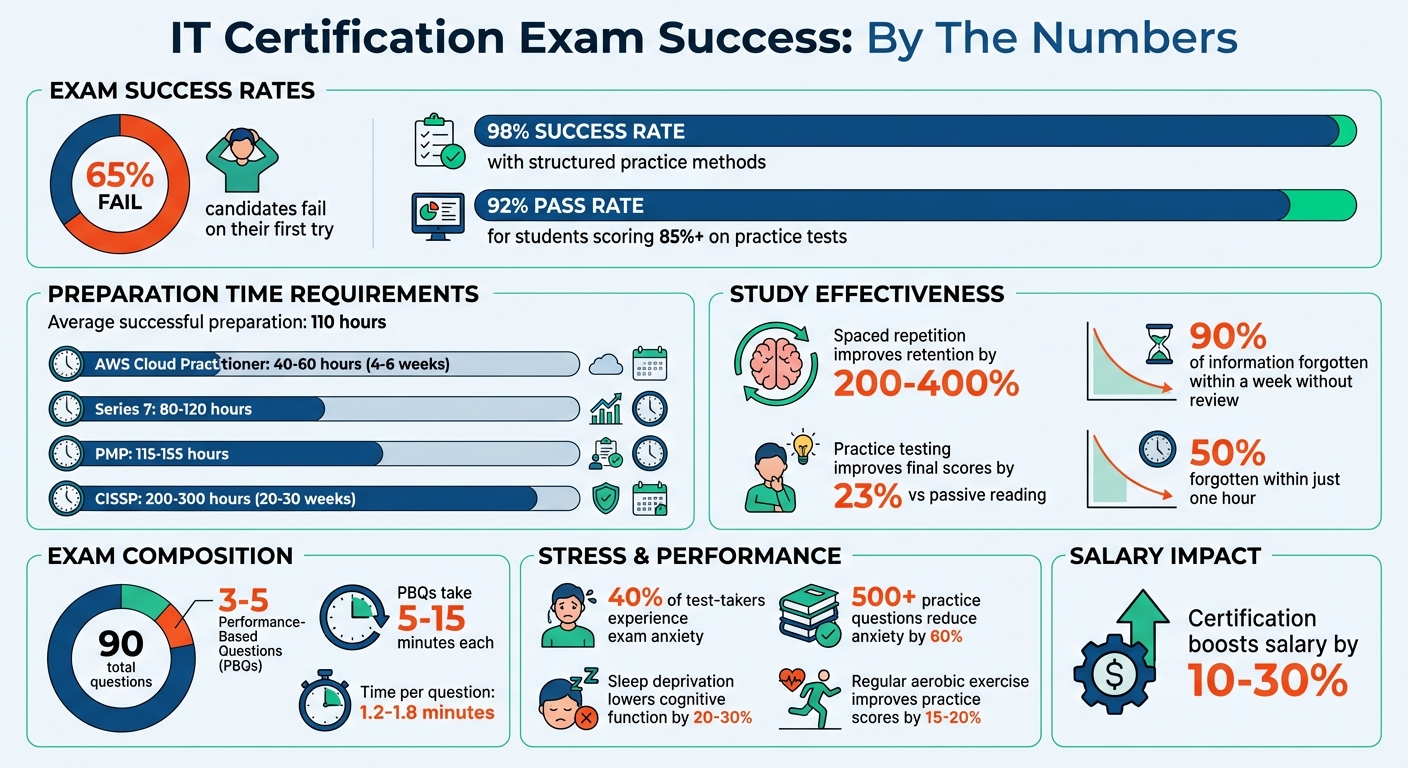
IT Certification Exam Success Statistics and Key Preparation Metrics
IT Certification Study Hacks for 2025 | How to Pass your IT Certifications Quickly|Cert Study Hacks
sbb-itb-b03e171
Understanding Exam Formats and Question Types
Certification exams come with a variety of question styles - multiple-choice questions (MCQs), performance-based questions (PBQs), scenario-driven questions, and sometimes adaptive testing formats. Let’s start by breaking down the most common type: multiple-choice questions.
Multiple-Choice Questions
MCQs are the foundation of most IT certification exams. These questions may ask for a single correct answer or use a "select all that apply" format, where more than one response is correct. To excel at MCQs, focus on understanding the question’s keywords and constraints.
Pay attention to key terms like "MOST cost-effective", "LEAST operational overhead", or negation words such as "NOT", "EXCEPT", or "FALSE". Misreading these critical terms is one of the most common mistakes test-takers make.
"The biggest cognitive error is misinterpreting the question stem. Students frequently overlook or misread critical negation words such as 'NOT,' 'EXCEPT,' or 'LEAST LIKELY.'" - OneLearning Blog
Use elimination strategies to narrow down your choices. Be cautious with answers that use absolutes like "always" or "never", as they’re rarely correct in professional exams. Eliminating even one distractor in a four-option question improves your odds from 25% to 33%, and eliminating two boosts it to 50%. For "select all that apply" questions, treat each option as a standalone true/false statement.
Other tips? Look for the longest or most detailed answer - it’s often correct. Ensure your choice aligns grammatically with the question. Finally, trust your gut; only change an answer if you’re confident you’ve caught an error.
Now, let’s shift to PBQs, which test your ability to apply knowledge rather than just recognize the correct answer.
Simulations and Performance-Based Questions
PBQs require hands-on skills. You might configure networks, set up firewall rules, troubleshoot systems, or analyze security logs. Unlike MCQs, these tasks demand that you create a solution rather than select one.
"PBQ readiness is the single biggest predictor of whether someone passes or fails on their first attempt." - Jeff Porch, Training Camp
PBQs typically carry more weight than MCQs and can take anywhere from 5 to 15 minutes each. Most exams include 3 to 5 PBQs out of approximately 90 total questions. To manage your time effectively, consider the "skip-first" strategy: flag PBQs, complete all MCQs first, and then return to the PBQs.
Hands-on practice is crucial for success. Set up a home lab using tools like VirtualBox, pfSense, or Wireshark to gain familiarity with real-world interfaces. For network and firewall-related PBQs, memorize common port numbers - SSH (22), DNS (53), HTTP (80), HTTPS (443), RDP (3389) - to save time during the exam.
Scoring for PBQs often allows partial credit, so even if you’re unsure, attempt as much of the task as possible. Avoid leaving PBQs blank. Most simulations also include a "Reset" button, letting you start over on that specific question without affecting other parts of the exam. Always review the instructions carefully to ensure you meet all constraints.
Building an Effective Study Plan
A well-structured study plan can dramatically improve your chances of passing compared to going in without one. The trick is to work backward from your exam date and create a realistic timeline that fits into your life.
Start by calculating how many weeks you have until the exam, accounting for holidays, work, or other commitments. Then, take a close look at your weekly routine to identify study windows. Most people can carve out 10–15 hours a week by using commutes, lunch breaks, or other small pockets of time. To pinpoint these opportunities, track your daily activities for a week using a spreadsheet or an app.
When planning, apply the 70/30 rule: dedicate 70% of your available time to active study and leave 30% as a buffer for unexpected challenges or tougher topics. Focus on high-weight exam areas - if three topics make up 65% of the score, allocate most of your time to mastering those. To stay organized, group topics into Easy (familiar), Medium (needs review), and Hard (new or complex) categories, and tailor your efforts accordingly.
This structured approach helps you set clear goals and use your study time effectively.
Setting Achievable Goals
The time you’ll need to prepare depends on the certification’s complexity. For example, the AWS Cloud Practitioner exam typically takes 40–60 hours (about 4–6 weeks at 10 hours per week), while the CISSP exam might require 200–300 hours (20–30 weeks at the same pace). Similarly, the Series 7 exam takes around 80–120 hours, and the PMP certification requires 115–155 hours.
Use practice exams to measure your readiness. Aim for at least 80% on two consecutive full-length tests before scheduling your exam. To boost retention, try the 3-Day Review Cycle: on Day 1, study and complete practice questions; on Day 2, review your mistakes; and on Day 3, tackle mixed questions. This method, which leverages spaced repetition, can improve long-term retention by 50% compared to last-minute cramming. Studies show that reviewing material at spaced intervals can help you retain 200–400% more information than studying it all at once.
Adapt your study schedule to your lifestyle. Early risers might find 60–90 minutes of quiet time before others wake up. Office workers can use 30–45 minutes during lunch breaks for flashcards or short videos. If you’re more productive at night, consider blocking out 2-hour sessions a few evenings a week. If weekdays are too hectic, dedicate 4–6 hours to intensive study sessions on weekends.
Once you’ve set clear goals, staying consistent and balancing your study sessions becomes much easier.
Balancing Study Time and Breaks
Without review, you could forget 50% of what you’ve learned in just one hour and up to 90% within a week. Taking strategic breaks not only fights this “forgetting curve” but also helps prevent burnout.
The Pomodoro Technique is a simple way to structure your study time: work for 25 minutes, then take a 5-minute break. For longer focus sessions, study up to 90 minutes before taking a 15-minute break.
Schedule your breaks like appointments. Use these moments to stretch, take a short walk, or do light exercise to boost blood flow and focus. Skip sugary snacks that can cause energy crashes - stick to protein-packed, whole-food options instead.
Make sure you’re getting enough rest. Aim for at least 7 hours of sleep per night and take one full day off each week. Sleep plays a key role in memory consolidation, and adults typically need 6–8 hours to effectively retain new information.
Lastly, mix things up during your study sessions. Instead of focusing on one subject for hours, alternate between topics. For example, spend 30 minutes on networking and then switch to security. This variety helps you better understand and apply concepts during the exam.
Using Practice Exams Effectively with Planet Cert

Practice exams are a game-changer when it comes to preparing for final tests. They simulate the environment of the actual exam, helping you build confidence and refine your skills. Planet Cert’s web-based exam simulator does just that - it replicates real exam conditions, ensuring your practice sessions align closely with the real thing. With a massive library of over 1,000 practice tests spanning 700+ industry exams and a reported success rate of over 98%, Planet Cert provides the tools you need to excel.
To get started, use Study Mode to focus on mastering concepts and identifying areas where you need improvement. Once you’ve strengthened your foundation, switch to Flashcard Mode for quick, on-the-go reviews - perfect for commutes or short breaks. As your exam date nears, transition to the Exam Simulator (ideally one to six days before the test) to build mental endurance and fine-tune your performance.
Experts recommend dedicating at least 14 days to practice with the simulator before scheduling your exam. Statistics show that students who score 85% or higher on practice tests have a 92% pass rate. Planet Cert also uses AI-powered insights to automatically identify weak areas, while session tracking helps you monitor your progress over time.
"This exam simulator was instrumental in my success. The questions were very similar to the actual exam!" – Sarah Chen, Senior Developer
Planet Cert keeps its materials up to date, with weekly updates ensuring the questions match current exam objectives. Plus, the platform is entirely online - no downloads required. Use code "hello26" for 15% off, and if you don’t pass your exam within 14 days of purchase, they offer a money-back guarantee.
Comparing Study Modes: Exam Simulator, Study Mode, Flashcard Mode
Each of Planet Cert’s study modes serves a unique purpose in your prep journey:
- Exam Simulator: Mimics real exam timing and interface, making it perfect for final preparation and performance refinement.
- Study Mode: Breaks down topics with expert-written explanations, helping you understand concepts and focus on weak areas.
- Flashcard Mode: Offers quick, self-paced reviews to reinforce key ideas, ideal for last-minute refreshers.
Research supports the effectiveness of these methods. Practice testing has been shown to improve final exam scores by 22%, while active recall boosts retention by 23% compared to passive study techniques like re-reading. By following a structured study plan - starting with learning materials, reinforcing with Study Mode, and finishing with the Exam Simulator - you’ll gain a deeper understanding of the material rather than just memorizing answers.
With these strategies in place, you’ll be well-prepared to handle the final hurdle: managing stress and time on exam day.
Managing Exam Day Stress and Time
Exam-day anxiety impacts about 40% of test-takers. However, thorough preparation - like completing over 500 practice questions - can ease stress by as much as 60%.
Preparing Mentally and Physically
Your mindset heading into the exam is just as crucial as the knowledge you've gained. A proven strategy is the WOOP technique: define your goal, imagine succeeding, pinpoint potential stress triggers, and plan your response (like using the 4-7-8 breathing method).
Physical readiness matters too. Make sure to get a full night's sleep, stick to your usual morning routine, eat a protein-rich breakfast, and arrive at the test center at least 30 minutes early. These steps can help lower stress levels. Interestingly, candidates who incorporate regular aerobic exercise during their study period tend to score 15–20% higher on practice exams compared to those who don’t.
If you feel overwhelmed during the test, techniques like 4-7-8 breathing or the S.T.O.P. method (Stop, Take a breath, Observe, Proceed) can help you regain focus.
"Nothing diminishes anxiety faster than action." - Walter Anderson
Time Management During the Exam
Once you’ve calmed your nerves and prepared yourself mentally and physically, managing your time during the test becomes key. Think of your exam time as a limited resource that decreases with every question. Since electronic devices are usually prohibited, wear a watch and set checkpoints, like a midpoint review and a 10-minute warning, to monitor your progress. For most certification exams, you’ll have about 1.2 to 1.8 minutes per question, so pacing is essential.
One helpful approach is the "First Five Minutes" rule: go slightly slower on the first 10 questions to establish a steady rhythm and build confidence. Skip overly difficult questions at first to avoid losing momentum. As you move through the test, sort questions into three categories: answer those you know immediately, use elimination strategies for tougher ones, and spend extra time on "50-50" questions where you’ve narrowed down the options.
Always record an answer before flagging a question for review - this ensures you won’t leave it blank if time runs out. Limit flagged questions to 30–40 to give yourself enough time to revisit them. Since most certification exams don’t penalize guessing, make sure every question has an answer before submitting. Maintain a steady pace, review flagged items only if time permits, and stay focused to finish strong.
Final Week Preparation Checklist
The last seven days before your exam are all about building confidence, not cramming new material. Research shows that up to 90% of new information fades within a week if it’s not reinforced. So, this is the time to focus on strengthening what you already know and ensuring you're fully prepared.
Reviewing Key Concepts
Zero in on the 20% of the syllabus that makes up 80% of the exam questions. Use past practice tests and exam blueprints to identify these high-yield topics. A helpful strategy is the Traffic Light System: label topics as Red (don’t understand), Yellow (need more practice), or Green (confident). Spend your time exclusively on the Red and Yellow areas. This approach ensures you're prioritizing effectively.
Instead of passive reading, switch to active recall. Try reciting or writing key ideas from memory. Research from Psychological Science in the Public Interest ranks practice testing as a "High Utility" study method, while re-reading and highlighting are considered "Low Utility". If you find it hard to explain a concept in simple terms, you’ve uncovered a gap. Use the Feynman Technique to break the topic down as if you’re teaching it to a child.
| Timeframe | Primary Focus | Recommended Activity |
|---|---|---|
| 7–5 Days Before | Assessment (Full-length exam) | Take a full-length practice test; identify weak areas. |
| 4–3 Days Before | Focus on "Red" and "Yellow" areas | Target weak areas identified in practice tests. |
| 2–1 Days Before | Tapering | Light review of flashcards; no new material; confirm logistics. |
In the final 48 hours, scale back your study intensity. Stick to light reviews using flashcards or summary sheets, such as Planet Cert's Study Mode. Make sure practical details are handled: set two alarms for exam morning, and ensure your car has gas or your transit pass is ready.
Taking Full-Length Practice Exams
To reinforce your preparation, schedule 2–3 full-length practice exams during the final week, with your last one 2–3 days before the exam. Use tools like Planet Cert's Exam Simulator mode, which mimics real testing conditions with strict time limits and no external aids. This will help you build mental stamina and sharpen your time management skills.
After each test, thoroughly review your answers. Pinpoint why you missed each question - was it a knowledge gap, a misread question, or a logic error? Then, write a one-sentence rule to avoid repeating the mistake. This method is backed by impressive results: specialized practice materials boast a 97%-98% pass rate, and 94% of students say practice questions closely resemble the actual exam.
Keep a simple log of your progress, noting the date, score, weak areas, and what you focused on afterward. Watching your scores improve can boost your confidence. During the first five minutes of every practice test, rehearse a "brain dump" by jotting down mnemonics, formulas, or key information you’ve memorized. This will help you replicate the process on exam day.
"Confidence isn't a pep talk; it's a pattern you've practiced." - Veteran Instructor, Certify with AI
Conclusion
Your success in IT certification exams relies on thorough preparation and smart, consistent practice. Research shows that active learning methods, like practice testing and spaced repetition, are far more effective than passive review techniques. In fact, students who commit to structured practice methods boast success rates exceeding 98%, while about 65% of those who skip such strategies struggle to pass on their first attempt.
But it’s not just about technical knowledge - your mindset plays a big role too. Anxiety often stems from uncertainty, and simulated exam sessions can help build what some call "calm competence". Completing 500+ practice questions has been shown to reduce exam-day anxiety by as much as 60%. Interestingly, moderate anxiety, when managed well, can even enhance your performance.
Your physical readiness matters as well. A good night’s sleep - ideally 7–9 hours - can significantly boost your cognitive function. Sleep deprivation, on the other hand, can lower it by 20–30%. To avoid unnecessary stress, finalize your logistics the night before. Plan your route, pack your ID, and ensure you’re fully prepared for the morning.
"Practice tests are not a box to tick. They are your training ground." - Certify with AI
It’s worth noting that the average preparation time for successful exam outcomes is closer to 110 hours - far more than the 30–40 hours often suggested. IT concepts are challenging. Tools like Planet Cert's Exam Simulator, Study Mode, and Flashcard Mode are designed to reinforce the habits and skills you need to excel on exam day.
Related Blog Posts

Discussion
Question Comments
0 comments·0 participantsSign in to leave a comment and access more free questions.