
How to Study for the New Omnissa Certifications in 30 Days
Want to pass Omnissa certifications in just 30 days? Here's how.
Omnissa, which took over VMware’s EUC division in 2024, now offers four new certifications: OCA-H, OCA-W, OCE-H, and OCE-W. These certifications validate your skills in managing Horizon and Workspace ONE platforms, crucial for IT professionals in virtual desktop infrastructure and endpoint management. Each exam costs $250 and is valid for two years.
What changed?
- No mandatory training required since August 2025.
- Exams focus on hands-on skills, making practice labs and structured study plans critical.
The 30-Day Plan at a Glance:
- Week 1: Learn the basics with Omnissa’s official courses and hands-on labs.
- Week 2: Focus on core configurations and troubleshooting.
- Week 3: Practice 400–500 questions using tools like Planet Cert.
- Week 4: Take full-length practice exams and refine weak areas.
Pro Tips:
- Dedicate 2–3 hours daily.
- Use the 3-Day Review Cycle for better retention.
- Aim for 80%+ on practice tests before scheduling the exam.
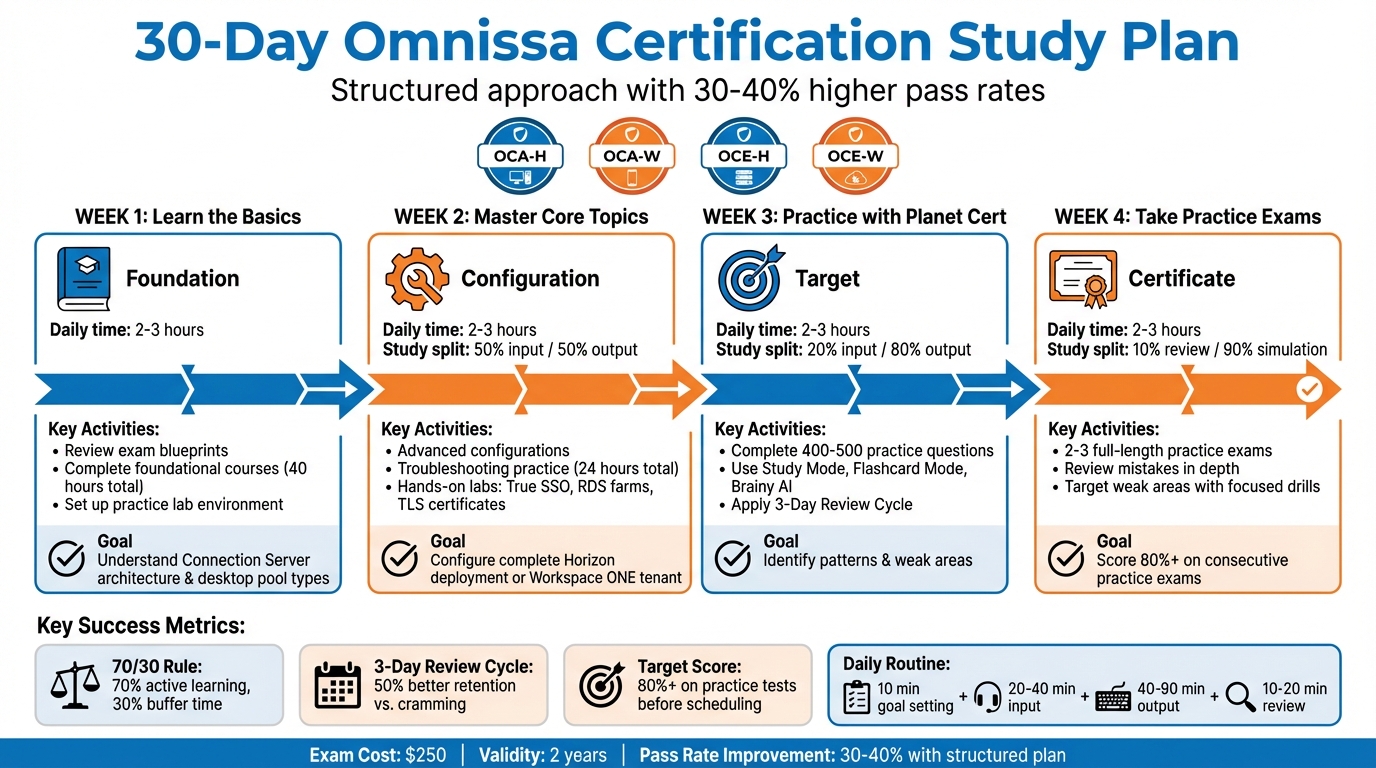
30-Day Omnissa Certification Study Plan Timeline
VMware\Omnissa Horizon VDI learning path on-premise\cloud-native solutions.
30-Day Study Plan
A 30-day plan can make certification prep feel achievable. Studies show that candidates who follow structured, week-by-week schedules have 30–40% higher pass rates than those who study without a plan. The trick is to balance learning (input) with doing (output), while leaving room for unexpected events.
The 70/30 Rule is a game-changer: dedicate 70% of your study time to active learning and keep 30% as a buffer for unforeseen issues or topics that need extra focus. Most people should aim for 2–3 hours of daily study, broken into focused 25-minute sessions with short 5-minute breaks.
Here’s a sample daily routine:
- 10 minutes for goal setting: Define specific, measurable objectives like "complete 20 practice questions on Connection Server setup."
- 20–40 minutes of input: Watch course videos or review Omnissa documentation.
- 40–90 minutes of output: Work on practice questions or hands-on labs.
- 10–20 minutes for review: Add recurring challenges to your error list.
The 3-Day Review Cycle is another key strategy for retention. On Day 1, learn new material and tackle 20 practice questions. On Day 2, review mistakes and add 10 more questions. On Day 3, mix in 10 questions covering both old and new topics. This spaced repetition approach can improve retention by 50% compared to cramming. Also, set a "stop rule" - move on after 90 minutes of focus or once you hit 70% accuracy on practice problems.
Every Sunday, take a few minutes to evaluate your progress and adjust your plan for the week ahead. Only schedule your final exam when you’re consistently scoring 80% or higher on practice tests, accounting for a potential 5–10% drop due to test-day nerves.
Planet Cert’s platform is designed to support each phase of this plan with tailored practice and feedback. Now, let’s break down the study plan week by week.
Week 1: Learn the Basics
Start Week 1 by building a strong foundation. For candidates pursuing OCA-H and OCA-W certifications, review the official Omnissa exam blueprints to understand which topics carry the most weight. For OCA-H, focus on the Horizon Deploy and Manage course, which covers 19 modules ranging from architecture to global scalability. For OCA-W, work through Workspace ONE UEM Administration. These courses typically require about 40 hours of study, so efficiency is crucial.
Make sure you meet the prerequisites and address any weak areas before diving deeper. For Horizon certifications, you should already be familiar with VMware vSphere (e.g., managing VMs, snapshots, and templates) and Microsoft Windows administration (e.g., Active Directory, DNS, DHCP, and Group Policy Objects). Setting up a hands-on lab with vSphere and Windows Server is highly recommended.
By the end of Week 1, aim to complete the foundational vendor-recommended courses and confidently explain key concepts like Connection Server architecture, desktop pool types, and Workspace ONE enrollment methods. Focus on covering all the basics and flag areas that need more attention later.
Week 2: Master Core Topics
In Week 2, shift your focus to advanced configurations and troubleshooting. For OCE-H, dive into topics like Connection Server setup, Instant-Clone desktop pools, and Unified Access Gateway (UAG) integration. For OCE-W, concentrate on conditional access policies, application deployment, and endpoint compliance workflows. These troubleshooting courses typically require about 24 hours of study.
Balance your study time evenly between input (50%) and output (50%). Spend less time passively learning and more time on hands-on practice. For example, work on configuring True SSO, setting up RDS farms with load balancing, or practicing TLS certificate setups for Connection Server installations. Focus on areas where you’re less confident and make sure each session delivers measurable progress, like completing a lab task or answering a set number of questions correctly without help.
By the end of Week 2, you should be able to configure core Omnissa components in a lab and explain how they interact. Test your skills by setting up a complete Horizon deployment or configuring an entire Workspace ONE tenant. If you’re still relying heavily on documentation, spend extra time reinforcing those areas. With the core topics under your belt, you’ll be ready for intensive practice in Week 3.
Week 3: Practice with Planet Cert
Week 3 is all about active recall. Shift your study time to 20% input and 80% output. Use Planet Cert’s platform as your primary tool.
Start with Study Mode to work through practice questions at your own pace, using the detailed explanations to deepen your understanding. Then, switch to Flashcard Mode for quick concept reviews during shorter study sessions. If you’re stuck on a topic, use Brainy AI to generate extra questions or get clarifications.
Aim to complete 400–500 practice questions this week. This volume helps you spot patterns in exam questions and identify weak areas. Keep updating your error list, and use the platform’s progress tracking to stay on top of your study goals.
Stick to the 3-Day Review Cycle for better retention. This method is three times more effective than re-reading notes and helps solidify what you’ve learned into long-term memory.
Week 4: Take Practice Exams and Fix Weak Areas
In Week 4, focus on simulation and targeted improvement. Dedicate about 10% of your time to review and 90% to exam simulations and drills.
Use Planet Cert’s Exam Simulator to take full-length practice tests under realistic, timed conditions. Plan to complete at least two or three practice exams. After each one, review your mistakes in Review Mode, focusing on the concepts behind each error. Use Study Mode to tackle weak areas until you consistently hit 70% accuracy.
Your goal is to score 80% or higher on two consecutive full-length practice exams before scheduling your actual test. This accounts for a potential score drop due to anxiety. If your scores are still in the mid-70s, spend focused sessions on problem areas. For example, if App Volumes integration is tripping you up, dedicate 90 minutes to mastering it. Similarly, if UAG troubleshooting remains tricky, create a lab scenario to practice until you’re confident. The goal isn’t to memorize questions - it’s to deeply understand the material so you’re prepared for any scenario on test day.
Study Tools and Resources
To make the most of your 30-day plan, take advantage of both official resources and Planet Cert's practice tools. Using the right tools can streamline your study process and boost your confidence. Omnissa provides official training through its Authorized Training Centers (OATCs), such as QA and Global Knowledge, both of which have over 15 years of experience teaching Horizon and device management courses. For instance, the Horizon Deploy and Manage (OMHDM) course costs about $3,715 and runs for five days, offering hands-on labs. Additionally, Omnissa's on-demand digital courses include a 30-day access period with built-in practice labs.
Official Study Guides and Courses
Omnissa's Tech Zone is a go-to hub for technical resources, offering reference architectures, guided tours, and structured activity paths for Horizon and Workspace ONE UEM. By logging in with your Customer Connect credentials, you can unlock personalized features like "MyTechZone", which streamlines navigation. For deeper learning, the Omnissa Workspace ONE and Horizon Reference Architecture provides detailed design, deployment, and configuration guidance to complement official documentation.
Courses like Workspace ONE UEM Administration and Operations and Horizon 8 Troubleshooting require around 40 hours and 24 hours of study time, respectively. Updated to version 8.8 as of March 2026, these courses reflect the latest product updates. These official resources pair seamlessly with Planet Cert's tools, offering a well-rounded study experience.
Planet Cert Platform Features
To enhance your preparation, Planet Cert's platform includes more than 1,000,000 practice questions across various study modes. Use Study Mode to work through questions at your own pace with instant feedback, Flashcard Mode for quick reviews, and the Exam Simulator for realistic, timed practice sessions. Their Brainy AI feature can even generate new questions, provide detailed explanations, and help clarify challenging topics.
Planet Cert suggests spending at least 14 days on practice materials and simulators before attempting the final exam. The platform's three-step "Fast Lane" method - selecting your exam, studying with the provided materials, and taking the test - keeps your preparation focused. By building questions directly from official syllabi, Planet Cert ensures you gain a solid understanding of the material rather than just memorizing answers.
Time Management Tips
Plan to dedicate about 10 hours per week during the first 25 days to complete vendor courses. Use the final two weeks for intensive practice with Planet Cert's Exam Simulator and targeted drills on weaker areas. Break your study sessions into manageable blocks:
- 20–40 minutes for input (videos and documentation)
- 40–90 minutes for practice (questions and labs)
- 10–20 minutes for review
"Consistency matters more than volume - momentum compounds." - Sucheta Gawade, Tech Insider
Hands-on labs are essential, as Omnissa certifications require practical experience. Track your progress weekly to ensure you're on schedule and ready for exam day.
sbb-itb-b03e171
Exam Day Preparation
After completing your 30-day study plan, it’s time to register and prepare for exam day. Omnissa uses a two-platform system: you’ll register through Clarus and schedule your test via Pearson VUE. Knowing the logistics ahead of time can help avoid unnecessary stress.
To make the most of your preparation, follow these steps to ensure a smooth testing experience.
Registration and Scheduling
Begin by signing in to the Omnissa Learning Website to verify and update your profile. Make sure your name, email, and company name match exactly with the ID you’ll present on exam day. Any discrepancies could prevent you from taking the test, so allow 24–48 hours for profile updates to process - don’t leave this until the last minute.
Once your profile is set, head to the Clarus platform to explore available certifications, check prerequisites, and register for your chosen exam (OCA-H, OCA-W, OCE-H, or OCE-W). After registration, you’ll schedule your test through Pearson VUE, where you can choose between testing at a physical center or opting for an online proctored exam. If you need to reschedule or cancel, you’ll handle it directly through Pearson VUE. For assistance, use [email protected] for general inquiries or [email protected] for certification-related questions.
Technical Requirements for Online Exams
If you’re taking the OnVUE online proctored exam, your setup must meet specific technical and environmental standards. Your computer must run Windows 10 or macOS 14 (or higher) - virtual machines and beta operating systems are not allowed. Additionally, your internet connection must maintain speeds of at least 6 Mbps download and 2 Mbps upload. To ensure compatibility, run the official OnVUE system test on the same device and network you’ll use on exam day.
Your testing environment is equally important. You’ll need a quiet, private room with a closed door and a completely clear desk - no books, electronics, notes, or writing tools are permitted. A webcam, microphone, and speakers are required, but headphones and headsets are strictly prohibited. Only one monitor is allowed, so disconnect any secondary displays and disable touchscreen features if applicable. Begin the check-in process 30 minutes before your scheduled exam time. During check-in, you’ll need to provide a 360° room scan along with photos of yourself, your ID, and your workspace.
Managing Your Credentials After the Exam
Once you’ve passed your exam, log in to Clarus to access your transcript and manage your credentials. Clarus keeps track of all your certifications and shows any prerequisites needed for advanced certifications, such as the Omnissa Certified Advanced Professional (OCAP). Keeping your profile information - especially your name and email - up to date is essential, as these details must align across all systems for future exams or credential verifications. Remember, profile updates require 24–48 hours to process, so plan ahead if you need to verify credentials for an employer or make changes to your contact information.
Conclusion
A dedicated 30-day study plan can help you pass the new Omnissa certifications - OCA-H, OCA-W, OCE-H, or OCE-W - with confidence. The key is a structured approach: start by building foundational knowledge in Week 1, dive deeper into core topics in Week 2, practice intensively with Planet Cert tools in Week 3, and spend the final week on timed practice exams to identify and strengthen weak areas. This method not only solidifies your understanding but also prepares you for the actual exam environment.
The results speak for themselves. Around 65% of students fail their certification exams on the first try due to poor preparation materials. However, using a structured plan with reliable certification exam platforms can boost success rates to over 98%. More than 5,000 students have already achieved their certifications with Planet Cert’s proven methodology.
Success hinges on using reliable, up-to-date resources rather than incomplete or risky options like "braindumps." Planet Cert’s tools - exam simulators, flashcards, and timed practice modes - are designed to help you truly understand the technology, not just memorize answers. As Jodie Cook, CCNA, shared:
"I was able to pass my CCNA exam easily with the help of the PDF documents. Promotion here I come!"
Dionne Garcia from ClinicSync also highlighted the value of this approach:
"I will recommend you to my friends. Thanks to Planet Cert I just earned my second cert! Had exactly what I was looking for!"
These testimonials highlight the power of focused preparation. By dedicating 14–30 days to this plan and leveraging Planet Cert’s resources, you’ll be ready to tackle your Omnissa certification. Plus, Planet Cert offers a money-back guarantee if you don’t pass your exam within 14 days of purchase. With the right tools and commitment, success is within reach.
FAQs
Which Omnissa exam should I take first (OCA-H, OCA-W, OCE-H, or OCE-W)?
If you're just beginning your certification journey, starting with the OCA-H (Omnissa Certified Associate - Horizon) exam is a smart move. This certification lays the groundwork by covering the basics of Omnissa Horizon technologies. Plus, it sets you up perfectly for tackling more advanced certifications, like the OCE-H (Omnissa Certified Expert - Horizon), down the line.
What lab setup do I need to prep in 30 days?
To get ready for Omnissa Horizon in just 30 days, start by setting up a simple lab environment. Include Active Directory, Windows/Linux servers, and the essential Horizon infrastructure. Use virtual machines with at least 4GB of RAM and 90GB of storage for Windows systems. Make sure to reserve enough resources for vCenter and other Horizon components.
Once your hardware is ready, focus on configuring networking, storage, and security settings. Afterward, proceed to install the necessary Horizon services. To optimize resource usage, take advantage of VM snapshots. This way, you can roll back changes easily and keep your setup manageable. As your needs grow, you can scale up the lab environment accordingly.
What score should I aim for on practice exams before booking?
Aim for at least a 70% score on practice exams before booking your Omnissa certification exam. Hitting this benchmark indicates a solid understanding of the material and increases your chances of doing well on the real test.
Related Blog Posts

Discussion
Question Comments
0 comments·0 participantsSign in to leave a comment and access more free questions.