

The Ultimate Guide to Cisco CCNA Certification Preparation
Looking to boost your IT career? The Cisco CCNA certification is a globally recognized credential that proves your expertise in managing enterprise-level networks. With an average salary bump of $8,000 for certified professionals and over 7,000 job postings requiring CCNA as of early 2026, it’s a smart move for IT professionals at entry to mid-career levels.
Here’s what you need to know:
- Exam Details: The CCNA 200-301 exam covers six domains, with IP Connectivity (25%) and Network Access (20%) being the most critical. It’s a 120-minute test with 100–120 questions, costing $300.
- Preparation Plan: A 10-week study plan combines theory, hands-on labs (using tools like Cisco Packet Tracer), and practice exams to ensure success.
- Key Topics: Subnetting, OSPF, VLANs, ACLs, and automation basics like APIs and JSON are essential areas to master.
- Certification Validity: CCNA is valid for three years, with options for recertification through exams or Continuing Education credits.
This guide breaks down the exam structure, provides a detailed study plan, and shares exam-day strategies to help you succeed. Whether you’re aiming for roles like Network Engineer or Junior Network Administrator, CCNA certification opens doors to higher salaries and career growth.
Don't Take the CCNA Exam Until You Memorize This Cram Guide
sbb-itb-b03e171
CCNA 200-301 Exam Overview
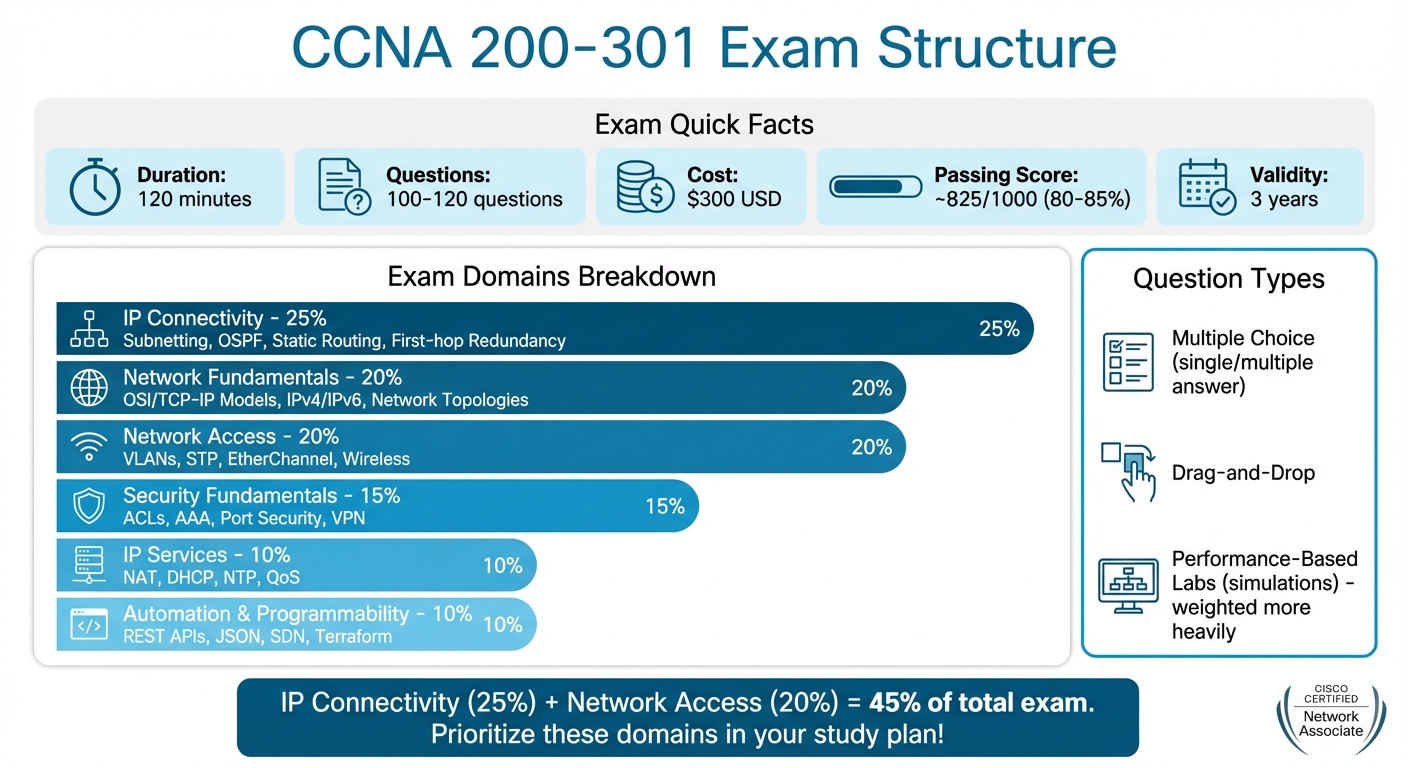
CCNA 200-301 Exam Domains and Score Weighting Breakdown
Exam Structure and Format
The CCNA 200-301 exam runs for 120 minutes and includes 100–120 questions. Version 1.1, effective from August 20, 2024, introduces new topics such as Generative AI, Machine Learning, and Terraform.
The exam features a mix of question types: single-answer and multiple-response multiple-choice questions, drag-and-drop tasks, and performance-based labs (simulations). Simulation labs carry more weight than standard multiple-choice questions, so being skilled in configuring Cisco IOS commands is critical. Keep in mind that once you submit an answer, it’s final.
Administered by Pearson VUE, the exam can be taken in-person at a testing center or online with a proctor. It is available in English and Japanese. While Cisco doesn’t officially disclose the passing score, it’s widely estimated to be around 825 out of 1,000 (roughly 80–85%).
Next, let’s look at the exam’s content domains and how they are weighted.
Exam Domains and Score Weighting
The exam is divided into six domains, each contributing a specific percentage to your overall score. The most heavily weighted domain, IP Connectivity, accounts for 25% and includes topics like subnetting, OSPF, static routing, and first-hop redundancy protocols. Network Fundamentals and Network Access each make up 20%, covering essential areas like the OSI/TCP-IP models, IPv4/IPv6 addressing, VLANs, Spanning Tree Protocol, and EtherChannel.
Security Fundamentals represents 15% of the exam, focusing on ACLs, AAA, port security, and VPN concepts. The remaining two domains, IP Services and Automation & Programmability, contribute 10% each. Together, the IP Connectivity (25%) and Network Access (20%) domains form nearly half of the exam, making them key areas to prioritize in your preparation.
Understanding these domains helps you allocate your study time more effectively.
Exam Cost and Certification Validity
Knowing the exam logistics is essential for planning your certification journey.
The exam fee is typically $300, though it can go up to $330 with taxes. Cisco Learning Credits can be used to cover this cost. If you don’t pass, you’ll need to pay the full fee again and wait five days before retaking the exam.
Once certified, your CCNA credential is valid for three years. To keep your certification active, you can either retake the exam, earn a higher-level Cisco certification (like the CCNP or CCIE), or complete 30 Continuing Education (CE) credits. Since there’s no grace period after the three-year validity, it’s important to plan your recertification strategy ahead of time.
Key CCNA Exam Topics to Master
Building on the exam overview, let’s dive into the essential topics you need to tackle. Below, we break down the critical areas that demand your focus.
Network Fundamentals
This section covers the foundational concepts, including the OSI and TCP/IP models, IPv4 and IPv6 addressing, subnetting, VLSM, and various network topologies like LAN, WAN, and WLAN. You'll also need to understand hardware essentials such as routers, Layer 2/Layer 3 switches, next-generation firewalls, and wireless access points.
Subnetting is a skill you can’t afford to overlook - experts estimate it contributes to 20–30% of your exam performance. To ace it, memorize powers of 2 (2, 4, 8, 16, 32, 64, 128, 256) and practice address calculations daily. Early familiarity with Cisco IOS CLI is equally crucial, as the exam includes performance-based simulations where you’ll need to input actual commands. Go beyond definitions - understand how each protocol and device works in real-world scenarios.
Once you’ve got the basics down, shift your attention to routing and switching for deeper insights.
IP Connectivity and Network Access
IP Connectivity focuses on routing concepts like single-area OSPF, static and default routes, and first-hop redundancy protocols such as HSRP. Meanwhile, Network Access dives into VLANs, 802.1Q trunking, Spanning Tree Protocol (STP), EtherChannel, and wireless architectures .
OSPF is the only dynamic routing protocol covered in detail on the current exam, with other protocols like EIGRP appearing only conceptually. Strike a balance between theory and hands-on practice - spend 45 minutes in simulators for every hour of study. Build OSPF topologies, introduce misconfigurations, and troubleshoot using "show" commands. Similarly, practice CLI configurations for VLANs, trunk ports, and EtherChannel to build muscle memory.
With routing and switching covered, the next step is to strengthen your knowledge in security and automation.
Security and Automation Basics
The Security Fundamentals section includes Access Control Lists (standard and extended), device hardening, AAA (Authentication, Authorization, and Accounting), and VPN basics. Pay close attention to ACLs, as rule order is critical - traffic is processed sequentially, and there’s an implicit deny at the end. Layer 2 security features like DHCP snooping, dynamic ARP inspection, and port security with sticky MAC addresses are equally important.
The Automation and Programmability section highlights the transition from traditional management to controller-based networking and Software-Defined Networking (SDN). You’ll need to understand REST-based APIs, including CRUD operations (GET, POST, PUT, DELETE), and how to interpret JSON-encoded data for network automation. Recent updates to the exam have introduced topics like Generative AI, Machine Learning fundamentals, and Terraform, while Puppet and Chef have been removed . Use tools like Cisco Packet Tracer or DevNet sandboxes to practice API calls and JSON parsing effectively.
Study Resources for CCNA Preparation
Getting ready for the CCNA exam requires both a solid understanding of the theory and plenty of hands-on practice. The right resources can make all the difference, helping you master everything from IP Connectivity to Automation. Below, you'll find a mix of official Cisco tools and third-party platforms designed to prepare you for the exam effectively.
Cisco Official Resources and Tools
Start with the Exam Blueprint provided by Cisco. This document outlines the six exam domains and their weightings, giving you a clear idea of where to focus your efforts. For example, IP Connectivity accounts for 25% of the exam, while Automation covers just 10%. Download this guide first to prioritize your study time wisely.
For practical learning, Cisco Packet Tracer is a must-have. This free simulation tool, available through the Cisco Networking Academy, supports over 90% of the CCNA configuration and verification topics. Create a free NetAcad account, enroll in the "Introduction to Packet Tracer" course, and start practicing. Familiarizing yourself with IOS commands in Packet Tracer is crucial since simulation questions are a significant part of the exam. Building that muscle memory will save you time during the test's 120-minute limit.
If you want to work with actual Cisco IOS software, consider Cisco Modeling Labs (CML). Unlike Packet Tracer, CML runs real Cisco IOS, providing an authentic environment for advanced practice. Keep in mind that CML requires a paid license and a system with higher specs, so it’s best suited for those looking for complete accuracy. For most CCNA candidates, Packet Tracer remains the preferred choice due to its accessibility and cost (it’s free).
Planet Cert: Practice Tests and Study Tools

Planet Cert is another excellent resource, offering over 500 practice questions with detailed explanations. These questions are updated weekly to reflect the latest exam patterns. The platform includes several modes to suit your learning style:
- Exam Simulator: Mimics the actual test environment with timed practice sessions.
- Study Mode: Lets you learn at your own pace with instant feedback.
- Flashcard Mode: Perfect for quick reviews of subnetting, port numbers, and other key topics.
- Review Mode: Helps you revisit questions you’ve missed to strengthen weak areas.
Planet Cert also features Brainy AI, which creates custom questions on challenging topics like OSPF configuration or subnetting. The platform tracks your progress across all six exam domains, making it easier to focus on areas where you need improvement. Aim for consistent scores above 85% on their practice tests to feel confident about your readiness. Unlike brain dumps - which violate Cisco’s policies and often contain outdated answers - Planet Cert ensures you’re learning the underlying concepts through verified and compliant content.
Study Books and Practice Labs
For in-depth study, the CCNA 200-301 Official Cert Guide, Volumes 1 and 2 by Wendell Odom is a trusted resource. These books, officially approved by Cisco, align with the latest exam blueprint. Volume 1 covers foundational topics like Ethernet LANs, VLANs, and IPv4/IPv6 routing, while Volume 2 dives into IP services, security basics, and automation. Use the "Do I Know This Already?" quizzes at the start of each chapter to gauge your knowledge and focus on areas that need more attention.
When it comes to hands-on practice, Hands-on Mastery with Packet Tracer walks you through configuration, troubleshooting, and verification for all CCNA topics. Another great option is Harris Andrea's CCNA 200-301 Commands - Packet Tracer Labs Guide ($19.95), which includes 42 labs covering IPv6, Trunking, OSPFv2, NAT, ACLs, and more. These labs provide instant feedback, helping you build the practical skills necessary to tackle simulation questions confidently.
With these resources, you’ll be well-equipped to handle the CCNA exam’s challenges and build a strong foundation in networking.
10-Week CCNA Preparation Plan
A well-organized 10-week plan can help you stay focused and on track. By breaking the CCNA 200-301 exam into smaller, manageable sections, this approach balances theory with practical application. Start by scheduling your exam date. A set deadline helps you stay accountable and maintain momentum.
Plan to study for two hours daily. Divide your time wisely: spend 60 minutes learning new concepts, 45 minutes doing hands-on labs with tools like Packet Tracer, and 15 minutes answering practice questions. As Paul Browning, author of 101 Labs, emphasizes:
You have no hope of understanding topics such as DHCP without configuring them. I mean none. DHCP will just be a fluffy concept in your mind with no practical application.
Using the resources mentioned earlier, this plan breaks your preparation into structured weekly goals.
Weeks 1-4: Learn the Fundamentals
Start by building a solid understanding of networking basics. Focus on the OSI and TCP/IP models, network topologies, and cabling standards. Dive into IPv4 and IPv6 addressing, and commit to practicing subnetting for 10-15 minutes each day until it becomes second nature.
As you progress, shift your attention to network access topics like VLANs, trunking (802.1Q), inter-VLAN routing (Router-on-a-Stick), Spanning Tree Protocol (STP), EtherChannel, and Wireless LAN fundamentals. Reinforce these concepts with hands-on labs in Packet Tracer to cement your understanding.
Weeks 5-8: Focus on Routing and Security
Now, move to IP Connectivity, which accounts for 25% of the exam. Study how routers create routing tables, set up static routes, and configure default routes. In weeks 5 and 6, concentrate on OSPFv2 and OSPFv3, focusing on key areas like neighbor relationships and cost metrics.
In weeks 7 and 8, turn your attention to IP Services and Security Fundamentals. Topics to cover include NAT (PAT, static, and dynamic), DHCP, NTP, QoS, Access Control Lists (ACLs), port security, DHCP snooping, and Dynamic ARP Inspection (DAI). Use tools like Planet Cert's Study Mode to get instant feedback and detailed explanations as you study.
Weeks 9-10: Practice Exams and Final Review
In week 9, focus on Automation and Programmability, which makes up 10% of the exam. Learn about Software-Defined Networking (SDN), REST APIs, JSON, and configuration management tools.
Dedicate the final week to taking full-length, timed practice exams using Planet Cert's Exam Simulator. This helps you build stamina and confidence for the real exam. Use Brainy AI to create custom questions and review areas where you struggled. Wrap up with intensive subnetting practice and troubleshooting labs to ensure you can work efficiently within the 120-minute exam time limit.
Exam Day Tips and Strategies
Now that you've laid the groundwork with solid preparation, it's time to focus on executing your plan effectively on exam day. Every second counts, so managing your time and staying composed during challenging moments are key to success.
How to Manage Your Time
Time management can make or break your exam performance. Aim to spend 60–75 seconds per multiple-choice question and 5–10 minutes on performance-based lab simulations. To stay on track, check your progress after every 20 questions.
Keep in mind that Cisco exams don’t allow you to revisit previous questions once you’ve submitted an answer. This means you need to read each question carefully and commit to your choice. When faced with a tough question, use elimination to remove the obviously incorrect options, make your best guess, and move forward without lingering.
For simulations, set a strict 10-minute limit per task. If you’re stuck, complete as much of the configuration as you can and move on. It’s better to allocate your time across all questions than to lose it perfecting one lab. Use the tutorial period at the start of the exam to jot down critical reference data - like subnetting tables, port numbers, or administrative distances - on the provided board.
How to Handle Subnetting and Simulations
Effective time management is just the start. You’ll also need to tackle technical challenges like subnetting and simulations with confidence. Subnetting alone accounts for 15–20% of the exam, while IP Connectivity (which includes subnetting) makes up about 25% of your total score. Aim to calculate network boundaries, broadcast addresses, and valid host ranges in under 30 seconds through consistent practice.
During simulations, leverage Cisco IOS shortcuts to save time. For example, the Tab key autocompletes commands, and typing "?" gives you context-sensitive help. Always verify your work using commands like show ip interface brief or show running-config before moving forward. Test your configurations with ping and traceroute to confirm everything is functioning as it should.
Pay close attention to the instructions provided in lab simulations. Adding unnecessary configurations or using incorrect VLAN IDs can cost you valuable points. Stick to the requirements and avoid overcomplicating your work.
After the Exam: What Happens Next
Once you’ve completed the exam, here’s what you can expect. You’ll receive a preliminary score report immediately after finishing. The official results are typically confirmed within 48 hours.
If you pass, your CCNA certification will be valid for three years. To keep it active, you’ll need to either retake the exam, pass a higher-level Cisco exam (like the CCNP), or earn 30 Continuing Education credits before your certification expires.
If you don’t pass on your first try, don’t be discouraged. Use your score report to pinpoint areas where you need improvement and adjust your study plan accordingly. Keep in mind that the exam fee is $300 USD, so approach your next attempt with the lessons you’ve learned to increase your chances of success.
Conclusion
Earning your CCNA certification requires a combination of structured preparation and steady effort. This guide has covered everything you need to know - from breaking down the exam's six domains and their respective weights to mastering hands-on tools like Cisco Packet Tracer and implementing a focused 10-week study plan that balances theory, labs, and CCNA practice tests.
Here’s a standout fact: CCNA-certified professionals earn an average salary of around $82,000, with senior positions exceeding $95,000. Plus, as of early 2026, there are over 7,000 job openings specifically requiring this certification. To succeed, you’ll need to develop a strong grasp of the core skills, dedicate time to hands-on practice, and aim for high scores on practice exams. The exam itself costs about $300 USD, and you’ll need to score approximately 825 out of 1,000 to pass.
By focusing on key areas like IP Connectivity (25%) and Network Access (20%), practicing simulations under timed conditions, and gaining substantial lab experience, you’ll be well-prepared - not just to pass the exam, but to excel. Your certification will be valid for three years, paving the way to roles in network engineering and serving as a stepping stone to advanced certifications like the CCNP.
Stick to a consistent study routine, use the strategies outlined here, and approach exam day with confidence. With the right preparation and mindset, success is within your reach.
FAQs
How many hours should I study per week to be ready in 10 weeks?
To get ready for the CCNA exam in 10 weeks, plan to dedicate 12–25 hours each week to studying. If you're new to networking, you'll likely need around 18–25 hours weekly to cover the material thoroughly. However, if you already have some networking experience, 12–18 hours per week might be enough. Tailor your schedule based on how comfortable you are with the topics and how quickly you can absorb the information to stay on track.
What lab skills matter most for CCNA simulations?
To excel in CCNA simulations, you need to develop practical, hands-on expertise with Cisco IOS commands and configurations. This includes tasks like setting up and troubleshooting routers and switches, working with VLANs, configuring trunking, and understanding spanning tree protocols. Routing protocols, especially OSPF, are also a major focus.
One of the best ways to build these skills is by creating a home lab. Whether you use physical hardware or virtual tools like Cisco Packet Tracer or GNS3, this setup allows you to practice device configurations, network segmentation, and troubleshooting in a controlled environment. These real-world exercises are crucial for mastering the technical challenges of CCNA simulations.
How do I decide what to review first from my practice exam results?
When preparing for an exam, begin by zeroing in on the questions or topics where you struggled the most. Spend time reviewing incorrect answers and areas where your confidence was low. This helps you pinpoint and address gaps in your understanding. Once you've tackled those weaker spots, shift your focus to the topics you already grasp well. By prioritizing your efforts this way, you can study more effectively and boost your overall exam readiness.
Related Blog Posts

Discussion
Question Comments
0 comments·0 participantsSign in to leave a comment and access more free questions.