

These 1z0 071 sample questions help you practise the reasoning behind Oracle SQL: which rows qualify, how NULL changes an expression, and which statements affect a transaction. Each original question includes answer choices and an explanation of the trap. They are study exercises rather than reproduced exam content.
I’d work through them without running the SQL first. Write down your predicted result, then explain why the other choices fail. When reviewing a PlanetCert practice test, use the same approach to turn a missed answer into a specific SQL rule. Each example below is independent; assume the named tables and columns exist and statements succeed unless the question asks about an error.
Which rows survive SELECT filters?
A filter keeps rows whose condition evaluates to TRUE. FALSE and UNKNOWN both exclude a row, which makes NULL comparisons easy to misread.
1. Which predicate finds a missing commission?
An employees table contains commission values NULL, 0 and 0.10. Which condition selects only the row with the missing commission?
- A.
commission_pct = NULL - B.
commission_pct <> NULL - C.
commission_pct IS NULL - D.
commission_pct = 0
Answer: C. IS NULL tests whether a value is null.
Both A and B evaluate to UNKNOWN for these comparisons. Neither selects the missing value. D selects the recorded zero, which is a known value.
The trap is treating NULL as an ordinary value. A missing commission and a recorded commission of zero can mean different things. Keep that distinction when reading both predicates and calculations.
Change the condition to IS NOT NULL as a follow-up exercise. It selects the zero and 0.10 rows.
2. Does AND take precedence over OR?
Assume employees contains these rows, written as (employee_id, department_id, salary):
(1, 10, 3000) (2, 20, 6000) (3, 20, 4000)
Which employee IDs does this query return?
SELECT employee_id
FROM employees
WHERE department_id = 10
   OR department_id = 20 AND salary > 5000;
- A. Employee 1 only
- B. Employee 2 only
- C. Employees 1 and 2
- D. All three employees
Answer: C. Oracle evaluates AND before OR.
The salary condition applies to the department 20 branch. Employee 1 qualifies through the department 10 branch, regardless of salary.
Parentheses change the result:
WHERE (department_id = 10 OR department_id = 20)
  AND salary > 5000
That version returns employee 2 only. When reviewing a compound condition, add its implied parentheses on paper before evaluating individual rows.
Where should NVL go in a calculation?
Place NVL around the value whose missingness you want to handle. Moving it outside an arithmetic expression can change the result.
3. Do these expressions return the same total?
What does this query return?
SELECT NVL(4000 + NULL, 0) AS total_a,
       4000 + NVL(NULL, 0) AS total_b
FROM dual;
- A.
4000, 4000 - B.
0, 4000 - C.
NULL, 4000 - D.
0, 0
Answer: B. total_a is zero and total_b is 4000.
In the first expression, adding NULL produces NULL. NVL then replaces that whole result with zero. In the second, NVL replaces the missing operand before addition.
For a salary-plus-bonus calculation, the placement expresses a business rule. If a missing bonus should contribute zero, write salary + NVL(bonus, 0).
That still leaves a missing salary untreated. Decide separately whether an unknown salary should remain unknown or receive a replacement. Don’t add NULL-handling functions without checking what each replacement means.
What do aggregate functions include?
For these questions, distinguish the rows in a group from the non-null values inside a particular column. Those counts can differ.
4. What do COUNT and AVG do with NULL?
A table contains three salary values: 1500, NULL and 3000. What does this query return?
SELECT COUNT(*),
       COUNT(salary),
       AVG(salary),
       AVG(NVL(salary, 0))
FROM employees;
- A.
3, 3, 1500, 1500 - B.
3, 2, 2250, 1500 - C.
2, 2, 2250, 2250 - D.
3, 2, 1500, 2250
Answer: B. The result is 3, 2, 2250, 1500.
COUNT(*) counts all three rows. COUNT(salary) counts two non-null values. AVG(salary) divides 4500 by two.
Replacing NULL with zero changes the input to the final average: it divides 4500 by three.
The trap is assuming both averages use the same denominator. Before calculating an aggregate, write down exactly which values it receives. Here, those inputs are either two salaries or three numbers.
5. Which department passes the grouped filter?
Department 10 has salaries of 4000 and 6000. Department 20 has salaries of 3000 and 2000.
SELECT department_id, SUM(salary) AS total_pay
FROM employees
GROUP BY department_id
HAVING SUM(salary) > 9000;
Which result is returned?
- A. Both departments
- B. Department 10 with total pay 10000
- C. Department 20 with total pay 5000
- D. An error because HAVING cannot use SUM
Answer: B. Department 10 has a total above 9000.
HAVING filters groups after aggregation. A WHERE condition filters individual rows before grouping. Moving the same-looking condition between those clauses can change the calculation or produce invalid SQL.
For example, adding WHERE salary > 5000 would remove the 4000 salary before the sum. Department 10 would then total 6000 and fail the existing HAVING condition.
When does a LEFT JOIN lose unmatched rows?
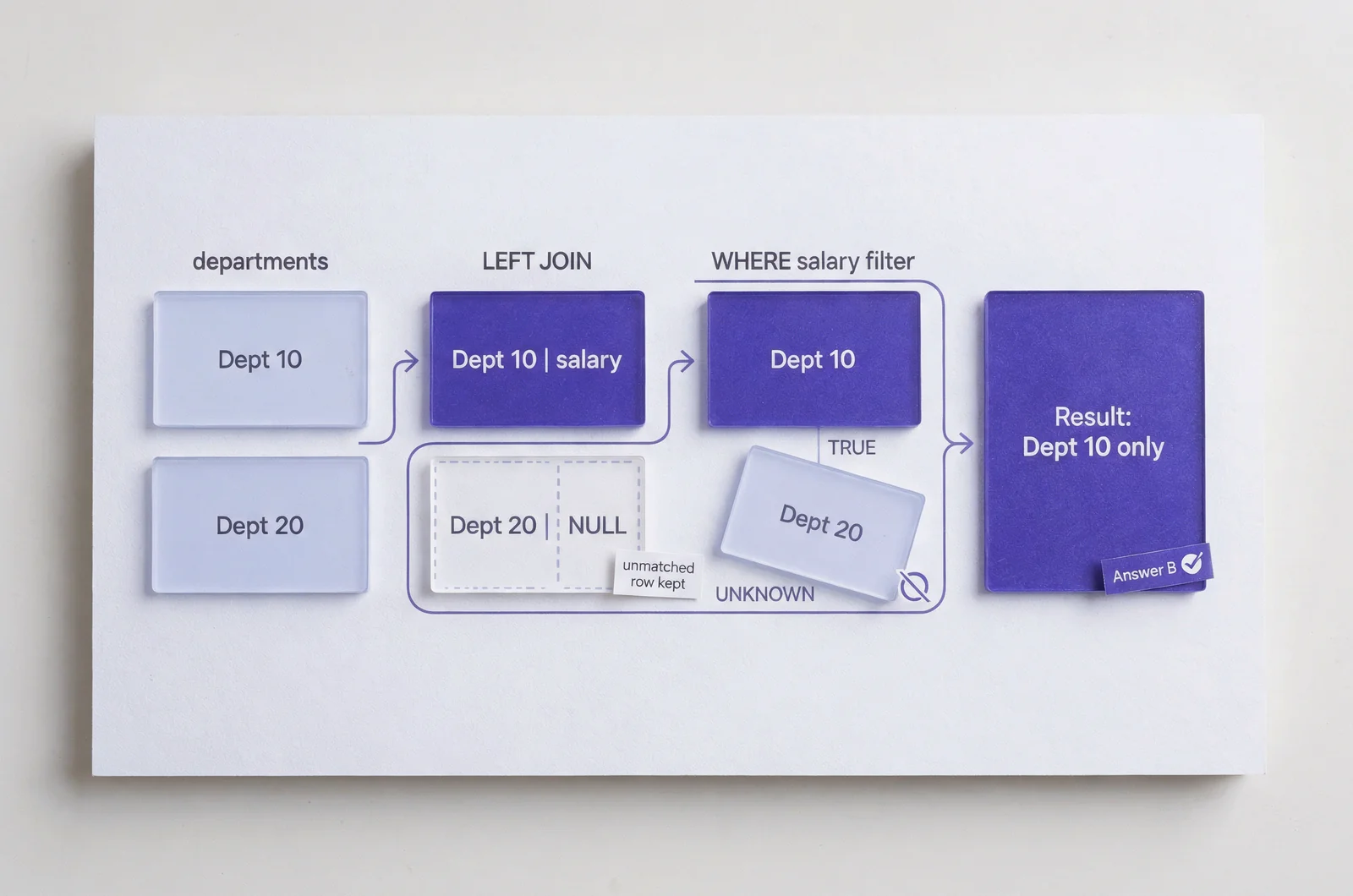
A LEFT JOIN preserves unmatched left-side rows at the join stage. A later WHERE condition can still remove them.
6. Does this query return departments without employees?
Assume departments 10 and 20 exist. Department 10 has one employee earning 7000; department 20 has no employees.
SELECT d.department_id, e.salary
FROM departments d
LEFT JOIN employees e
  ON e.department_id = d.department_id
WHERE e.salary > 5000;
- A. Both departments, with NULL for department 20
- B. Department 10 only
- C. Department 20 only
- D. An error because WHERE follows an outer join
Answer: B. The query returns department 10 only.
The join initially produces a null-extended row for department 20. Its salary comparison evaluates to UNKNOWN, so WHERE removes it.
To retain every department while joining only employees earning above 5000, put the salary condition in ON:
LEFT JOIN employees e
  ON e.department_id = d.department_id
 AND e.salary > 5000
That version returns department 20 with a null salary. Trace the joined rows before applying the final filter; otherwise, the word LEFT can distract you from what WHERE does.
How do NULLs and row counts change subqueries?
Subquery questions often turn on a specific assumption: whether the result contains NULL, or whether an expression receives more than one row.
7. What happens when NOT IN encounters NULL?
The table excluded_departments contains two values: 10 and NULL.
SELECT 20 AS department_id
FROM dual
WHERE 20 NOT IN (
  SELECT department_id
  FROM excluded_departments
);
What is returned?
- A. One row containing 20
- B. One row containing 10
- C. One row containing NULL
- D. No rows
Answer: D. The predicate does not evaluate to TRUE.
For this example, think of the condition as 20 <> 10 AND 20 <> NULL. The first comparison is TRUE; the second is UNKNOWN. The combined condition is UNKNOWN.
The trap is assuming that the absence of a matching known value guarantees inclusion.
Filtering NULL out of the subquery changes this example’s result. A correlated NOT EXISTS can also express the absence of a matching row. When rewriting either form, decide how a NULL in the outer value should behave.
8. Can a scalar subquery return two rows?
Assume department 10 has two employees, with salaries of 4000 and 6000.
SELECT (
  SELECT salary
  FROM employees
  WHERE department_id = 10
) AS chosen_salary
FROM dual;
What happens?
- A. It returns 4000
- B. It returns 6000
- C. It returns NULL
- D. It raises an error
Answer: D. A scalar subquery cannot return more than one row.
Oracle does not automatically choose the first, highest or lowest salary. If the requirement is the highest salary, an aggregate such as MAX(salary) expresses that requirement.
A scalar subquery returning zero rows produces NULL. That differs from returning two rows, which causes an error.
Check the subquery’s possible row count before evaluating its values. Also distinguish a genuinely empty result from an aggregate without GROUP BY, which returns one row even when no input rows qualify.
How do set operators handle duplicate values?
UNION removes duplicate result rows. UNION ALL keeps them, so the distinction affects both membership and row count.
9. How many rows does each UNION form return?
Table x contains 1, 1, 2. Table y contains 2, 3.
SELECT n FROM x
UNION
SELECT n FROM y;
Compare that query with the same query using UNION ALL.
- A. Both return three rows
- B. UNION returns three; UNION ALL returns five
- C. UNION returns five; UNION ALL returns three
- D. Both return five rows
Answer: B. UNION returns the distinct values 1, 2 and 3. UNION ALL preserves all five input rows.
Neither query guarantees display order without an appropriate ORDER BY.
For a further check, x MINUS y returns the distinct value 1, while x INTERSECT y returns 2. Duplicate removal applies to complete selected rows. If you select additional columns, compare the whole row before deciding whether two results are duplicates.
Which changes can ROLLBACK undo?
For these transaction questions, assume autocommit is disabled. Track both the changes and the transaction boundaries; the final statement alone does not tell the whole story.
10. What remains after ROLLBACK TO a savepoint?
A product starts with a committed stock value of 10.
UPDATE products SET stock = stock - 2
WHERE product_id = 1;

SAVEPOINT after_first_update;

UPDATE products SET stock = stock - 3
WHERE product_id = 1;

ROLLBACK TO after_first_update;
What stock value does the same session see?
- A. 10
- B. 8
- C. 5
- D. NULL
Answer: B. The stock value is 8.
The rollback undoes the second update. The first update remains part of the uncommitted transaction.
A savepoint marks a position within a transaction; it does not commit earlier work. A subsequent full ROLLBACK would restore the committed value of 10, assuming no intervening commit.
When tracing this sequence, annotate the stock value after each update: 8, then 5, then 8.
11. Does ROLLBACK reverse a successful TRUNCATE?
An order has a committed status of NEW. All three statements succeed:
UPDATE orders
SET status = 'READY'
WHERE order_id = 10;

TRUNCATE TABLE staging_orders;

ROLLBACK;
Which statement is correct?
- A. The order returns to NEW; staging rows return
- B. The order stays READY; staging rows return
- C. The order stays READY; staging rows stay removed
- D. The order returns to NEW; staging rows stay removed
Answer: C. The order remains READY and the staging rows remain removed.
TRUNCATE is DDL. Oracle commits the preceding transaction before executing DDL, and the successful truncate cannot be undone by the later rollback.
Compare that sequence with DELETE FROM staging_orders inside an uncommitted transaction. A full rollback could undo both the delete and the preceding update.
Classify the statement before applying familiar rollback rules.
Which missing values do constraints permit?
A column constraint can allow NULL unless another rule rejects it. Read UNIQUE, CHECK and NOT NULL separately.
12. Which two INSERT statements succeed?
Consider this table:
CREATE TABLE demo_codes (
  code NUMBER UNIQUE,
  quantity NUMBER CHECK (quantity > 0)
);
Choose two inserts that succeed independently on an empty table.
- A.
INSERT INTO demo_codes VALUES (NULL, 1); - B.
INSERT INTO demo_codes VALUES (NULL, NULL); - C.
INSERT INTO demo_codes VALUES (1, 0); - D.
INSERT INTO demo_codes VALUES (2, -1);
Answer: A and B.
The single-column UNIQUE constraint permits NULL. The check condition permits a row when its result is TRUE or UNKNOWN. For a null quantity, quantity > 0 is UNKNOWN.
Zero and negative quantities make the check FALSE, so C and D fail.
To require a positive, recorded quantity, add NOT NULL as well as the check. To require a recorded unique code, use UNIQUE with NOT NULL, or a primary key where that matches the design.
An additional NULL code would also be allowed by this single-column unique constraint.
How should you review these Oracle SQL answers?
Review the rule behind each answer before repeating the same question. A remembered option letter gives you little evidence that you can solve a changed example.
For every miss, record the condition you overlooked and alter one detail. Remove NULL from the exclusion subquery. Move the salary predicate between ON and WHERE. Replace TRUNCATE with an uncommitted DELETE. Predict the new result.
Then use a timed session in PlanetCert’s simulator to practise applying those distinctions under time pressure. Keep a small error log by topic rather than collecting only an overall score.
A useful interactive checklist would let you mark each question as correct, guessed or incorrect, then show which SQL rules need another attempt. It should keep guessed answers visible for review.
These exercises cover selected SQL behaviours. For syllabus alignment, use the study guide currency checks alongside the objectives for your intended exam. Repeat missed rules with fresh data before repeating familiar wording.
What can help you review SQL practice more effectively?


Discussion
Question Comments
0 comments·0 participantsSign in to leave a comment and access more free questions.