
Adobe Visual Design Specialty Credential Requirements: Photoshop, Illustrator, InDesign
A few months ago, a designer I’ve known since her first freelance project called me frustrated. She had just earned her Adobe Certified Professional in Photoshop and assumed that would be enough to land a mid-level agency role. After three interviews, she kept hearing the same question: “Great work, but can you handle Illustrator for brand assets or InDesign for client layouts?” Each time, she couldn’t point to anything that proved she could. She missed two offers before she realised that a second certification wasn’t just a resume boost — it was the difference between being seen as a specialist and being seen as a full visual designer.
That’s exactly why this credential exists. The Adobe Visual Design specialty credential requirements aren’t buried in a complicated handbook; they boil down to a single, clear formula. Understand that formula, pick the right second exam for your career, and you’ll earn a badge that hiring managers actively search for. Here’s how every piece fits together.
The Credential’s Core Formula
Adobe doesn’t make you sit a third exam. The Adobe Certified Professional in Visual Design specialty credential is automatically awarded when you hold two specific active certifications. According to the Adobe Specialty Credentials page, the required pair is:
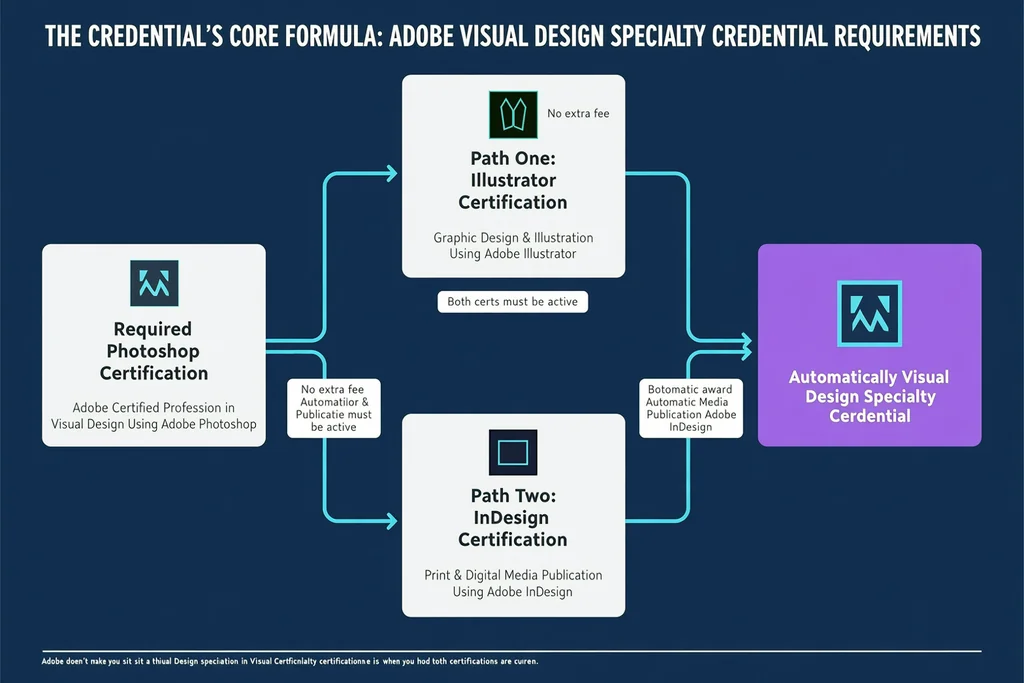
- Adobe Certified Professional in Visual Design Using Adobe Photoshop (required — no substitute)
- Either Adobe Certified Professional in Graphic Design & Illustration Using Adobe Illustrator or Adobe Certified Professional in Print & Digital Media Publication Using Adobe InDesign
Once both certifications are current in your Certiport account, the credential appears within a few days. You don’t fill out an application, pay an additional fee, or request a manual review. If you pass Photoshop one month and Illustrator the next, the badge materialises on its own.
That pairing isn’t arbitrary. Photoshop handles raster work — retouching, compositing, colour grading — but professional design almost always demands a second skill set. Illustrator covers vector graphics and branding; InDesign covers multi-page layouts and typography-heavy publication work. The credential signals that you can move between the two applications employers actually expect a visual designer to use together.
The credential is valid for three years from the date of issue. That means you’ll need to keep both underlying certifications active on their own three-year cycles. If one expires, the specialty credential drops until you recertify that application. Keeping an eye on your Certiport dashboard once or twice a year is enough to avoid surprises.
Photoshop Certification — The Non-Negotiable First Step
Every path to the Visual Design credential starts with Photoshop. The exam, officially titled Visual Design Using Adobe Photoshop, is a 50-minute proctored assessment delivered through Certiport. The Adobe Certified Professional FAQ confirms that each certification exam mixes live-in-the-application tasks with selected-response questions, all developed and validated by industry practitioners.
The exam objectives span these domains:
- Working in the Design Industry — project setup, client communication, copyright basics, file formats and their appropriate uses
- Project Setup and Interface — document creation with correct dimensions, resolution, colour modes; workspace customisation and panel navigation
- Organising Documents — layer management, Smart Objects, non-destructive editing workflows
- Creating and Modifying Visual Elements — selection tools, masking, retouching, type layers, shape layers
- Publishing Digital Media — export for web, print, and screen; compression settings, colour profiles, output options
Realistically, you’ll want around 150 hours of hands-on experience before scheduling the exam. That number comes straight from Adobe’s preparation materials and matches what most successful test-takers report. The hours can come from freelance projects, online courses, or deliberate practice inside the application.
One candidate I worked with passed on her first attempt after a concentrated four-week study block. She spent the first two weeks working through practice tests to find her weak spots — mostly layer masks and colour profiling — then drilled those topics inside Photoshop every evening during the final two weeks. She said the biggest surprise wasn’t the tool-specific questions; it was the industry-terminology section, which she’d assumed she could breeze through. If you want a structured approach, a four-week Photoshop certification study plan can help you organise that kind of focused push around a work schedule.
Path One — Illustrator Certification for Vector-Based Design
If your work centres on branding, logo design, icon systems, or any project that demands resolution-independent graphics, the Illustrator exam is the logical second step.
The exam — Graphic Design & Illustration Using Adobe Illustrator — follows the same 50-minute, in-app-plus-question format. The Adobe Illustrator Certification page outlines the 2025 exam objectives, which include:
- Working in the Design Industry — core terminology, legal considerations, project management workflows
- Project Setup and Interface — artboard configuration, colour mode selection (CMYK versus RGB), interface customisation
- Organising Documents — layers, groups, isolation mode, symbols, global edits
- Creating and Modifying Visual Elements — drawing tools, Shape Builder, Pathfinder operations, type handling, gradients and patterns
- Publishing Digital Media — exporting assets for screens, preparing print-ready files, SVG and web formatting
Vector work demands a different mental model than raster work. In Photoshop, you think in pixels and layers; in Illustrator, you think in paths, anchor points, and infinitely scalable objects. Candidates who come from a Photoshop-only background often find the Pen tool and Bézier curve manipulation to be the steepest part of the learning curve. Block out an extra 15 to 20 hours specifically for Pen and curvature tool exercises, and you’ll close that gap faster than you’d expect.
This path makes the most sense for anyone who spends their days building brand identity systems, designing app icons, creating infographics, or producing digital illustration work. It’s less relevant if your output is predominantly multi-page documents or editorial layouts — that’s where InDesign earns its spot.
Path Two — InDesign Certification for Layout and Publishing
If you produce magazines, brochures, annual reports, eBooks, or any document where copy-heavy content meets structured visual design, the InDesign certification validates exactly the skill set those employers need.
Key exam domains typically include:
- Working in the Design Industry — same foundational knowledge as the other exams, with a heavier emphasis on print production terminology
- Project Setup and Interface — document settings (bleeds, slugs, margins), master pages, baseline grids
- Organising Documents — paragraph and character styles, linked assets, layers, book files
- Creating and Modifying Visual Elements — text frame creation and threading, table building, anchored objects, interactive elements for digital publication
- Publishing Digital Media — preflight checks, file packaging for print, PDF export standards (such as PDF/X), EPUB and other digital format options
InDesign’s exam gets less attention in design forums than the Photoshop or Illustrator equivalents, but for the right career path it’s arguably more differentiating. Lots of designers can open InDesign and drop in some text. Far fewer can set up a 200-page document with nested styles, conditional text, and a clean packaging workflow that a commercial printer won’t bounce back.
A production designer I used to work alongside added the InDesign certification to her existing Photoshop credential and saw a noticeable jump in interview invitations within two months. She wasn’t learning an entirely new craft — she was proving something she had already been doing for years. If your job description includes “publication,” “editorial,” “marketing collateral,” or “print production,” this is the route that speaks directly to the hiring managers you’re trying to reach.
How to Choose Between Illustrator and InDesign
Both paths satisfy the credential requirement, so the decision comes down to your daily toolset and your next career move. Ask yourself three questions:
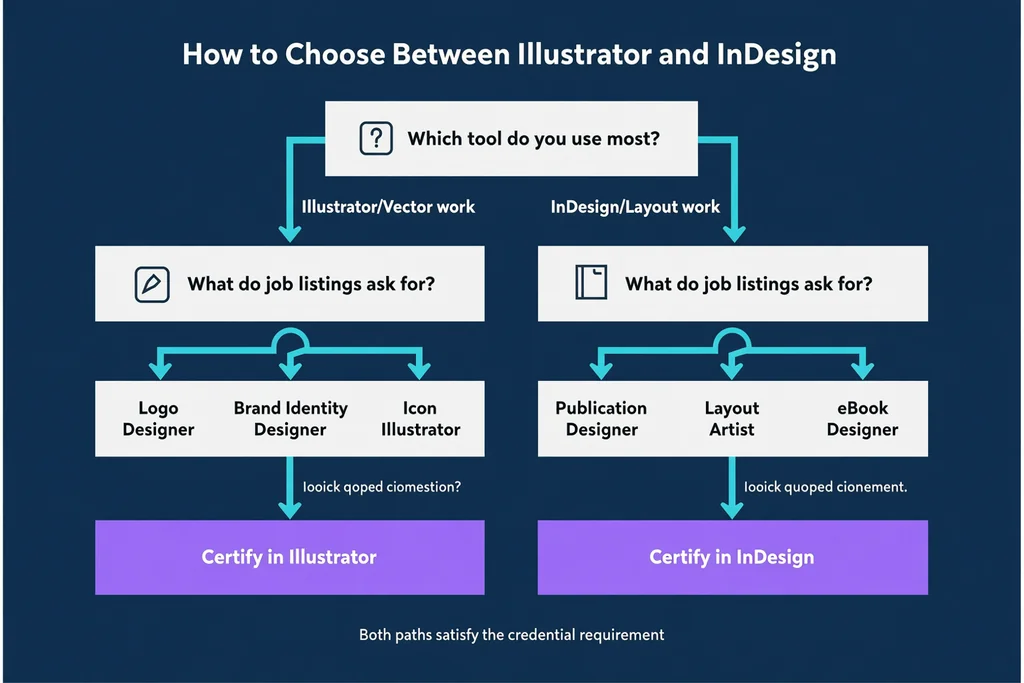
Which application do you already use? If you regularly open Illustrator for logo work or InDesign for layout projects, lean into the tool where you already have substantial hours. Building on existing muscle memory is faster than starting from scratch, and the 150-hour experience recommendation still applies to whichever exam you choose.
What do job listings in your target market ask for? Browse five to ten visual designer postings in your region or industry. Count how many mention Illustrator versus InDesign. A quick scan of remote visual-designer openings in mid-2026 showed Illustrator appearing in roughly two-thirds of listings, while InDesign showed up in about half — but in print-heavy sectors like publishing and corporate communications, InDesign was listed as a requirement more often than Illustrator. Let the roles you actually want dictate the tool you certify.
What kind of portfolio do you want to show? The certification alone won’t get you hired, but the projects you build while preparing can strengthen your portfolio. If you need more branding and illustration samples, pick Illustrator. If you need publication and layout samples, pick InDesign. The study period itself can double as a portfolio-building sprint.
There’s no “better” option here. Both lead to the same specialty credential. Some candidates later add the third certification to complete the set, but that’s completely optional — the credential triggers with just two, and most employers care far more about demonstrated ability than about stacking every possible badge.
What Exam Day Actually Looks Like
Both exams are delivered exclusively through Certiport and its network of authorised testing centres. You can test in person at a partner location or, for English-language exams, use the OnVUE remote proctoring option from home.
Each Adobe Certified Professional exam costs roughly US$150, though regional pricing varies — check the Certiport store for your country’s exact figure. Students enrolled at participating institutions may qualify for discounted vouchers. I’ve written a separate breakdown of the Adobe Certified Professional exam cost if you want the detailed numbers before budgeting.
The exams blend two question formats: live-in-the-app tasks where you perform operations inside the actual Creative Cloud application, and selected-response items that test conceptual knowledge. There’s no trick scoring — you either complete the task correctly or you don’t. If you’ve used a simulation-based practice test platform before, the in-app portion feels familiar: you get a realistic workspace with a set of instructions, and your actions are automatically recorded and evaluated.
If you fail, Certiport enforces a waiting period before you can retake. Most candidates who prepare methodically pass on the first attempt, especially those who use practice tests to familiarise themselves with the exam interface and question style. Schedule your real exam about two weeks after you start hitting your target scores in full-length practice runs, not before.
Across the full range of Adobe certification exams, the pattern is consistent: hands-on application experience combined with targeted practice testing yields the strongest results. If you want to explore other specialty credentials later — Video Design, Web Design, or the Entrepreneurship track — the same exam infrastructure applies, so understanding the Visual Design path now sets you up for anything you pursue next.
Keeping the Credential Active and Making It Count
Once earned, the Visual Design specialty credential is valid for three years. The underlying Photoshop and Illustrator/InDesign certifications each run on their own three-year clock from the date you passed, so you’ll need to recertify each application individually. There’s no combined renewal exam.
Add the credential to your LinkedIn profile under “Licenses & Certifications.” Use the digital badge Adobe issues through Credly, and include it in your email signature and portfolio bio. A creative director I know told me she actively filters for applicants who list multiple verified Adobe credentials — not because she thinks a badge programme replaces experience, but because it signals genuine tool fluency that’s hard to fake in an interview.
More importantly, use the preparation period to build real portfolio pieces. Every practice project you complete while studying can become a case study. When a hiring manager sees the credential on your CV and then opens a portfolio that demonstrates exactly those skills, the combination is far stronger than either element alone. One designer I mentored built three brand-identity projects while studying for the Illustrator exam; by the time she earned the specialty credential, her updated portfolio looked like a mid-level agency reel.
Visual Design Specialty Credential Questions, Answered
Can I earn the specialty credential with older certification versions?
Yes, as long as your certifications are active. Credentials earned through CC 2018 exams and newer carry the Adobe Certified Professional title. CC 2015 certifications remain under the older Adobe Certified Associate name and still count toward the specialty credential. Adobe transitioned the programme naming in June 2021, but the underlying exam content is still valid if your credential hasn’t expired. Check your Certiport account to confirm which versions you hold.
What if I already hold both Photoshop and Illustrator certifications?
The specialty credential is awarded automatically. If both certifications are current and the badge hasn’t appeared after a few days, log into your Certiport account or check your Credly profile. The delay is usually just processing time.
Does the order of exams matter?
No. You can pass Photoshop first and then Illustrator or InDesign, or the reverse. The credential triggers as soon as both are active, regardless of sequence. Some designers prefer tackling the application they’re more comfortable with first to build momentum, but there’s no strategic advantage either way.
Is there a combined exam for the specialty credential?
There is no single Visual Design specialty exam. You must pass two separate Adobe Certified Professional exams. The credential is a recognition of the pair, not a standalone test.
How does this compare to the older Visual Design Specialist title?
Prior to August 2020, Adobe offered a “Visual Design Specialist” credential under a different naming scheme. That credential was renamed to Adobe Certified Professional in Visual Design, and the requirements were streamlined to the current two-exam model. If you held the older designation, it transitioned automatically.
Will Adobe change the requirements in the future?
Adobe periodically reviews exam objectives and releases updated versions, but the core structure — Photoshop plus one other application — has remained stable since the 2020 restructure. Checking the Adobe Specialty Credentials page once or twice a year is enough to stay current.
More Adobe Certification Prep Resources
- A 4-Week Adobe Photoshop Certification Study Plan
- Adobe Certified Professional Exam Price 2026: Full Cost Breakdown
- Adobe Exam Questions 2026
browse the relevant exam page and purchase a practice test
Learn more
Discussion
Question Comments
0 comments·0 participantsSign in to leave a comment and access more free questions.