
How to Use Wireshark to Build Your Own Microsoft Exam Labs
Build realistic troubleshooting scenarios from live packet captures to sharpen the hands-on skills Microsoft now expects from Azure administrators, solution architects, and Teams engineers.
Most candidates preparing for AZ-104, AZ-305, or MS-700 rely on multiple-choice questions and flashcards to memorise facts. That works for definitions, but it falls apart when the exam presents a scenario: a VM that cannot reach a storage account, a Teams call with one-way audio, or a VPN gateway dropping packets under load. Microsoft has steadily increased the proportion of scenario-based and hands-on assessment items across its certification portfolio, with Microsoft guidance confirming that practice assessments now mirror the style and difficulty of live exam questions. The gap between knowing a feature and diagnosing it under pressure is where many capable candidates fail.
Wireshark transforms abstract networking theory into concrete evidence. By capturing traffic from your own Azure VMs, VPN gateways, and Microsoft 365 services, you create a personal library of real symptoms, errors, and resolutions. Each capture becomes a mini-case study you can revisit, annotate, and eventually turn into exam-style questions. This guide walks through installing Wireshark, capturing cloud traffic safely, building scenario labs that map to specific exam objectives, and integrating that hands-on work into a broader study plan that includes structured AZ-104 practice questions and timed simulator sessions.
What You Need Before You Start
You do not need a production Azure subscription to begin. A free Azure account, a local Wireshark installation, and one running VM are sufficient for the first captures. As you progress, you will want additional resources to build richer scenarios.
Start with Wireshark 4.2 or later from the official repository. The 4.x branch includes improved display filters for TLS 1.3 and QUIC, both of which appear in modern Microsoft 365 traffic. Install on Windows, macOS, or Linux; the interface and capture engine are consistent across platforms. You also need an Azure account with at least one VM deployed in a virtual network. The free tier covers a B1s VM for 750 hours monthly, which is plenty for lab work. Finally, install the Azure CLI locally or use Cloud Shell, since you will create and destroy network resources repeatedly.
For advanced scenarios, consider a small VPN gateway deployment or a second VM in a peered virtual network. These cost roughly £10-15 monthly if you delete them after each session. If you are studying for AZ-305 or AZ-700 specifically, the investment pays off: network troubleshooting is a significant portion of both exams, and AZ-700 networking questions assume familiarity with packet-level symptoms.
Optional but useful: a second Wireshark instance running inside the VM itself, so you can compare what the guest OS sees versus what arrives at the virtual NIC. This dual-perspective approach mirrors how Azure Network Watcher captures work, and it builds the exact analytical habit the exams reward.
Installing Wireshark and Your First Azure Capture
Download Wireshark from wireshark.org, verify the signed installer, and accept the default components including Npcap on Windows. Npcap places your physical NIC into promiscuous mode, which is necessary to see all traffic on the local segment. In Azure, you do not control the physical layer, so you will use alternative capture methods.
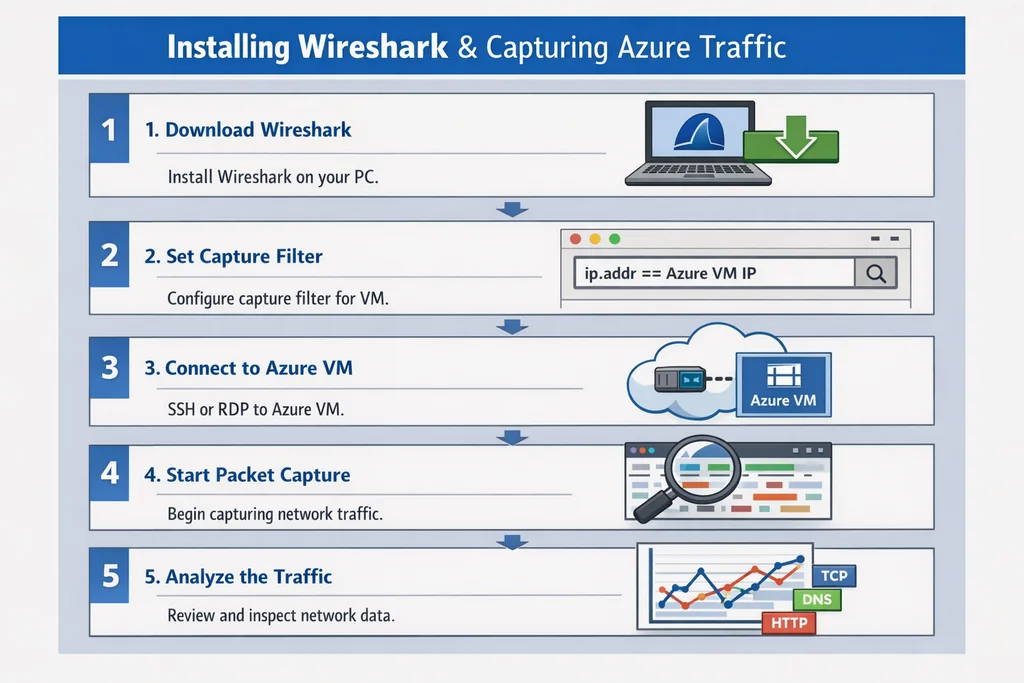
For your first capture, use Azure's built-in packet capture through Network Watcher. Enable Network Watcher in your VM's region, then navigate to the VM's networking blade and select "Packet capture." This creates a .cap file stored in a storage account you designate. Download it and open in Wireshark. The capture contains traffic between the VM and its subnet gateway, plus any flows you generate intentionally.
Alternatively, install Wireshark directly on the VM and capture on the primary Ethernet adapter. This shows traffic after Azure's virtual switch has processed it, which is useful for understanding guest-level filtering. The dual-capture method—Network Watcher at the hypervisor level plus Wireshark inside the guest—lets you spot where packets disappear. Did Azure drop them at the NSG? Did the guest firewall reject them? Or did the application never send them? This three-question framework appears repeatedly in AZ-305 sample questions, where you must diagnose connectivity failures from symptom descriptions.
Run your first intentional test. From the VM, ping 8.8.8.8 while both captures run. In Wireshark, filter with icmp and verify you see echo request and reply pairs. If replies are missing, check the NSG on the VM's network interface: ICMP is blocked by default in many Azure Marketplace images. Open it temporarily, rerun the capture, and compare. You have just built your first troubleshooting scenario: "VM cannot reach external DNS; identify the missing NSG rule from packet evidence."
Building AZ-104 Scenarios from Real Traffic
AZ-104 tests your ability to manage Azure compute, storage, and networking resources. The exam's scenario items often describe a symptom—"users report slow file transfers to a storage account"—and expect you to identify the cause from a short list of configuration changes. Packet captures make these scenarios concrete.
Create a storage account with a private endpoint in the same virtual network as your VM. Upload a test file using Azure Storage Explorer while capturing at both the VM and the storage subnet levels. In Wireshark, filter with tcp.port==445 for SMB or tcp.port==443 for HTTPS. Examine the TCP stream: do you see retransmissions? Window size stagnation? TLS handshake failures? Each pattern maps to a specific AZ-104 objective.
Retransmissions combined with stable RTT suggest packet loss at an intermediate hop. In Azure, this often traces to an NSG or route table misconfiguration. Window stagnation indicates a receiver not acknowledging data, which in storage scenarios usually means the client or service is CPU-bound or the connection is hitting a bandwidth cap. TLS failures at the Client Hello stage point to certificate or cipher suite mismatches, common when private endpoints use custom DNS configurations.
Document each scenario in a standard format: symptom, capture evidence, root cause, resolution, and exam objective mapping. For the storage upload example, your entry might read: "Slow SMB upload to private endpoint storage; Wireshark shows TCP window frozen at 640 bytes; root cause is VM size too small for network throughput; upgrade to D2s_v3 or enable accelerated networking; maps to AZ-104 objective 'Configure Azure Storage networking options.'" This structured documentation becomes your personal exam revision guide, far more memorable than flashcards because you built the evidence yourself.
Crafting AZ-305 Network Architecture Labs
AZ-305 demands deeper architectural reasoning. You design solutions across multiple subscriptions, regions, and connectivity types. The exam's case studies present business requirements and expect you to select appropriate services, sizes, and configurations. Packet captures help you validate that your architectural decisions actually work under load.
Deploy a hub-and-spoke topology with a VPN gateway in the hub and spoke virtual networks in two regions. Place a VM in each spoke. Establish site-to-site VPN connections from an on-premises simulated network—this can be a second Azure virtual network with a VPN gateway configured as the "on-premises" device. Capture traffic at three points: the simulated on-premises gateway, the hub gateway, and a spoke VM.
Generate traffic with iperf3 between the "on-premises" VM and a spoke VM. In Wireshark, filter by the tunnel endpoint IPs and examine the encapsulation. Do you see ESP packets for IPsec? Is the encapsulation UDP 4500 for NAT traversal? What happens to packet size—are you fragmenting at the tunnel interface because the VM's MTU exceeds the VPN gateway's capabilities?
These questions mirror AZ-305's emphasis on validating design decisions. The exam does not ask you to run iperf3, but it does ask you to identify why a VPN-connected VM experiences throughput collapse. The answer is often MTU mismatch or TCP MSS clamping misconfiguration, both visible in packet captures. By seeing the symptoms firsthand, you move from memorised answers to understood behaviour.
Build a second AZ-305 scenario around ExpressRoute. Since most candidates lack physical ExpressRoute circuits, simulate the routing behaviour with VNet peering and route tables. Advertise specific prefixes from a "provider" virtual network and observe how the spoke VMs update their effective routes. Capture traffic during a route withdrawal to see how quickly convergence occurs. Document the BGP update timing and any packet loss during the transition. This maps to AZ-305 objectives around hybrid connectivity resilience and routing optimisation.
Simulating MS-700 Teams Call Quality Issues
MS-700 focuses on Microsoft Teams administration, including call quality, meeting performance, and network optimisation. Teams media traffic uses SRTP over UDP, with fallback to TCP 443 when UDP is blocked. The exam presents call analytics scenarios where you must identify why a user's calls drop or degrade. Wireshark captures of Teams traffic reveal the exact failure modes.
Install the Teams desktop client on your Azure VM and place a test call to another endpoint—this can be a second VM, a mobile device, or the Teams web client. Capture on the VM's network interface during the call. In Wireshark, filter with udp.port==3478 || udp.port==3479 || udp.port==3480 || udp.port==3481 to catch STUN/TURN traffic, or use the Telephony → RTP stream analysis if you can decrypt the SRTP (which requires the session keys, not typically available).
More practically, examine the ICE candidate negotiation visible in the STUN packets. Does the client gather srflx (server reflexive) candidates, or only host candidates? Host-only candidates indicate the client believes it has no NAT, which in Azure is true for VMs with public IPs but false for private-IP VMs. If the call establishes but media flows through a TURN relay rather than directly, you have identified a scenario: "Remote user reports poor call quality; call analytics shows high jitter; packet capture reveals all media via TURN relay due to symmetric NAT blocking direct paths."
Build a second MS-700 scenario around QoS marking. Configure a Group Policy object or local policy on your VM to mark Teams media traffic with DSCP EF (46). Capture egress traffic and verify the DSCP field in the IP header. If the mark is missing, trace whether the application honoured the policy or whether an intermediate device stripped it. This maps directly to MS-700 objectives around implementing QoS for Teams and verifying policy application.
For deeper preparation, combine these labs with MS-700 practice questions that test your ability to interpret call analytics dashboards and correlate them with network configuration. The packet evidence and the exam questions reinforce each other: you recognise symptoms faster because you have seen their signatures.
Turning Captures into Personal Practice Questions
The ultimate goal is to convert your lab evidence into exam-style questions you can revisit during revision. This closes the loop between hands-on exploration and test readiness.
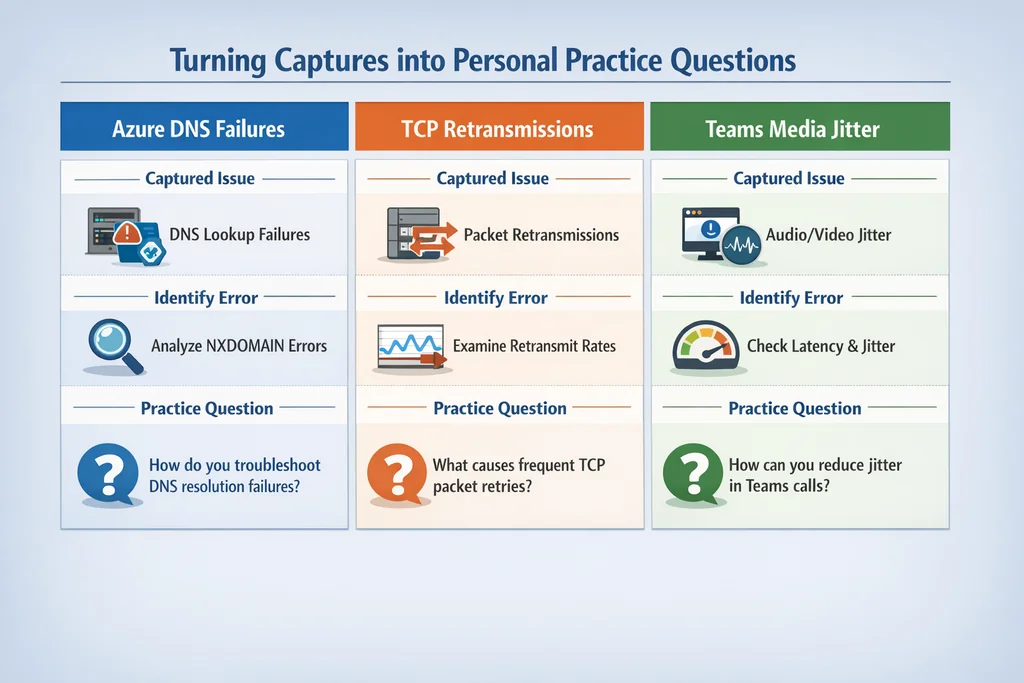
For each scenario, write one multiple-choice question and one case study fragment. The multiple-choice question presents a symptom and asks for the most likely cause. The case study fragment provides a brief architecture diagram and asks what configuration change would resolve the issue. Use your actual capture files as the source material: quote specific frame numbers, protocol fields, or timing values to make the questions concrete.
Example from an AZ-104 storage scenario: "A packet capture shows TCP segments 145-152 retransmitted three times with no ACK received. The VM's effective routes show a UDR with next-hop 'Virtual Appliance' for the storage service tag. What is the most likely cause? A) Storage account firewall blocks the VM's subnet. B) The virtual appliance is dropping asymmetric return traffic. C) The VM's OS firewall blocks outbound 443. D) The storage account is in a different region with high latency." The correct answer is B, visible in the capture as retransmissions without RST, indicating silent dropping rather than active rejection.
Store your questions in the same directory as the capture files, with a naming convention that links them: az104-storage-slow-upload-2026-05.pcap pairs with az104-storage-slow-upload-questions.md. Review them weekly, first by re-reading the questions, then by reopening the capture and verifying you can still spot the evidence. This spaced repetition with authentic data builds the pattern recognition that distinguishes confident candidates from anxious guessers.
If you are pursuing the Wireshark certification practice test, these personal question banks become even more valuable. The WCA-101 exam tests packet analysis directly, and your Azure-specific captures provide unique material that no commercial question bank can replicate.
Common Capture Mistakes and How to Avoid Them
Even experienced engineers capture the wrong traffic, filter too aggressively, or misinterpret timing. These errors waste lab time and build false confidence.
First mistake: capturing on the wrong interface. In Azure, a VM may have multiple virtual NICs or a NIC with multiple IP configurations. Verify which interface carries your test traffic before starting the capture. Use ipconfig or ip addr to confirm, then match the interface GUID in Wireshark's capture options.
Second mistake: filtering during capture rather than during analysis. Capture filters using Berkeley Packet Filter syntax reduce file size but risk excluding the packets that matter. Unless you are running a very long capture on a busy interface, capture everything and filter in Wireshark's display filter bar. Storage is cheap; missed evidence is expensive.
Third mistake: ignoring relative time. Wireshark shows absolute timestamps by default, but the delta time between packets often matters more. Enable the "Delta" column to see inter-packet gaps. A 30-second delta between TCP SYN and SYN-ACK indicates a timeout or firewall issue, not slow network speed.
Fourth mistake: assuming unencrypted traffic is normal. Modern Azure services use TLS 1.3 with perfect forward secrecy, which Wireshark cannot decrypt without session keys. Do not waste time trying to decrypt Teams media or Storage HTTPS traffic. Instead, focus on metadata: certificate chains, SNI values, TLS alert codes, and TCP behaviour. These reveal plenty for troubleshooting purposes.
Fifth mistake: building labs that are too complex to repeat. A three-region, multi-subscription topology with ExpressRoute and private DNS resolver looks impressive, but if it takes two hours to rebuild after a mistake, you will avoid practising. Start simple, document every step, and only add complexity when the basic scenario is repeatable from memory.
Integrating Labs with Structured Exam Preparation
Hands-on labs deepen understanding, but they do not replace structured question practice and timed simulation. The most effective study plan combines all three modalities.
Dedicate specific days to each activity. Monday and Thursday might be lab days: build a new scenario, capture traffic, document findings. Tuesday and Friday are question days: work through AZ-500 security questions or more AZ-104 questions to test factual recall and scenario reasoning. Saturday is simulation day: a full timed practice exam under exam conditions, including the same breaks and environment you expect on test day.
Review your lab notes immediately after each simulation. Did any questions involve symptoms you have captured? If not, add that scenario to your lab queue. Did any questions stump you despite having relevant lab experience? That indicates a gap in your question-reading technique or a misunderstanding of how Microsoft frames distractors. Analyse the explanation carefully, then design a lab that demonstrates why the correct answer works and why your chosen answer fails.
This iterative cycle—lab, question, simulate, reflect, repeat—is what transforms hands-on experimentation into exam performance. The labs build authentic understanding; the questions build pattern recognition; the simulations build stamina and time management. Skip any leg and the structure wobbles.
When to Schedule Your Exam
Timing matters. Microsoft certifications now retire on predictable cycles, with Microsoft guidance noting that study guides and practice assessments are updated in step with exam revisions. Check the exam page for your target certification—AZ-104, AZ-305, MS-700, or others—and verify the retirement date before booking.
Aim to schedule your exam for 2-3 weeks after you consistently score 85% or higher on full-length practice tests. This buffer allows for final review of weak areas without the stress of imminent deadline. If your scores plateau below 80%, extend preparation rather than retaking the same questions repeatedly. Build a new Wireshark lab focused on your weakest objective domain, capture fresh evidence, and return to questions with renewed context.
The money-back promise on legitimate practice test platforms exists because structured preparation works. Combine that structure with personal labs that no one else can replicate, and you enter the exam room with both knowledge and confidence.
Learn more — browse the relevant exam page and purchase a practice test.
FAQ
Do I need a paid Azure subscription for these labs?
No. The free Azure account provides sufficient credits for months of lab work if you delete resources after each session. Use Azure CLI scripts or ARM templates to automate teardown.
Can I capture Teams traffic without decrypting SRTP?
Yes. Focus on STUN/TURN negotiation, ICE candidate gathering, and QoS marking. These metadata layers reveal most call quality issues without needing the media payload.
How do I share captures with study partners without exposing credentials?
Use TraceWrangler or similar tools to anonymise IP addresses, hostnames, and certificate details. Alternatively, describe the scenario in text and share only the relevant frame summaries.
Will these labs help with exams other than AZ-104, AZ-305, and MS-700?
Yes. The packet analysis skills transfer to AZ-700, AZ-500, and any networking-focused certification. The specific scenarios map most directly to the three exams discussed, but the methodology applies broadly.
How long should each lab session last?
Plan 90-120 minutes for building and capturing a new scenario, plus 30 minutes for documentation. Review sessions of 20-30 minutes are sufficient for revisiting existing captures.
Further Reading
- AZ-305 exam overview
- additional AZ-305 questions
- more MS-700 questions
- 2
- Azure Security Technologies Practice Test
References
- Microsoft guidance — Practice Assessment | Microsoft Learn Practice Assessment | Microsoft Learn Practice Assessment | Microsoft Learn Practice Assessment | Microsoft Learn (#main) This browser is no

Discussion
Question Comments
0 comments·0 participantsSign in to leave a comment and access more free questions.