

Old AZ-104 Guides Are Wrong: What Microsoft Tests Now
The AZ-104 Azure Administrator exam changed on April 17, 2026, and most prep materials floating around the internet have not caught up. If you are studying from a guide published before that date, you could be drilling topics that carry less weight while missing the new AI and Copilot administration content Microsoft now expects you to know. This walkthrough shows you exactly what shifted, which domains matter more (or less) now, and how to realign your study plan so you are ready for the version of AZ-104 that Pearson VUE is actually delivering today.
What Changed on April 17, 2026
Microsoft publishes a skills measured document for every exam, and the April 2026 edition of AZ-104 introduces a new focus area that did not exist in prior versions: AI service management and Copilot administration. Per the official study guide, most of the traditional domains (storage, compute, networking) carry the same labels but received minor wording adjustments. The real shift is structural. Microsoft added content that tests whether an Azure administrator can configure, monitor, and govern AI-related services inside an Azure tenant.
This is not a ground-up rewrite. The five core skill areas remain:
- Implement and manage storage
- Deploy and manage Azure compute resources
- Implement and manage virtual networking
- Configure and manage Azure identities and governance
- Monitor and maintain Azure resources
What changed is how those areas are assessed. Scenarios now weave in Azure AI Services, Copilot for Microsoft 365 integration points, and policy-driven governance for AI workloads. Community estimates suggest roughly 8 to 15 percent of scored questions touch AI-adjacent administration tasks. If your study plan was built around the 2023 objectives refresh, you are missing that slice entirely.
How the Domain Weights Shifted
The exam still covers the same broad categories, but the emphasis has redistributed. Storage and compute remain the heaviest weighted domains, each landing in the 20 to 25 percent range. Virtual networking holds steady around 15 to 20 percent. Identity and governance expanded slightly, partly because governing AI service access now falls under that umbrella.
Here is a simplified view of where your study hours should go under the current blueprint:
| Domain | Approximate Weight | Change from Prior Version |
|---|---|---|
| Storage | 20–25% | Minor wording updates |
| Compute | 20–25% | Minor wording updates, containers section refreshed |
| Virtual Networking | 15–20% | No structural change |
| Identity and Governance | 15–20% | Expanded to include AI service governance |
| Monitoring and Maintenance | 10–15% | Minor updates |
The takeaway: if you were already strong on storage and networking, those skills still count. But identity and governance now carries more conceptual weight because it covers RBAC scenarios that involve AI resource access, diagnostic logging for Copilot-related workloads, and policy enforcement for Azure OpenAI deployments.
The New AI and Copilot Content You Cannot Skip
The biggest gap between old guides and the current exam is the AI layer. Microsoft is not testing whether you can train a machine learning model. The focus is administrative: can you set up, secure, and monitor AI services the way an Azure administrator would in a real organization?
Expect questions in these areas:
- Azure AI Services resource provisioning. Creating and configuring Cognitive Services or Azure OpenAI resources, assigning the right pricing tier, and connecting them to virtual networks with private endpoints.
- Copilot for Microsoft 365 governance. Controlling which users can access Copilot features through license assignment, sensitivity labels, and conditional access policies tied to Azure AD.
- Monitoring AI workloads. Using Azure Monitor and diagnostic settings to track usage, cost, and error rates for AI service endpoints.
- Policy and compliance. Applying Azure Policy definitions that restrict AI resource deployment to approved regions or enforce content safety configurations.
A candidate named Priya, who passed AZ-104 in early May 2026, described her experience on a certification forum: she encountered three to four questions that referenced Azure OpenAI or Copilot settings, and none of them were pure definitions. Each one presented a scenario where something was misconfigured, and she had to choose the right fix using portal settings or CLI commands.
Step-by-Step: Realigning Your Study Plan
If you are mid-study and your exam date is coming up, you do not need to restart from scratch. Follow this sequence to patch the gaps without wasting time on material you already know.
1. Audit your current coverage against the April 2026 objectives
Pull up the Microsoft AZ-104 study guide and compare the "Skills measured as of April 17, 2026" table against your existing notes. Highlight every row marked "Minor" or any skill area you have not studied. This takes about 20 minutes and immediately shows you where to focus.
2. Add Azure AI Services to your lab practice
Spin up a free-tier Azure AI Services resource in your own subscription. Walk through the creation process, configure a private endpoint, and assign RBAC roles to a test user. You do not need to build an AI application. The goal is to understand the admin surfaces: how you deploy these resources, how you lock them down, and how you monitor them in the Azure portal.
3. Review Copilot governance in Microsoft 365 admin center
Even though AZ-104 is an Azure exam, Copilot for Microsoft 365 touches Azure AD for identity and conditional access. Familiarize yourself with how Copilot licenses are assigned, what security groups control access, and where sensitivity labels come into play. Microsoft's official certification page confirms that identity and governance is a tested domain, and Copilot governance now fits squarely inside it.
4. Rebuild your practice question sets
If you have been drilling questions from a resource that predates April 2026, those items are no longer aligned with the live exam. Switch to a source that has already updated its question bank to match the current objectives. An AZ-104 practice test built around the April 2026 blueprint will surface the AI governance and monitoring scenarios you need to rehearse, along with detailed explanations for each answer choice.
5. Schedule a timed simulator session before exam day
Once your study feels solid, run a full-length timed session through a simulator. This does two things: it builds pacing habits (AZ-104 gives you roughly 120 minutes for 40 to 60 questions) and it reveals which domains still have weak spots. Treat the score report as a diagnostic. Any domain below 70 percent gets another round of targeted review.
Common Mistakes Candidates Make After an Exam Update
When Microsoft refreshes an exam, predictable traps catch unprepared candidates. Here are the ones that show up most often with AZ-104:
Studying from outdated "skills measured" PDFs. Microsoft keeps old versions of the skills document accessible online. Always verify you are looking at the version dated April 17, 2026 or later. The footer of the PDF usually includes a version date.
Over-indexing on new content at the expense of fundamentals. The AI and Copilot questions are real, but they represent a minority of the exam. Do not spend 80 percent of your remaining prep time on 15 percent of the test. Keep your storage, compute, and networking skills sharp.
Ignoring containers. The containers subsection under compute received a minor update. If you skipped Kubernetes Service (AKS) basics because the old exam barely covered them, review the current objectives. Microsoft added wording that reflects more granular AKS administrative tasks.
Cramming theory without lab time. As reporting from CIO noted in early 2026, IT certifications across the industry are shifting toward practical, skills-based validation. AZ-104 follows that pattern. Scenario questions expect you to know which blade in the Azure portal to click, not just which definition matches a term.
Building a 4-Week Study Plan for the Current Exam
If you are starting fresh or restarting after the update, here is a realistic timeline that accounts for the revised content.
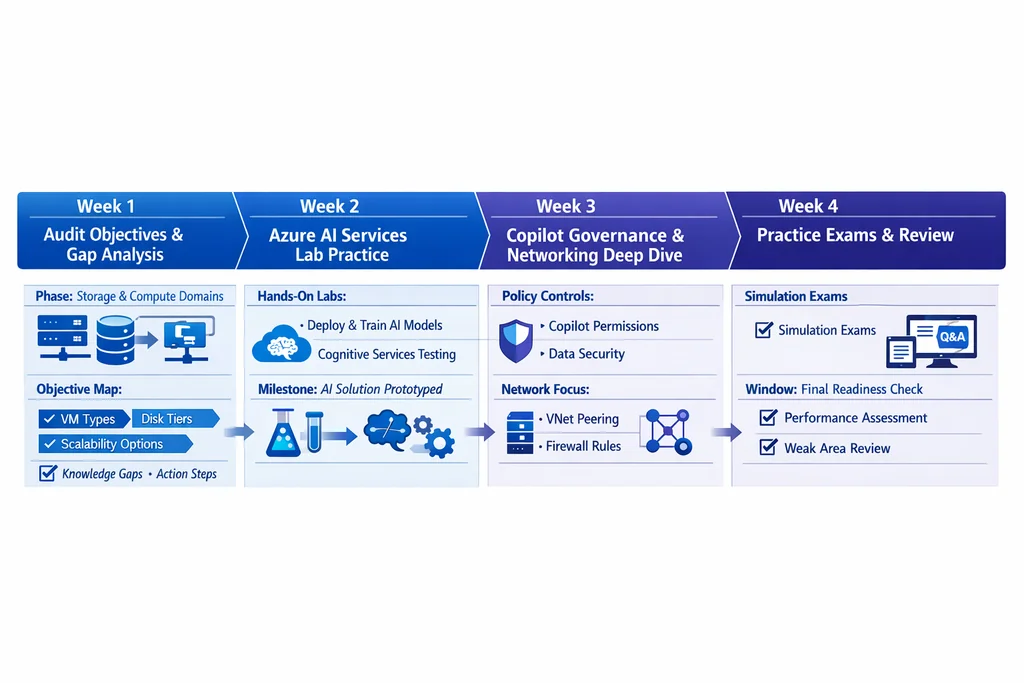
Week 1: Storage and Compute (core review). Cover Azure Blob Storage tiers, Azure Files configuration, VM deployment, availability sets, scale sets, and the refreshed containers content. Allocate 60 to 90 minutes per day. Use the AZ-104 exam page on PlanetCert to check objective alignment.
Week 2: Networking and Identity. Focus on virtual network design, NSGs, Azure Firewall basics, load balancers, Azure AD (now Microsoft Entra ID), RBAC, and conditional access. Spend extra time on any identity topics you have not practiced hands-on.
Week 3: AI governance, Monitoring, and Governance. This is the week to cover the new material. Provision Azure AI Services, configure diagnostic settings, apply Azure Policy definitions, and review Copilot license management. Pair this with Azure Monitor alerts, Log Analytics queries, and cost management.
Week 4: Practice exams and weak-spot drilling. Take at least two full timed practice sessions. Review every missed question, categorize it by domain, and revisit those topics. Mix in flashcards for definitions and CLI commands you tend to mix up. A study planning guide for tech certifications can help you structure this final phase.
What This Means for Recertification
If you already hold the Azure Administrator Associate certification, Microsoft's renewal window is 12 months from the date you earned it. When you renew, the renewal assessment reflects the current exam objectives, not the version you originally passed. That means your renewal quiz may include AI governance questions even if your original exam did not cover them. Review the updated study guide at least a week before your renewal date so the new content does not catch you off guard.
Candidates preparing for related exams should also note the ripple effect. AZ-305 (Azure Solutions Architect) was updated around the same timeframe, and Microsoft's vendor exam catalog reflects similar AI integration across the Azure certification track. If you plan to stack certifications, the AZ-104 AI content you learn now gives you a head start on those adjacent exams.
FAQ
How much of the AZ-104 exam is new AI content? Community reports and Microsoft's own objectives update suggest 8 to 15 percent of scored questions now reference Azure AI Services, Copilot governance, or AI-related monitoring. The bulk of the exam still covers storage, compute, networking, identity, and monitoring.
Do I need to know how to build AI models for AZ-104? No. The exam tests administrative skills: provisioning AI service resources, configuring access, setting up monitoring, and applying governance policies. You are not expected to train or deploy machine learning models.
Is the AZ-104 harder after the April 2026 update? The overall difficulty level has not changed dramatically. What changed is the breadth of topics. If you studied the old objectives thoroughly, adding the AI governance layer is manageable. If you were already borderline on fundamentals, the extra content can tip the balance.
Where can I find practice questions aligned with the current version? Look for a practice test provider that explicitly states it has updated to the April 2026 objectives. AZ-104 sample questions from PlanetCert reflect the current exam blueprint and include explanations for each answer.
How long should I study if I am starting from scratch? Most candidates with some Azure experience need 3 to 4 weeks of focused study. Complete beginners should plan for 6 to 8 weeks and include regular lab time alongside reading and practice questions.
Learn more — browse the AZ-104 exam page and purchase a practice test to study with questions aligned to the current objectives.
Further Reading
- AZ-104 Practice Test 2025
- Study Planning Guide for Tech Certification Exams
- The Role of Real Exam Questions in Certification Success

Discussion
Question Comments
0 comments·0 participantsSign in to leave a comment and access more free questions.