

PL-300 Exam Format: Case Studies, PBIX Labs, and 700 Passing Score
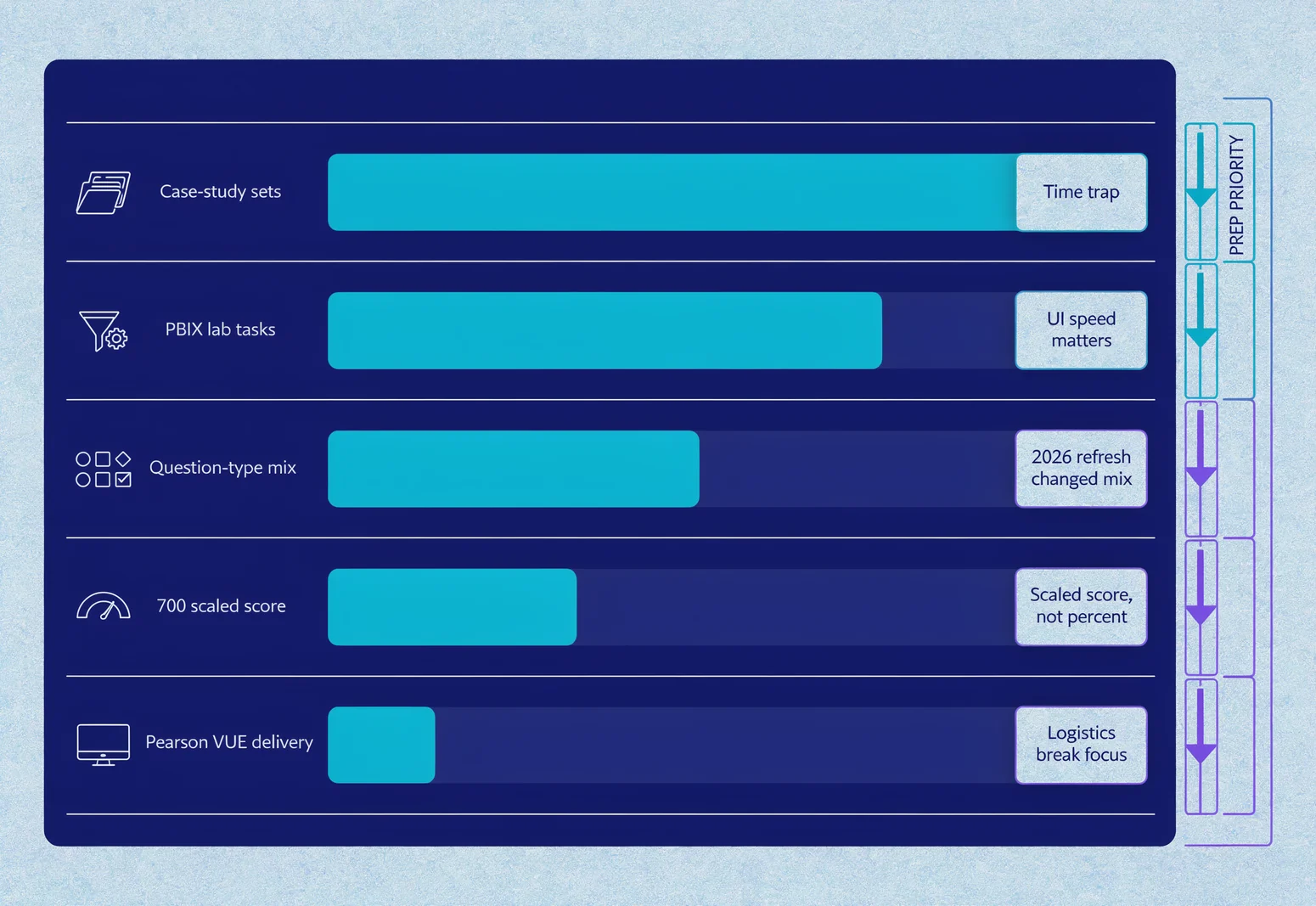
Walking into the PL-300 without knowing the exam mechanics is like opening Power BI for the first time and guessing where the ribbon lives. You might know DAX inside out, but if a case study throws six interdependent questions at you and the timer keeps running while you panic-scroll through tabs, that knowledge won't save you. This article ranks the five format elements that trip up candidates most often, ordered by how much each one changes your study plan and test-day behaviour. The goal is simple: make the unfamiliar familiar before you sit down at Pearson VUE.
Why format literacy matters as much as Power BI skill
Microsoft refreshed the PL-300 skills measured on 20 April 2026, folding in Copilot features, DirectLake, and tighter Fabric integration. The domains shifted, and so did the practical emphasis of the questions. Yet most prep content still treats the exam as a knowledge test. It is not. It is a performance test with a 100-minute clock, adaptive question sequencing, and hands-on tasks that punish hesitation.
The candidates who pass on their first attempt tend to share one trait: they practised the format until it felt routine. They knew when a case study would appear, how long to spend per question, and what the PBIX lab interface actually lets them do. If you are searching for a microsoft pl-300 practice test, you are already thinking about simulation. That instinct is right. But simulation only works when you know what to simulate.
The five format elements ranked by preparation impact
1. Case-study sets: the time trap that looks like a reading exercise
Case studies dominate the PL-300 experience more than most Microsoft role-based exams. You receive a business scenario—often two to three paragraphs of narrative plus a data model diagram, a requirements list, and sometimes a screenshot of an existing report. Then you answer four to six questions that all draw from the same source material.
The critical detail: the scenario text stays visible while you work through the questions, but the questions are interdependent. A wrong choice on question three might lock you into a wrong path on question four. You cannot skip ahead to see what is coming, and you cannot return to a case study once you leave it.
Microsoft's exam sandbox lets you explore this interface before test day. Use it. The case study layout splits the screen between scenario tabs on the left and questions on the right. The scroll behaviour, tab switching, and question navigation all differ from standard multiple-choice items.
Who this hits hardest: candidates who read fast but decide slowly. You have roughly 90 to 120 seconds per question across the whole exam. A six-question case study can swallow twelve minutes if you re-read the scenario for every item.
Preparation move: practise with timed case-study blocks. PlanetCert's simulator includes case-study formatting that mirrors the live exam structure, which helps build pace awareness without burning through the official practice assessment too early.
2. PBIX lab tasks: when knowing the UI beats knowing the theory
The PL-300 includes hands-on labs where you work in a live Power BI Desktop environment. These are not simulations. You get a real .pbix file, a task list, and a timer that does not pause while you hunt for the right ribbon button.
Tasks typically fall into three categories:
- Data transformation: clean a column, merge queries, or create a calculated column in Power Query
- Modeling: build relationships, write a DAX measure, or configure row-level security
- Visualisation: add a visual, format it, and configure interactions or tooltips
The environment is functional but stripped down. Some keyboard shortcuts work. Others do not. The formula bar behaves normally, but IntelliSense can lag. You cannot save your work, and you cannot undo indefinitely.
Microsoft's exam readiness videos show the lab interface in action, though they do not let you interact with it. The only way to build muscle memory is repeated exposure to similar tasks under time pressure.
Common failure pattern: candidates spend three minutes writing a perfect DAX measure, then realise they need to drag it to the correct visual and format the number type before the task counts as complete. The task instructions are specific. "Create a measure that calculates year-over-year growth" is not enough. You must also apply it.
Preparation move: build a library of ten to fifteen standard tasks—create a date table, write a SAMEPERIODLASTYEAR measure, configure a drillthrough page—and practise them until each takes under two minutes. If you are using a microsoft pl-300 practice test platform, verify that it includes interactive PBIX-style labs, not just multiple-choice questions about what you would do.
3. Question-type distribution: what the 2026 refresh actually changed
As of April 2026, the skills measured break down into four domains with these weightings:
| Domain | Weight |
|---|---|
| Prepare the data | 25–30% |
| Model the data | 25–30% |
| Visualize and analyze the data | 25–30% |
| Manage and secure Power BI | 15–20% |
This represents a shift from earlier versions. The "Manage and secure Power BI" domain shrank slightly, while data preparation and visualisation gained emphasis. More importantly, the question types within each domain changed. Microsoft now explicitly tests:
- Creating narrative visuals with Copilot
- Using Copilot to generate or suggest report pages
- Visual calculations using DAX at the report layer
- DAX Query View and Performance Analyzer for troubleshooting
These appear as standard multiple-choice items, drag-and-drop sequencing, and "hot area" questions where you click the correct part of a screenshot. The drag-and-drop format is particularly common for ordering ETL steps or matching security roles to permissions.
What this means for format prep: you need exposure to every question type, not just multiple choice. A practice test that only serves standard four-option questions leaves you vulnerable to interface surprises.
Preparation move: mix question types in every study session. Spend twenty minutes on multiple-choice knowledge checks, then switch to a drag-and-drop or hot-area block. The cognitive switch itself is worth practising.
4. Scoring mechanics: what 700 really means
Microsoft uses scaled scoring. The passing threshold is 700 on a scale of 1 to 1000. This does not mean 70% correct. The scale is adjusted per exam form, so a 700 on one version might correspond to 65% correct while another might need 72%.
Microsoft confirms that a score of 700 or greater is required to pass. What they do not publish is the exact raw-to-scaled conversion. This matters because:
- Some questions are unscored pilot items. You cannot tell which ones.
- Case-study questions may carry partial credit or be weighted differently from standalone items.
- Labs are scored on task completion, not method. There is usually one correct path, but sometimes multiple approaches earn full credit.
Your score report breaks down performance by domain, but not by question. A "Fail" with 680 and strong modelling scores tells a different story from a "Fail" with 620 and weak visualisation. Use that granularity to retarget your study.
Preparation move: aim for consistent 80%+ on timed practice tests before booking the live exam. That buffer accounts for exam-day pressure and the unknown pilot questions. If your Microsoft practice tests include detailed domain breakdowns, use them to identify whether your weakness is knowledge, pace, or question-type unfamiliarity.
5. Pearson VUE delivery: logistics that break concentration
The exam runs through Pearson VUE, either at a test centre or via online proctoring. The 100-minute seat time does not include the check-in process, tutorial, or survey. For online delivery, add fifteen to thirty minutes for system checks, ID verification, and room scanning.
Critical logistics:
- Calculator: an on-screen calculator is provided. You cannot bring your own.
- Scratch paper: not allowed for online proctoring. You get a digital whiteboard that many candidates find awkward for DAX sketching.
- Breaks: none scheduled. The timer runs continuously.
- Question review: you can mark questions for review and return to them within a section, but case studies lock once exited.
The digital whiteboard is the most underappreciated friction point. If you are used to scribbling relationship diagrams or measure logic on paper, practise with the whiteboard tool during your simulation sessions. Some candidates type notes directly into the exam's comment field as a workaround, though this is not officially supported.
Preparation move: book your exam with a two-week buffer after your target readiness date. Pearson VUE slots fill unevenly, and rescheduling fees apply within five days of the appointment.
How to structure your final two weeks
With the format elements ranked, here is how to sequence your preparation:
Week one: heavy emphasis on case studies and PBIX labs. Run one full case-study block daily, timed. Complete three to four lab tasks per session, focusing on speed rather than elegance.
Week two: mixed-format practice exams under full exam conditions. Use the 100-minute timer, the digital whiteboard, and the same break policy (none). Review every incorrect answer for format failure, not just knowledge gaps. Did you misread the case-study tab? Did you forget to apply the measure? Did you run out of time on the lab?
If your preparation includes a microsoft pl-300 practice test with explanation depth, read the rationales even for questions you got right. The official Microsoft practice assessment is free and worth running once, but it does not provide the iterative, feedback-rich environment that repeated simulation offers.
What the April 2026 refresh means for your study materials
Several guides currently ranking on search engines quote domain weights from before the April 2026 update. If you build a revision timetable around old percentages, you risk over-investing in modelling and under-preparing for data governance and Copilot integration.
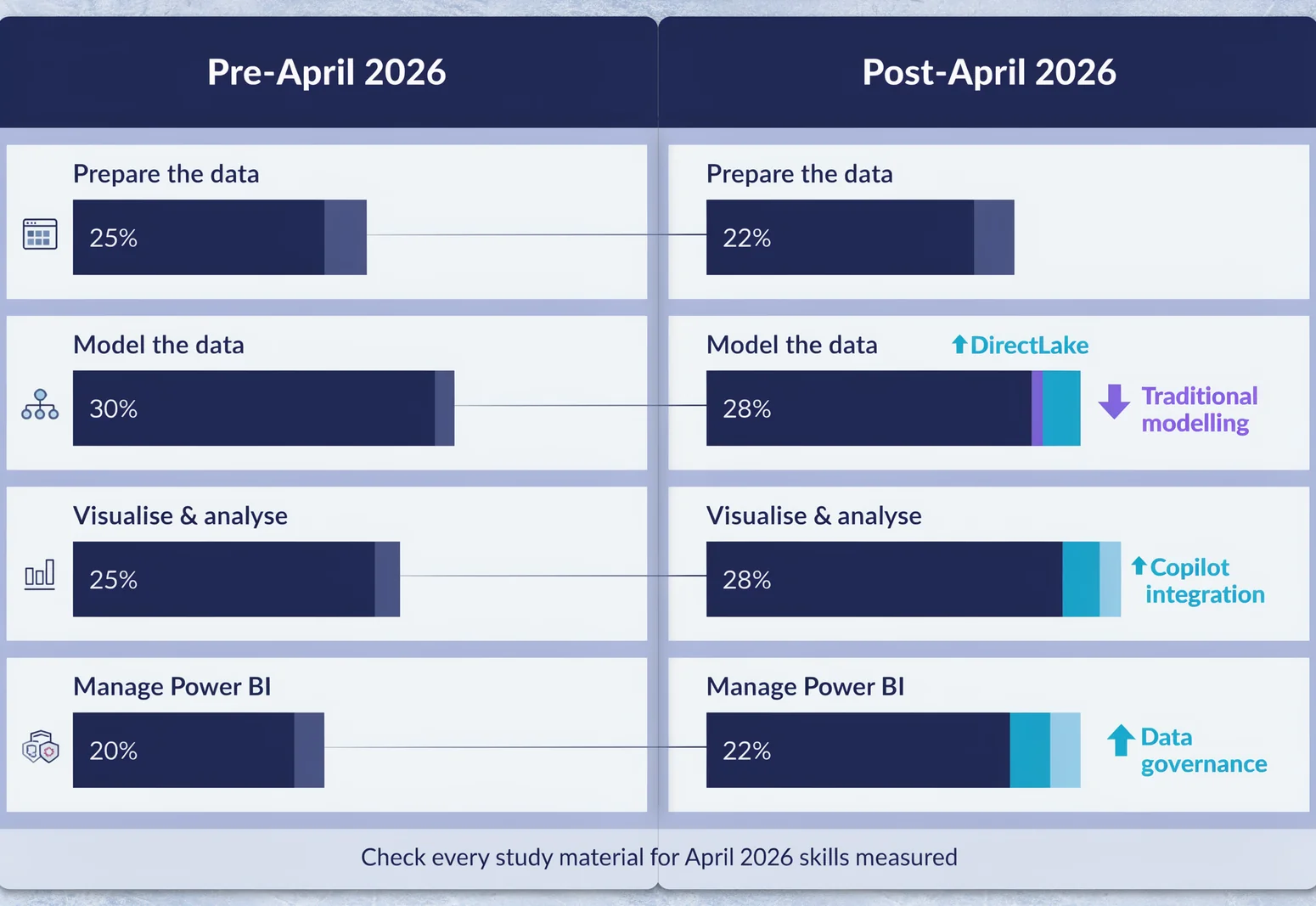
Verify that any course, book, or practice test you use explicitly references the April 2026 skills measured. Microsoft Learn's study guide was last revised in March 2026 and covers the updated objectives. Third-party materials vary widely in refresh speed.
Questions candidates still ask
Do I need to know Fabric to pass?
DirectLake and Fabric integration appear in the current objectives, but at a foundational level. You should understand when to use DirectLake versus Import mode, and how workspace roles map to Fabric capacities. Deep Fabric engineering is not required.
How many PBIX labs appear on a typical exam?
Microsoft does not publish this, and it varies by exam form. Plan for at least one substantial lab task set, possibly two. The readiness videos suggest labs are concentrated in the "Prepare the data" and "Model the data" domains.
Is the 700 passing score likely to change?
Microsoft has held 700 as the standard threshold for role-based exams for several years. There is no indication of a change for PL-300 specifically.
Can I use Copilot during the exam?
No. The exam tests your knowledge of Copilot features, not your ability to use Copilot to answer questions. The lab environment does not include Copilot assistance.
References
- Microsoft guidance — # Study guide for Exam PL-300: Microsoft Power BI Data Analyst | Microsoft Learn ... | Useful links | Description | | --- | --- | | How to earn the certification | Some
- Microsoft guidance — ](https://aka.ms/exam ... ) | You ... | (/en-us/credentials/certifications/request-accommodations) | If you use assistive devices, require extra time, or need modification to any
- Microsoft guidance — # Preparing for PL-300 - Prepare the Data (Part 1 of 4) | Microsoft Learn Episode # Preparing for PL-300 - Prepare the Data (Part 1 of 4) with Aravind Sridharan Exam Readiness
Keep reading on exam preparation


Discussion
Question Comments
0 comments·0 participantsSign in to leave a comment and access more free questions.