

Where to Log In for Your AWS Certification Exam and Results
You have spent weeks preparing for your AWS Certified Cloud Practitioner or Solutions Architect exam, and now you cannot find the right login page. Maybe your password works on one site but fails on another. Maybe your exam history has vanished, or your digital badge never arrived. You are not alone. AWS splits certification workflows across three separate systems—AWS Skill Builder, Pearson VUE, and Credly—and each uses different credentials, URLs, and recovery flows. This guide shows you exactly where to go, what to click, and how to fix the most common login problems before they cost you a rescheduling fee or delay your results.
The Three Portals You Actually Need
AWS does not run everything from one dashboard. Depending on what you are trying to do, you will need one of three distinct portals. Understanding which system handles which task is half the battle.
AWS Skill Builder: Training and Exam Registration
AWS Skill Builder is the hub for training content, practice materials, and the starting point for scheduling most exams. If you are looking for free digital training, exam prep courses, or the official practice question sets, this is where you begin. Since April 2026, AWS has also made microcredentials freely accessible here without requiring a paid subscription, so you may already have an account even if you have not scheduled an exam yet.
To log in, navigate to skillbuilder.aws and use your AWS Builder ID. This is a separate identity from your AWS Management Console root account or IAM credentials. Many candidates mistakenly try their console credentials here and hit a wall. If you have ever taken an AWS training course or started a free plan, you likely created a Builder ID then. The email address is usually the same, but the password may differ.
Pearson VUE: Scheduling, Rescheduling, and Test Delivery
Once you are ready to book your exam, Pearson VUE handles the actual scheduling and delivery. You reach this system through your AWS Certification Account, not by going directly to pearsonvue.com with a generic account. From your AWS Certification Account, you click through to Pearson VUE's AWS-branded scheduling portal. This is where you pick your date, time, and delivery method—testing centre or online proctored exam.
The critical detail: your Pearson VUE account for AWS is linked, not standalone. If you already have a Pearson VUE account from a Cisco or CompTIA exam, it will not automatically work here. You must initiate the connection from the AWS side, which is why candidates often get "account not found" errors when they try to log into Pearson VUE directly.
Credly: Digital Badges and Verification
After you pass, Credly issues your digital badge. Employers and recruiters use this to verify your credential, so you will want access. Credly sends an acceptance email after AWS notifies them of your pass, usually within five to seven business days. You log into Credly with its own credentials, or via single sign-on if your organisation has integrated it.
Finding Your Correct Login Path
Let us walk through the decision tree. This covers the scenarios that trip up most candidates.
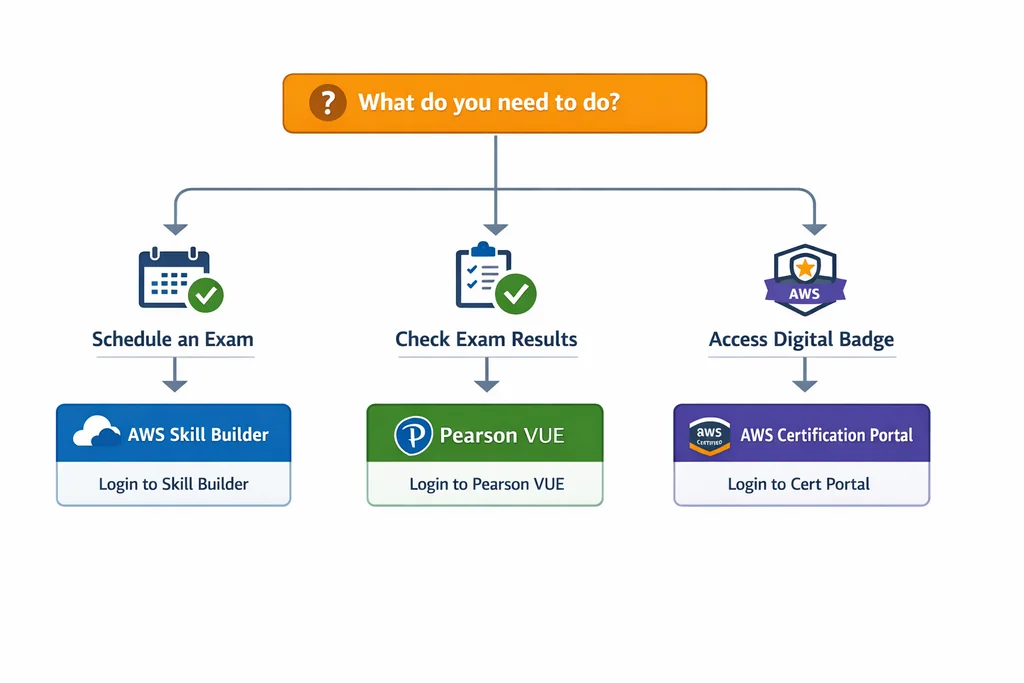
Scenario One: You Need to Schedule or Reschedule an Exam
Start at aws.amazon.com/certification and click "Schedule an exam." This routes you through your AWS Certification Account, which uses your AWS Builder ID. If you have not created one, the flow prompts you to do so. Once authenticated, you will see a "Schedule with Pearson VUE" button. Clicking it either links your existing Pearson VUE account or creates a new linked one.
If you get an error saying your email is already in use at Pearson VUE, do not create a duplicate account. Contact Pearson VUE candidate support and request that they merge or link your accounts. Duplicate accounts are a common source of "exam not found" errors later.
Scenario Two: You Need to Check Results or Download a Score Report
For completed exams, log into your AWS Certification Account with your Builder ID. Navigate to "Exam History" or "Transcript." Score reports appear here once the exam is fully scored. For online proctored exams, this is usually within five business days; for testing centre delivery, it can be the same day or up to five days depending on proctoring validation.
If your exam does not appear, check whether you accidentally used a different email when scheduling. This happens more often than you would think, especially if your company email forwards to personal and you typed one at Skill Builder and the other at Pearson VUE.
Scenario Three: You Need to Access Your Digital Badge
Wait for the Credly notification email. If it has been more than ten business days since your pass, first check your spam folder, then verify in your AWS Certification Account that your profile email is correct. You can update it under "Account Settings" and request a resend. Once you have the Credly invite, create a Credly account or log in if you already have one from another certification vendor.
Fixing the Most Common Login Failures
Password resets fail. Accounts look unlinked. Emails bounce. Here is how to recover without opening three support tickets.
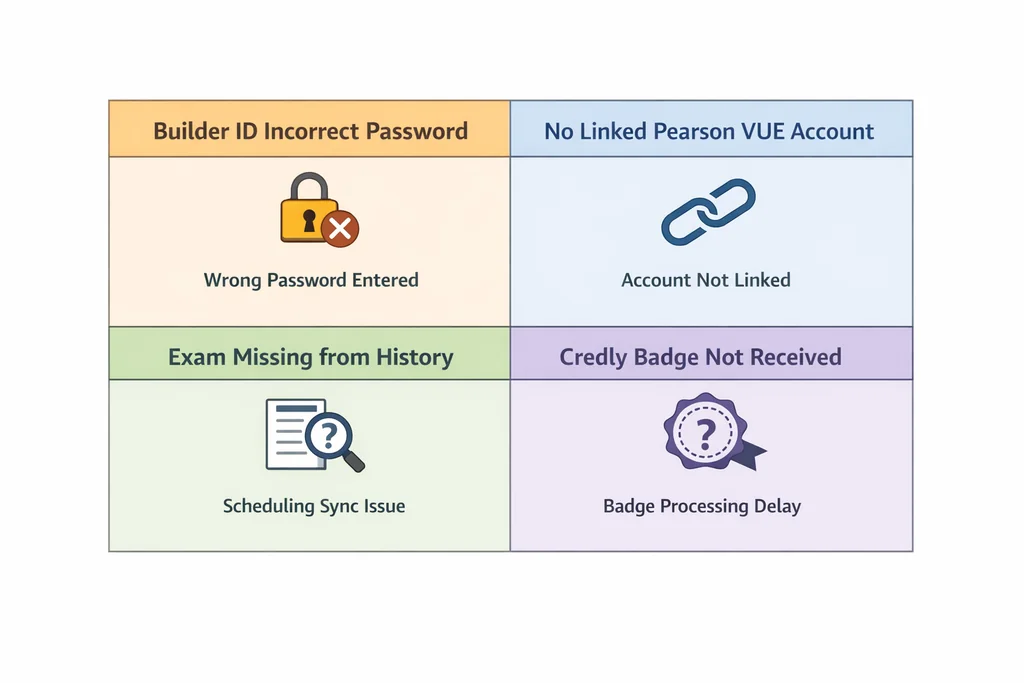
"Your AWS Builder ID Password Is Incorrect"
Use the "Forgot password" link on the Skill Builder login page. The reset email arrives within a few minutes. If it does not, check that you are not trying to reset your AWS Management Console password by mistake—the console and Builder ID systems are separate. If you previously used the legacy aws.training portal, note that AWS retired that site on 24 June 2026. Your credentials there do not transfer automatically; you need to create a Builder ID on Skill Builder if you have not already.
"No Linked Pearson VUE Account Found"
This error usually means you tried to log into Pearson VUE directly rather than through the AWS Certification Account flow. Always initiate from AWS. If you previously had a linked account but now see this error, your link may have broken during a password change or account merge. The fix: log into your AWS Certification Account, go to "Schedule an Exam," and click the Pearson VUE link again. This re-establishes the connection.
"Exam Not Showing in History"
First, confirm which email address you used when scheduling. Pearson VUE and AWS Certification Accounts are linked by email, so a mismatch hides the exam. Second, check whether the exam is still in proctoring review. AWS applies General Policies around score validation, and some results are held for quality assurance. If it has been more than five business days, contact AWS Certification Support through the form in your account.
"Credly Badge Never Arrived"
Verify your email in both your AWS Certification Account and your Credly profile. If you changed jobs and your old company email is attached to either system, the notification went to a dead address. Update to your current email, then use the "Resend Badge" option in your AWS Certification Account under "Digital Badges."
What Changed in 2026 and Why It Matters
AWS has overhauled its certification program significantly this year. Starting in April 2026, new AI-focused content rolled into exams across all tiers, and proctoring requirements tightened. The retirement of the legacy aws.training portal in June 2026 forced every candidate onto Skill Builder and the Builder ID system. If your study materials reference the old portal, or if you bookmarked pages there, those links now redirect or fail.
Additionally, AWS now offers free microcredentials through Skill Builder, which means more professionals have Builder IDs earlier in their learning journey. This is useful for tracking progress, but it also means more people hit the credential confusion described above before they ever schedule a paid exam. Knowing the portal landscape in advance saves you the stress of troubleshooting on exam day.
A Practical Checklist Before You Click Anything
Run through this list the day before you need to log in for any certification task:
- Confirm your AWS Builder ID email and password in a fresh browser session
- Verify your Pearson VUE link is active by starting the scheduling flow (you can cancel before payment)
- Check that your AWS Certification Account profile shows your current personal email, not an old work address
- Save the direct URLs: skillbuilder.aws, aws.amazon.com/certification, and your Credly invite link
- Download any course completion certificates from legacy aws.training before 24 June 2026 if you still need them
When You Are Ready to Prepare
Sorting out your aws certification login is step one. Step two is making sure you pass on the first attempt. If you are targeting the Cloud Practitioner level, a Cloud Practitioner practice test lets you run timed sessions against exam-style questions before you face the real proctor. For associate-level roles, the Developer Associate practice test covers the updated 2026 objectives including the new AI service integrations. Professional and specialty candidates can find targeted prep for the Solutions Architect Professional test and the Security Specialty practice test.
Questions That Still Come Up
Do I need an AWS account to take a certification exam? No. You need an AWS Builder ID for training and scheduling, but you do not need an AWS Management Console account or active services. Your exam fee is paid through Pearson VUE, not AWS billing.
Can I use the same email for work and personal certification tracking? You can, but be cautious. If you leave your employer and lose access to that email, recovering your certification history becomes difficult. AWS allows you to update your profile email, but do this before you lose access to the old one.
What if my exam was cancelled by the testing centre? Log into your AWS Certification Account and check your email for a Pearson VUE reschedule link. You typically have thirty days to rebook without penalty. If the link fails, contact Pearson VUE directly with your exam confirmation number.
How long do I have to claim my Credly badge? Credly badges do not expire, but the acceptance link in your email may. If your link has expired, request a resend from your AWS Certification Account rather than contacting Credly support.
Where do I find official exam content outlines? AWS publishes detailed AWS Certification Exam guides for every current certification. These list in-scope services, weightings, and recommended experience. Check these before you schedule, especially for exams updated in 2026, as the AI and machine learning content has expanded.
Keep Going After You Log In
Once you have reliable access to all three portals, your certification path becomes predictable. Schedule with confidence, track your results without panic, and display your badge where employers can verify it. If you are still deciding which exam to pursue next, our AWS certification pricing guide breaks down costs by role and level so you can budget before you commit.
More on AWS Certification Paths and Costs

Discussion
Question Comments
0 comments·0 participantsSign in to leave a comment and access more free questions.