
Wireshark Traffic Analysis for the AWS Solutions Architect Professional
You're staring at a scenario question on the SAP-C02 exam. A hybrid application between on-premises and AWS is failing intermittently. The architecture diagram looks correct — Direct Connect, private VIF, proper route tables. The question asks what to check next. One option mentions jumbo frames. Another suggests BGP path attributes. A third points to TLS cipher suites.
If you've never opened a pcap file, these answers feel like guesses. The SAP-C02 exam overview makes clear that professional-level architects need to bridge high-level design decisions with operational reality. That means understanding what actually crosses the wire when your elegant architecture meets production traffic.
This guide walks through five Wireshark capture patterns that map directly to SAP-C02 scenario domains. Each pattern includes the capture filter, the display filter that isolates the problem, what the packet trace reveals, and the AWS service or configuration that fixes it. You can replicate every example in your own lab.
What You'll Need
A laptop with Wireshark installed and access to an AWS account. For the Direct Connect and BGP examples, you'll need either a physical DX connection or a simulated environment using AWS Site-to-Site VPN with BGP routing. For VPC peering and cross-AZ latency, standard EC2 instances in different Availability Zones suffice.
If you're building a home lab on a budget, two t3.micro instances in us-east-1a and us-east-1b with VPC peering between separate VPCs cover patterns three through five. Patterns one and two need a VPN connection to something that speaks BGP — a pfSense instance or even a second AWS account with a Virtual Private Gateway works.
Pattern 1: MTU Mismatches on Direct Connect Private VIFs
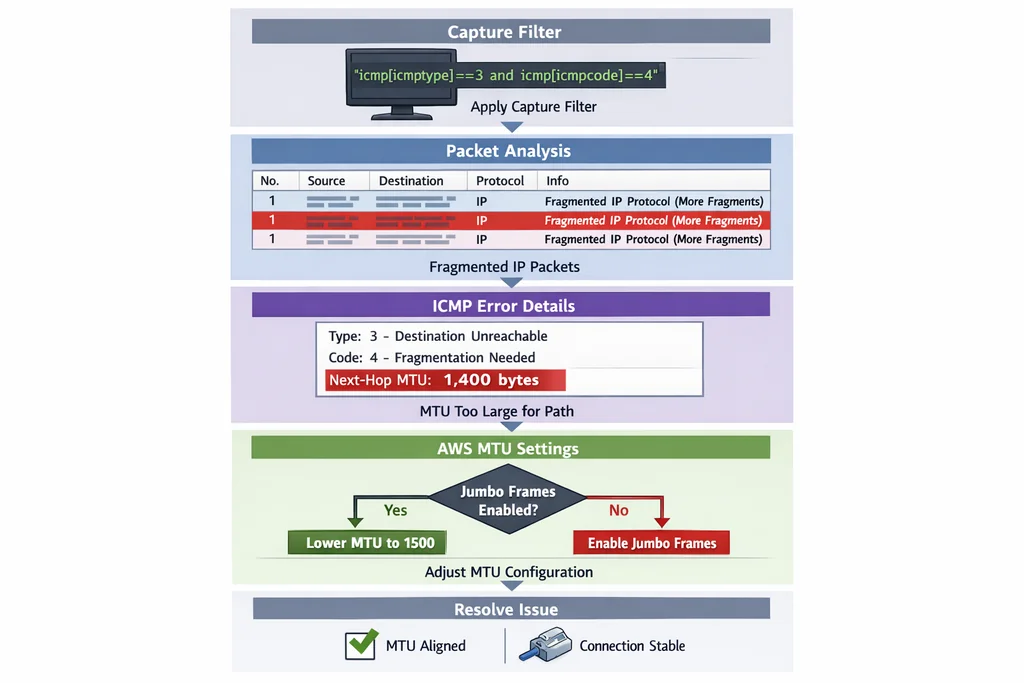
The SAP-C02 exam loves MTU questions because they separate architects who read documentation from those who've actually troubleshot production traffic. AWS Direct Connect supports 1500 bytes standard MTU or 9001 bytes jumbo frames on private virtual interfaces. The catch: every hop in the path must agree, or you get silent fragmentation or black-holed packets.
Capture Setup
On your on-premises host or the AWS side of the Direct Connect, start Wireshark and apply this capture filter:
host 10.0.0.0/8 and icmp
Replace the CIDR with your actual VPC or on-premises range. Now generate test traffic with explicit packet sizing:
ping -M do -s 8972 10.0.1.10
The -M do flag sets "Don't Fragment." The -s 8972 gives you 9000 bytes total when you add the 8-byte ICMP header and 20-byte IP header.
What to Look For
In the Wireshark packet list, apply this display filter:
icmp.type == 3 && icmp.code == 4
Type 3, Code 4 is "Fragmentation Needed but Don't Fragment Bit Set." If you see these, your path MTU is smaller than 9000 bytes somewhere. Check the "MTU of next hop" field in the ICMP message — it tells you exactly where the bottleneck sits.
Without the display filter, look for successful pings at 1500 bytes but failures at 9000. Right-click a failed frame, select "Follow > ICMP Stream," and note whether the echo request leaves but no reply returns. One-way traffic with no ICMP error usually means a firewall or security group silently dropping oversized packets.
The AWS Fix
If you need jumbo frames, verify every component:
- Direct Connect virtual interface MTU: set to 9001 in the AWS console
- EC2 instances: enable jumbo frames on the ENI (default on most modern instance types, but verify with
ip link show) - Intermediate appliances: firewalls, load balancers, and NAT gateways must all support and pass 9001-byte frames
- On-premises routers: interface MTU and any GRE or IPsec tunnel overhead
For the exam, remember that Site-to-Site VPN cannot use jumbo frames — IPsec overhead caps effective MTU around 1399 bytes depending on encapsulation. If a question mentions VPN instead of Direct Connect, jumbo frames are immediately wrong.
Pattern 2: BGP Session Failures and Path Attribute Flapping
Direct Connect with BGP dynamic routing is standard for SAP-C02 architectures, yet the exam tests subtle failure modes. A BGP session that oscillates between Established and Idle looks like a network problem but often traces to configuration mismatches that Wireshark exposes quickly.
Capture Setup
Filter for BGP traffic on TCP port 179:
tcp port 179
If your BGP session is down, you may need to capture during router startup or after clearing the BGP session to see the full negotiation.
What to Look For
Apply this display filter to isolate BGP OPEN and NOTIFICATION messages:
bgp.type == 1 || bgp.type == 3
Type 1 is OPEN. Type 3 is NOTIFICATION, which precedes session teardown. Expand a NOTIFICATION message and check the Error Code and Error Subcode fields. Common SAP-C02 scenarios:
- Error Code 2, Subcode 2: Peer AS mismatch. You configured the wrong ASN in the Direct Connect gateway or customer gateway.
- Error Code 2, Subcode 3: Bad BGP identifier. Duplicate router IDs in a multi-connection setup.
- Error Code 6, Subcode 2: Unacceptable hold time. Mismatched BGP timers between your router and AWS.
For path attribute flapping — where routes appear and disappear — filter on UPDATE messages:
bgp.type == 2
Look for rapid withdrawals and re-advertisements of the same prefix. This often means a route-map or prefix-list is oscillating, or an AS-path filter is rejecting the route after advertisement.
The AWS Fix
AWS Direct Connect advertises routes with specific BGP attributes you cannot change:
- Local Preference: 100 (default, not configurable)
- AS-Path: prepended with the AWS ASN for the region
- MED: not set by AWS
Your router configuration must accept these attributes without modification if you want stable routing. Common exam trap: applying an outbound route-map that strips or modifies AS-path attributes, causing AWS to reject the route on next evaluation.
For multi-region resilience questions, remember that AWS propagates routes between transit gateways but does not automatically prefer one Direct Connect location over another. You control preference through your own Local Preference settings or AS-path prepending on your side.
Pattern 3: TLS Handshake Delays in Hybrid Architectures
Modern SAP-C02 scenarios increasingly involve TLS 1.3, mutual TLS between services, and certificate pinning across hybrid boundaries. Slow handshakes don't always mean CPU saturation — often they're network-induced timeouts waiting for certificate chain downloads or OCSP responses.
Capture Setup
Capture TLS traffic on the relevant port. For HTTPS between on-premises and AWS:
host 10.0.1.10 and port 443
Adjust the host IP to your ALB, NLB, or direct instance target.
What to Look For
Isolate the handshake with this display filter:
ssl.handshake.type == 1 || ssl.handshake.type == 2 || ssl.handshake.type == 11 || ssl.handshake.type == 12 || ssl.handshake.type == 13 || ssl.handshake.type == 14
These are Client Hello, Server Hello, Certificate, Server Key Exchange, Certificate Request, and Server Hello Done respectively. Right-click the Client Hello, select "Follow > TLS Stream," and examine the timeline.
Key metrics to measure:
- Time from Client Hello to Server Hello: should be under 100ms on a healthy Direct Connect. Over 500ms suggests routing asymmetry or overloaded security appliances.
- Certificate message size: large chains with multiple intermediates slow parsing. AWS Certificate Manager issues lean chains, but imported certificates may carry legacy intermediates.
- Certificate Request presence: mutual TLS adds a full round-trip. If the question involves service-to-service authentication, this matters.
Look for TCP retransmissions during the handshake:
tcp.analysis.retransmission && ssl
Retransmitted handshake packets almost always indicate MTU problems (back to pattern one) or asymmetric routing where one path drops packets.
The AWS Fix
For ALBs, enable TLS 1.3 and prefer modern cipher suites in the security policy. For NLBs terminating TLS on the instance, ensure your instances have adequate connection tracking capacity — the exam sometimes tests whether you know NLBs preserve source IP but consume more instance resources than ALBs.
In hybrid scenarios with private Certificate Authorities, consider whether the on-premises CA is reachable from AWS for OCSP stapling. If not, disable OCSP checking or use short-lived certificates with AWS Private CA. The exam favors architectures that minimize external dependencies.
Pattern 4: DNS Resolution Paths Across VPC Boundaries
DNS in multi-VPC AWS architectures is deceptively complex. Route 53 Resolver endpoints, VPC peering, Transit Gateway attachments, and on-premises conditional forwarders all interact. When an application resolves the wrong IP or times out, Wireshark reveals which resolver actually answered and how long it took.
Capture Setup
Capture UDP and TCP port 53 traffic. TCP matters because large DNS responses fall back to TCP:
udp port 53 or tcp port 53
Generate test queries from your instance:
dig +trace +tcp hybrid.example.com
What to Look For
Filter for your target domain:
dns.qry.name contains "hybrid.example.com"
Examine the response flags. Look for:
- Authoritative Answer (AA) bit: set if the responder owns the zone. Unset with data means cached or forwarded.
- Recursion Available (RA) bit: tells you if the resolver accepted recursive queries.
- Response Code: SERVFAIL (2) or NXDOMAIN (3) indicate upstream problems, not local ones.
For resolution path tracing, compare the source IP of DNS responses against your expected resolver. If you configured Route 53 Resolver outbound endpoints but see responses from your on-premises DC, your DHCP option set or instance configuration is bypassing AWS resolvers.
Check the Time to Live (TTL) values in answers. Very low TTLs (under 60 seconds) combined with frequent queries suggest a health-check or load-balancing mechanism that the exam might test as "inefficient" or "costly."
The AWS Fix
For hybrid DNS, the exam typically tests one of three architectures:
- Route 53 Resolver with outbound endpoints: AWS resolvers forward on-premises domains to your DC. Wireshark shows queries leaving the outbound endpoint ENIs with your VPC CIDR as source.
- Route 53 Resolver with inbound endpoints: On-premises resolvers forward AWS domains to Route 53. Capture on-premises shows queries targeting the inbound endpoint IPs.
- Private hosted zones with VPC associations: No forwarding needed, but peering or Transit Gateway must be in place for cross-VPC resolution.
A common exam error: assuming VPC peering enables DNS resolution by default. It does not. You need the enableDnsHostnames and enableDnsSupport attributes on both VPCs, plus either a private hosted zone associated with multiple VPCs or explicit resolver rules.
Pattern 5: Cross-AZ Latency Spikes and Asymmetric Routing
The SAP-C02 exam tests whether you understand that Availability Zones are separate failure domains with physical separation. Cross-AZ traffic has measurable latency, and asymmetric routing — where request and response paths differ — causes subtle failures that application logs won't capture.
Capture Setup
Capture between two instances in different AZs. On the sender:
host 10.0.2.20 and tcp port 8080
Generate sustained traffic:
iperf3 -c 10.0.2.20 -t 60 -i 1
What to Look For
First, measure baseline RTT. In Wireshark, select Statistics > TCP Stream Graphs > Round Trip Time Graph. Cross-AZ within a region typically shows 1-3ms. Cross-region or through Transit Gateway peering shows 10-50ms depending on distance.
For latency spikes, look for:
- TCP retransmissions with increasing RTO:
tcp.analysis.retransmissionfilter. Spikes without packet loss suggest bufferbloat or QoS policing. - Out-of-order packets:
tcp.analysis.out_of_order. In AWS, this usually means ECMP hashing across different path lengths, common with Transit Gateway attachments. - Duplicate ACKs:
tcp.analysis.duplicate_ack. Indicates the receiver saw a gap, often from packet loss or reordering.
Asymmetric routing is harder to spot in a single capture. You need simultaneous captures on both ends, then compare TCP sequence numbers. If host A sees packets 1-2-3-4 but host B only sent 1-3-4, an intermediate path dropped packet 2. If host B sees acknowledgments for packets it hasn't sent yet, responses are taking a different route.
The AWS Fix
For the exam, cross-AZ latency matters when selecting:
- RDS Multi-AZ deployments: synchronous replication between AZs adds commit latency. Wireshark shows this as increased TCP RTT on the database port.
- ElastiCache for Redis with cluster mode: cross-AZ reads are slower than same-AZ reads. Architecture questions test whether you place readers in the same AZ as application instances.
- Transit Gateway inter-region peering: traffic hairpins through the Transit Gateway in the source region, then again in the destination. Latency exceeds direct VPC peering.
When a question mentions "lowest latency" between two VPCs in the same region, VPC peering wins over Transit Gateway. When it mentions "centralized inspection" or "shared services," Transit Gateway's routing flexibility justifies the latency cost.
Building Your Lab and Study Rhythm
These five patterns cover the majority of network troubleshooting scenarios you'll encounter on the SAP-C02 exam, but reading about packet captures is not the same as interpreting them under time pressure. I recommend a structured practice approach.
Set aside two hours weekly for hands-on lab work. Start with the AWS Free Tier and build incrementally: single VPC with EC2, add a second VPC with peering, introduce a Site-to-Site VPN, then progress to Direct Connect if your budget allows. At each stage, generate traffic and capture it.
When you're ready to test scenario recognition speed, move to timed practice. The SAP-C02 practice questions include network troubleshooting scenarios that mirror the exam's style — long descriptions, architecture diagrams, and four plausible answers where two are technically possible but only one meets all constraints.
For deeper coverage of operational monitoring beyond packet analysis, the SOA-C02 sample questions test similar troubleshooting logic from a systems administration angle. The skills reinforce each other.
Common Capture Mistakes That Waste Time
Even experienced engineers trip over Wireshark's defaults. In AWS environments specifically:
Capturing on the wrong interface. EC2 instances have at least two interfaces: the primary ENI and the loopback. Tunnels and VPN clients add more. Always verify with ip addr which interface carries your target traffic.
Forgetting VPC flow logs exist. Wireshark is powerful but invasive — you need shell access. VPC Flow Logs give you the same five-tuple information without touching the instance. Use flow logs for baseline behavior, Wireshark for payload inspection.
Display filters that hide the real problem. Filtering too aggressively early in troubleshooting can conceal correlated events. Start broad (tcp), narrow based on what you see, and save your filter progression.
Ignoring timestamps across captures. AWS instances use NTP by default, but your laptop might not. When comparing captures from different sources, verify clock synchronization or use relative time within each capture.
From Packet Traces to Exam Answers
The SAP-C02 exam doesn't ask you to read hex dumps. What it tests is whether packet-level behavior informs architectural decisions. When you see a question about intermittent application failures in a hybrid setup, your mental model should run through these checks:
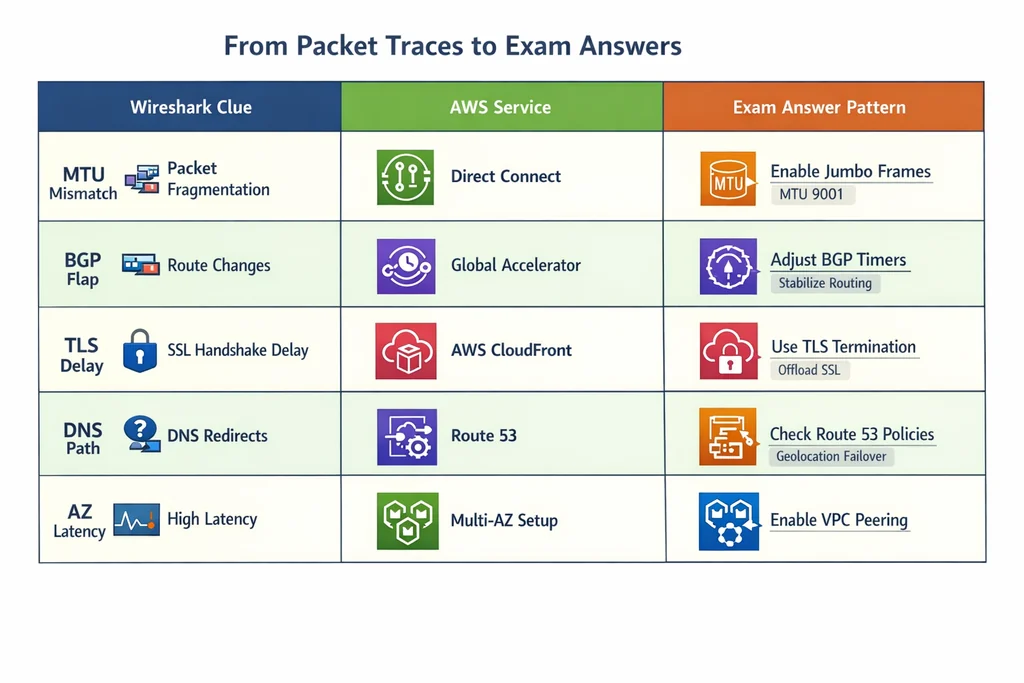
- Are we using jumbo frames with any MTU-constrained path?
- Is BGP stable, and do our route advertisements match what AWS expects?
- Does TLS handshake latency suggest network or compute bottleneck?
- Is DNS resolving through the intended path, or leaking to unexpected resolvers?
- Are we assuming same-AZ performance for cross-AZ traffic?
Each pattern in this guide gives you a concrete diagnostic to eliminate wrong answers. The exam rewards architects who can trace symptoms to causes across the network-application boundary.
If you're scheduling your exam soon, consider running through more SAP-C02 questions to stress-test your recognition speed. Scenario questions consume the most time, and confidence in network troubleshooting frees mental capacity for the complex design items that follow.
Learn more — browse the relevant exam page and purchase a practice test.
Troubleshooting Scenarios the Exam Loves
Beyond the five core patterns, several hybrid edge cases appear regularly in SAP-C02 item pools. Understanding these saves precious minutes during the exam.
IPsec tunnel MTU discovery failures. When using Site-to-Site VPN with BGP, the tunnel interface MTU is typically 1399 bytes for standard VPN and 1446 bytes for accelerated VPN using AWS Global Accelerator. If your application sends 1500-byte packets without path MTU discovery, you'll see silent drops. Wireshark won't show ICMP errors because the VPN endpoint handles encapsulation internally. The fix: enable TCP MSS clamping on your customer gateway device, or configure your instances with net.ipv4.tcp_mtu_probing=1.
Direct Connect public VIF routing surprises. A public VIF advertises all AWS public IP ranges to your router, but only over the Direct Connect path. If you also have internet connectivity, your router may prefer the Direct Connect path for some services and internet for others based on AS-path length. Wireshark captures on both paths reveal which route your traffic actually takes. For the exam, remember that public VIFs do not access VPC private IPs — you need a private VIF or Transit Gateway for that.
Certificate transparency log delays. When you request a new certificate from AWS Certificate Manager, the certificate authority must log it to certificate transparency logs before browsers accept it. In Wireshark, this appears as a TLS handshake that completes successfully but the application layer fails immediately afterward. The certificate itself is valid, but the OCSP response or SCT (Signed Certificate Timestamp) extension is missing. This rarely appears directly on the exam, but the underlying concept — that TLS involves more than just key exchange — supports several answer choices.
Exam Day Strategy for Network Scenarios
SAP-C02 scenario questions present dense information. I recommend a systematic approach:
First, identify the traffic flow. Draw the path: source AZ, destination (VPC, on-premises, or another region), and the connectivity mechanism (peering, Transit Gateway, Direct Connect, VPN).
Second, note the symptoms. Is it complete failure or intermittent? Does it affect all traffic or specific protocols? Time-of-day patterns suggest congestion or scheduled maintenance, not configuration errors.
Third, eliminate impossible answers. If the architecture uses VPN, jumbo frames is wrong. If the question mentions "no changes to route tables," BGP attribute manipulation is wrong. If both VPCs are in the same region, global accelerator adds unnecessary complexity.
Fourth, match remaining answers to your pattern library. The five patterns in this guide cover perhaps 80% of network scenarios. The troubleshooting extensions above cover another 15%. The remaining edge cases usually test specific service limits or recent feature releases.
Where Packet Analysis Fits in Your Certification Journey
Wireshark skills sit at the intersection of associate and professional level knowledge. The SAA-C03 tests that you know VPC peering exists; the SAP-C02 tests that you understand when peering fails silently. The associate exam checks that Direct Connect provides dedicated connectivity; the professional exam asks how BGP communities affect route preference during a region failover.
This progression mirrors real career advancement. Early in your AWS journey, you configure resources through the console or CLI. As you advance, you debug why those configurations behave unexpectedly. Packet analysis is the final layer — when CloudWatch metrics look normal, flow logs show permitted traffic, and yet the application still fails.
Investing time in these skills pays dividends beyond certification. Production incidents rarely match documentation examples. The engineer who can capture, filter, and interpret live traffic diagnoses faster and proposes more precise fixes. That capability distinguishes senior architects from those who stop at infrastructure-as-code.
For candidates transitioning from the associate level, the SAA-C02 sample questions provide foundational networking context that this guide builds upon. The VPC peering, security group, and NACL fundamentals tested there are prerequisites for the troubleshooting depth expected at the professional level.
Deeper into AWS Security and Operations
Network troubleshooting connects directly to two other professional-level domains. The SCS-C02 security questions test encryption, certificate management, and traffic inspection — all topics that appear in patterns three and four of this guide. Understanding TLS handshake behavior helps you answer security specialty questions about certificate pinning, perfect forward secrecy, and cipher suite selection.
Similarly, the DOP-C02 practice questions cover operational excellence and continuous improvement. Network automation, infrastructure monitoring, and incident response all benefit from packet-level visibility. The DevOps Professional exam specifically tests whether you can design observability systems that catch anomalies before they become outages.
Cross-training across these exams strengthens your overall AWS expertise. The network patterns in this guide appear in modified form across all three professional and specialty levels. Master them once, apply them repeatedly.
Exams That Test Similar Network Concepts
While this guide focuses on AWS, the underlying networking principles are universal. Cloud architects working in multi-cloud environments benefit from understanding how other platforms handle equivalent scenarios.
The AZ-700 networking questions cover Azure's approach to hybrid connectivity, including ExpressRoute (Azure's Direct Connect equivalent), VPN Gateway BGP support, and virtual network peering. Comparing Azure's implementation to AWS deepens your architectural intuition — you learn which constraints are fundamental to cloud networking and which are vendor-specific.
For broader solutions architect perspective, the AZ-305 architect questions test network design decisions in Azure's framework. The latency, redundancy, and security tradeoffs are similar, though the service names and configuration details differ.
Even specialized platforms follow comparable patterns. The Citrix traffic management questions test application delivery networking, load balancing algorithms, and session persistence — concepts that map directly to AWS ALB and NLB behavior, though with different terminology.
Keep Practicing Under Pressure
The gap between lab comfort and exam performance is real. In your home environment, you can spend twenty minutes exploring a capture. On exam day, you have roughly two minutes per question. The patterns must be automatic.
Build speed through repetition. Each week, pick one pattern, generate the problematic traffic, capture it, and time yourself from capture to root cause. Aim for five minutes initially, then two, then one. When you can glance at a BGP NOTIFICATION and immediately identify the error subcode, you're ready.
Use practice exams to simulate pressure. The timed format, unfamiliar scenario wording, and need to eliminate plausible distractors all tax working memory. The more patterns you've internalized, the more cognitive capacity remains for the genuinely novel questions that separate passing scores from top-tier performance.
Learn more — browse the relevant exam page and purchase a practice test.
More SAP-C02 Resources to Explore
- SAP-C02 practice questions
- more SAP-C02 questions
- SOA-C02 sample questions

Discussion
Question Comments
0 comments·0 participantsSign in to leave a comment and access more free questions.