

Most candidates don't fail because they didn't know the material. They fail somewhere around question 90, when concentration slips, pacing falls apart, and scenario questions that took four minutes in study mode now have to be answered in 80 seconds. If you're wondering how to build exam stamina with simulators, the answer starts with picking the right tool: one that can run genuine full-length, timed, uninterrupted sittings and then show you exactly where you faded. Quiz apps and flashcard decks can't do that. This roundup compares the exam simulators worth your money, judged on timed full-length sittings, review analytics, retake-friendly pricing, and how honestly each one replicates the real testing environment.
What Separates a Real Simulator From a Quiz App
Before the picks, here's the filter I used. A tool earns a place on this list only if it meets most of these criteria:
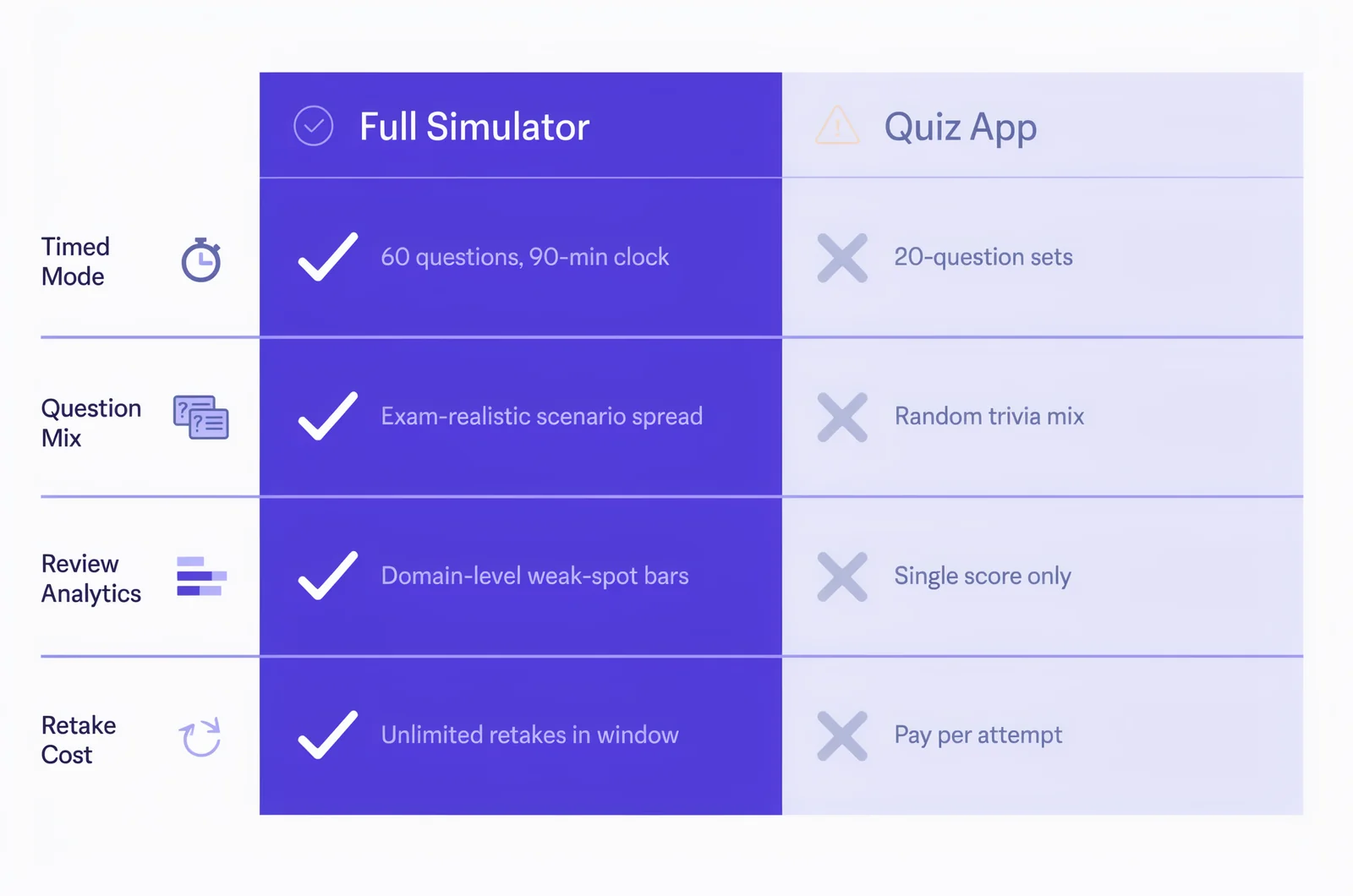
- Full-length timed mode. The sitting must match the real exam's question count and clock. A 20-question quiz is useful for revision; it does nothing for endurance. If your exam runs 90 minutes with 60 questions, your simulator should run 90 minutes with 60 questions, not a "sampled" subset.
- Exam-realistic question mix. Scenario items, drag-and-drop, and performance-style tasks where the vendor uses them, written to current objectives rather than recycled from a retired exam version.
- Review analytics. Domain-level score breakdowns, per-question explanations, and ideally timing data so you can see which question types slowed you down. A raw percentage score tells you almost nothing actionable.
- Retake economics. Stamina is built through repetition. Coaching guides for long exams like the PMP recommend three to five full-length timed simulations per study cycle: three show a measurable performance trend, five build pacing without over-familiarising you with the question bank. If every retake costs full price, the tool fights against its own purpose.
That last point matters more than people expect. Endurance research on exam prep consistently points the same way: shorter focused sessions build retrieval habits early, but as the exam date approaches, sessions should lengthen and replicate test-day conditions, timed, uninterrupted, no notes. Your simulator is the "long run" of certification training. Schedule the first full sitting at least four weeks out, not the week before.
One more thing to check: when the question bank was last updated against the vendor's objectives. Exam versions change, and a simulator built for last year's blueprint trains you for the wrong marathon. A CompTIA A+ bank written for the retired 220-1101 objectives, or an AWS bank still covering a replaced service, teaches you to sprint in the wrong direction. For a sense of how those formats actually work on the Microsoft side, our breakdown of Microsoft exam formats covers what role-based tests throw at you.
The Simulators That Build Real Endurance
Each of these earns its place for a different kind of candidate. None of them is the universal winner, and I'd be suspicious of any roundup that claims otherwise.
MeasureUp is the closest thing to an official practice channel for a big slice of the IT certification world. It's the official practice test provider for Microsoft, and its catalogue spans CompTIA, Cisco, AWS, VMware, and more, which makes it the natural pick if your exam is from one of the big vendors and you want question style and difficulty that track the real thing.
Where MeasureUp fits the stamina goal: its practice tests run in a timed certification mode that mirrors the live exam experience, and the reporting breaks performance down by objective so you can see which domains collapsed late in a sitting. The explanations reference why each wrong answer is wrong, which is what turns a simulation into a study session rather than a score generator. It also offers a study mode alongside the timed mode, so the same bank serves both phases of your plan: untimed gap-closing early, full-length endurance runs late.
The limitation is price per exam. MeasureUp sells per-exam practice tests, so candidates sitting multiple certifications (say, AZ-104 then SC-300) will feel the cumulative cost. If your study plan calls for five full simulations, though, a single MeasureUp test with unlimited attempts during its access window still covers that without retake fees. Best fit: candidates who want the most vendor-aligned questions available and are preparing for one specific exam at a time.
Boson ExSim-Max
For Cisco exams, Boson ExSim-Max is the benchmark the community measures everything else against. Boson's own description says ExSim-Max is built to simulate the complete exam experience: question types, topics covered, difficulty, and timing. A CCNA package runs to roughly 370 questions across multiple full practice exams, priced at $99 per exam at the time of writing. See Boson ExSim-Max for current product information.
That structure suits endurance training unusually well, because multiple distinct full-length exams mean you can run several simulations without hitting the same questions twice. That solves the biggest practical problem with retake-heavy training on a single bank: by your third sitting you recognise items, and your score measures memory rather than readiness. Boson's difficulty is famously set slightly above the real exam, which has a training effect similar to running hills: candidates who consistently pass ExSim-Max simulations under time pressure tend to find the actual CCNA comfortable by comparison. The explanations are long and technical, and the score report maps to exam topics so weak domains are obvious.
The trade-offs: it's Cisco-centric, the $99 price is among the highest per-exam in this list, and there's no broad multi-vendor catalogue if your roadmap jumps between Cisco, AWS, and Microsoft. Best fit: CCNA and CCNP candidates who want the hardest realistic simulation available and budget for a premium tool. If you go this route, our guide on using Boson practice exams walks through how to sequence the timed sittings.
Pearson VUE Practice Tests
Pearson VUE sits in a different category: it's the company that actually delivers most IT certification exams, and for selected vendor programmes it sells official practice tests through its own store. Pearson's own description of these products is worth noting: they're unproctored, web-based exams offered around the clock, and they are timed. The Pearson VUE practice test store shows the catalogue for the programmes that participate.
The appeal is authenticity of environment. Because Pearson runs the real testing platform, its practice tests come closest to the actual interface, navigation, and clock behaviour you'll face at a test centre or in an OnVUE session. For candidates whose anxiety is about the environment rather than the content, that familiarity is worth a lot. Knowing exactly where the timer sits, how flagging works, and how case studies paginate removes a whole category of test-day surprises. The IT exam resources hub also links vendor-specific prep options if you're unsure whether your exam programme offers one.
The limitations are real, though. Coverage is patchy: only certain vendors sell practice tests through Pearson, availability varies by programme, and the analytics are thinner than dedicated training platforms. You won't get the per-domain breakdowns that make MeasureUp or Boson useful for gap-closing. Treat it as a final dress rehearsal rather than your main training tool. Best fit: candidates in a participating vendor programme who want one sitting in the exact delivery environment before exam day.
Matching the Simulator to Your Study Window
The right pick depends less on brand reputation and more on how your next six weeks look.
Two to four weeks out, one exam. Buy the vendor-aligned option with unlimited retakes inside its access window (MeasureUp for Microsoft and most multi-vendor needs, Boson for Cisco). Plan three full timed sittings: one at the start to baseline, one mid-plan to expose weak domains, one five to seven days before the exam as a dress rehearsal. Leave at least two review days between sittings; running simulations back to back without review just rehearses the same mistakes.
Shoestring budget or a fundamentals exam. Free and low-cost timed options can cover a fundamentals-level cert like AZ-900 if you choose carefully, and our roundup of timed practice tests for AZ-900 shows what "good enough" looks like at that level. The moment an exam runs past 60 questions or includes case studies and labs, the limits of free tools show fast.
Simulation plus gap-closing in one place. This is where PlanetCert fits honestly into the picture: the platform pairs a timed web-based exam simulator with flashcards and per-question explanations across Microsoft, AWS, Cisco, CompTIA, and VMware exams, so a simulation can flow straight into targeted review of the domains you missed, without switching tools. It's a sensible option if you want the simulator and the gap-closing workflow under one subscription rather than buying per-exam.
Whichever tool you pick, the method matters more than the brand. Sit the full length in one go. Same time of day as your booked exam slot, phone in another room, no pausing the clock. Afterwards, don't just read the score: log which question types slowed you down and which domains your accuracy dropped in during the final third of the sitting. That late-test decay is exactly what stamina training is trying to flatten, and a simulator with per-domain analytics turns it into a fixable, measurable problem instead of a vague fear. A candidate who scores 85% in the first half and 68% in the second has an endurance problem; a candidate who scores 70% throughout has a knowledge problem. The fix for each is completely different, and only full-length timed data can tell you which one you are.
A quick tool idea if you want to pressure-test your plan: a simple "simulation scheduler" where you enter your exam date and question count, and it spaces three to five full timed sittings backwards from test day with review days between them. Even a spreadsheet version of this changes how consistently people actually run the simulations they paid for.
Questions Candidates Ask About Simulator Training
How many full-length simulations do I actually need?
Three to five is the range most coaching guidance converges on. Below three, you can't see a trend; above five on the same question bank, you start memorising items instead of building endurance. If you need more sittings than your bank supports, that's an argument for a tool with multiple distinct full exams, like Boson.
Is a high quiz-app score a sign I'm ready?
No. Twenty-question sets don't reproduce the cognitive load of question 150. The simulator is the only study tool that trains sustained reasoning under time pressure, which is why quiz-only tools didn't make this list. A 95% average on short quizzes can coexist with a failing full-length score.
When should I run my first full simulation?
At least four weeks before the exam. An early baseline tells you whether your problem is knowledge or endurance, and those need completely different fixes. Running it one week out leaves no time to act on what the report shows.
Should the simulator be harder than the real exam?
It helps. Tools like Boson deliberately pitch difficulty above the live test, so exam day feels easier by comparison. Just make sure the difficulty comes from question quality, not from outdated or off-objective content.
Do I need the official delivery platform too?
Not essential, but if your vendor sells a practice test through Pearson VUE, one sitting there is a worthwhile final rehearsal for interface familiarity.
Keep Building Your Exam Plan


Discussion
Question Comments
0 comments·0 participantsSign in to leave a comment and access more free questions.