
How to Become an Adobe Certified Professional in Photoshop: Step by Step
Lena has been using Photoshop daily for four years. She handles client edits, compositing work, and batch processing without breaking a sweat. But when a studio job listing asked for “Adobe Certified Professional preferred,” she realised she had no way to prove any of that experience on paper. She knew the tool inside out—she just didn’t have the credential employers were screening for.
If that sounds familiar, you’re in the right place. This guide walks through every stage of earning the Adobe Certified Professional in Photoshop: what the exam actually tests, how to register through Certiport, which study resources are worth your time, and what to expect when you sit down at the test workstation. By the end, you’ll have a clear, actionable path from “I should probably get certified” to holding the credential.
What the Photoshop Certification Exam Actually Tests
The Adobe Certified Professional programme is an industry-recognised certification that validates hands-on proficiency with a single Creative Cloud application. Each credential is tied to one tool—Photoshop, Illustrator, InDesign, Premiere Pro, and others—and the exams are developed and delivered by Certiport, a Pearson VUE business. The official exam title is Visual Design Using Adobe Photoshop, and it runs for 50 minutes in a Live-in-the-Application (LITA) format.
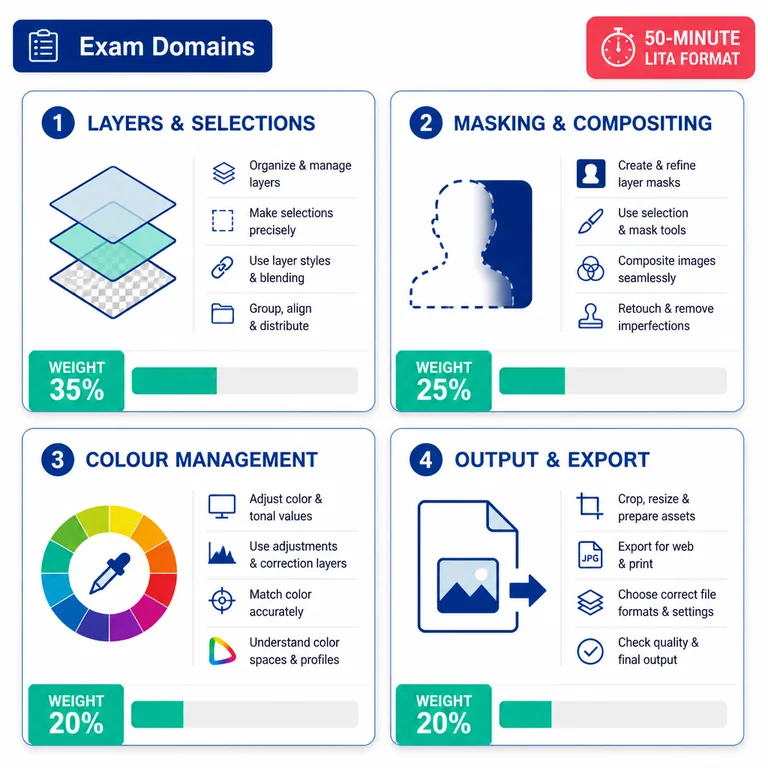
That LITA format is what sets this apart from a generic course completion certificate. You’re not answering multiple-choice questions about where a menu item lives. The testing engine—called Compass—loads inside Photoshop itself and presents tasks you execute directly in the application. You work against the clock in the real software environment, which tells an employer you can perform under time pressure, not just recall facts about the tool.
The current exam objectives are based on the 2025 version of the exam. Adobe publishes a full exam guide that breaks down every domain. The domains typically cover working in the design industry, project setup and interface navigation, document organisation, creating and modifying visual elements, layers, masks, selections, colour and type management, effects, and preparing files for output. The Adobe Photoshop Certification page makes clear that the key items listed in the exam guide are examples—they don’t form an exhaustive list. So a study approach that covers only the published bullet points will leave gaps. You need broad, applied familiarity with the tool, not just a checklist of features.
The same Certiport delivery system supports credentials for other Adobe applications, including Adobe Experience Manager, so the exam-day experience translates across the whole Adobe stack. When you sit for Visual Design Using Adobe Photoshop, you’re inside a testing environment that other Adobe pros recognise.
Before You Register: Recommended Experience and Prerequisites
There are no formal prerequisites. No degree, no prior Adobe certification, no coursework requirements. But Adobe and Certiport strongly recommend logging roughly 150 hours of instruction and hands-on experience with Photoshop before attempting the exam.
That number isn’t arbitrary. It reflects the time needed to move from basic tool familiarity to the kind of fluid, muscle-memory workflow the exam demands. If you’ve been using Photoshop professionally for a year or more, you might already have that. If you’re coming in fresher, a structured ramp-up matters. Adobe’s own Get Started with Adobe Certification page frames it plainly: once you’ve logged those hours and feel ready, the next step is reviewing the exam guide, taking a practice test, and then scheduling the exam. I’d add one caveat—feeling ready and being ready are different things. A timed practice test will tell you which camp you’re actually in, and that’s something we’ll cover in detail later.
A related reality check: even experienced users sometimes struggle with domain areas that don’t get daily use. The exam tests colour management settings, output presets, and workflow terminology that many working designers rarely configure from scratch. Recognising where your practical experience diverges from the published objectives is the first real study decision you’ll make.
Registering Through Certiport: Your Two Options
Registration happens entirely through Certiport. You have two delivery options, and the one you pick depends on your location, language, and comfort with setting up your own machine.
OnVUE remote proctoring. Certiport’s OnVUE platform lets you take the exam from home or your office. A live proctor watches via webcam, and the Compass testing engine loads on your machine. OnVUE delivery is currently limited to English-language exams, so if you need the exam in another language you’ll need the in-person route.
Certiport Authorised Testing Centre. Thousands of centres worldwide offer in-person delivery. You sit at a configured workstation with the software pre-installed and a proctor on site. Many candidates prefer this because the technical setup is handled for you—no worrying about whether your home machine meets the system requirements for LITA delivery, no troubleshooting webcam drivers, and no stress about your internet dropping mid-exam.
To book, visit Certiport’s website, locate the Adobe Certified Professional section, select Visual Design Using Adobe Photoshop, and choose your delivery method. You’ll purchase the exam voucher and pick a date. Some testing centres and solution providers sell exam bundles that include a practice test voucher alongside the exam, which is worth looking for if you’re paying out of pocket. A practice test voucher costs a fraction of the exam fee and is cheap insurance against a retake.
If you’re also eyeing credentials in adjacent Adobe tools, the registration flow for something like the Adobe Workfront Project Manager exam follows the same Certiport process, so your second certification run will feel familiar.
Study Materials That Prepare You for the Real Test
Not all Photoshop study material is created equal. The exam tests applied skills inside the application, so resources that only cover theory or menu navigation won’t cut it. Here’s what actually lines up with the exam format and the time pressure.
The official exam guide. Download the objectives document from the Adobe Photoshop Certification page. Read every domain and sub-objective. Mark the areas where you’re weak, then build your study plan around those gaps rather than rehashing what you already know. If you’ve been using Photoshop for a while, don’t assume you’re solid everywhere—the exam tests some workflow areas that working designers rarely touch, like specific colour management settings or obscure output presets.
CertPREP practice tests. Powered by GMetrix, these are the officially endorsed practice tests for Adobe certification. They run in the same LITA environment as the real exam, which means you get a genuine preview of the Compass interface, the task-based question style, and the 50-minute time pressure. If you only invest in one paid resource, make it this one.
Structured coursework and books. Adobe’s own learning materials, including the Adobe + Coursera career certificates, offer structured coursework that maps to exam domains. For candidates who prefer a classroom environment, vendors like AGI Training run live instructor-led Photoshop certification classes that cover the exam objectives. These tend to be pricier—often several hundred dollars for a multi-day course—but they provide direct access to an instructor familiar with the exam format. Self-paced textbooks with video content, such as the Photoshop Digital Classroom series, are another option if you need more depth than the exam guide but less structure than a live class.
Supplemental practice platforms. For candidates who want extra exam-style repetition beyond the official CertPREP, some platforms offer Photoshop practice test bundles with timed simulations and flashcards that mirror the LITA format. Look for ones that include detailed answer explanations for every question, not just correct-answer indication. This same review-objectives → practice-test → close-gaps rhythm holds for other Adobe credentials too, whether you’re studying for an Adobe Campaign Developer exam or a business practitioner track.
Why Practice Tests Are Your Best Insurance
“Becoming an Adobe Certified Professional typically requires 150 hours of hands-on experience and instruction.” — Adobe Certified Professional programme overview
The official recommendation tells you that time investment matters, but it doesn’t tell you how to structure it. Practice tests give you the map. They surface two things simultaneously: knowledge gaps and pacing problems. You might know exactly how to create a luminance mask, but if it takes you four minutes instead of the two the exam allocates for that task type, you’ll bleed time across the full test.
Marcus, a freelance retoucher in Manchester, failed his first attempt by three questions. His technical skills were solid, but he’d never practised against a clock. On his second attempt, he spent two weeks running timed CertPREP sessions every other day, reviewing every wrong answer, and targeting his weakest domains. He passed with room to spare.
That’s the gap practice tests fill. Aim to take at least three full-length timed simulations. Review every answer explanation—including the ones you got right. Sometimes you arrive at the correct result through a slower method, and the explanation will show you a faster path. The goal isn’t just getting the answer right; it’s getting it right efficiently.
If you’re balancing certification prep with a full-time job—and most candidates are—timed practice sessions also teach you how to fit small wins into a busy week. Thirty minutes of targeted drill on your weakest domain, three times a week, can shift your score faster than four-hour cram sessions on weekends.
Exam Day: From Setup to Score Report
The Live-in-the-Application format means the Compass testing client launches inside Photoshop. The taskbar (Windows) or Dock (Mac) is hidden during the exam. A task pane appears on one side of the screen with your current task description, and you work directly in the Photoshop workspace to complete it. There’s no switching between a question window and the application—everything happens in one view, which is a blessing and a curse. You can work naturally, but you also can’t pause to look up a menu command.
Your experience on the day depends heavily on your delivery choice.
In-person at a testing centre. The workstation is pre-configured with the correct Photoshop version, the Compass client, and any required system settings. The Adobe Certified Professional exam readiness guide from Certiport details the environmental setup: supported application versions, hiding the taskbar or Dock, and the configuration exam that verifies the machine is ready for LITA delivery. Centre staff handle all of that. You don’t need to worry about firewall settings, Compass permissions, or whether the application build matches the exam version—they’ve validated everything in advance.
Remote via OnVUE. You’re responsible for that setup. Run the system test at least 48 hours before your exam slot. Install the required Photoshop version, verify that Compass loads correctly, and make sure your webcam, microphone, and internet connection meet the proctoring requirements. Close everything else—background applications, notifications, second monitors (OnVUE typically requires a single-display setup). The proctor will ask you to pan the room with your webcam before the exam begins, and any interruptions during the test—someone walking in, a phone ringing—can invalidate your session. On the Mac side, you also need to enable specific Adobe permissions before launching the exam, a detail confirmed in the readiness guide.
You get your preliminary result on screen immediately after finishing. A passing score is based on a scaled cut score, and Certiport provides the official score report within a few days. The score report includes domain-level performance, so if you don’t pass, you know exactly where to focus before your retake. The report isn’t just a pass-or-fail signal; it’s your personalised improvement plan.
After You Pass: Badges, Recertification, and Building a Stack
Your Adobe Certified Professional credential is valid for three years. After that, you’ll need to recertify by taking the current version of the exam—exam objectives update as Adobe releases new features and retires older workflows, so recertification keeps your credential aligned with the current application version.
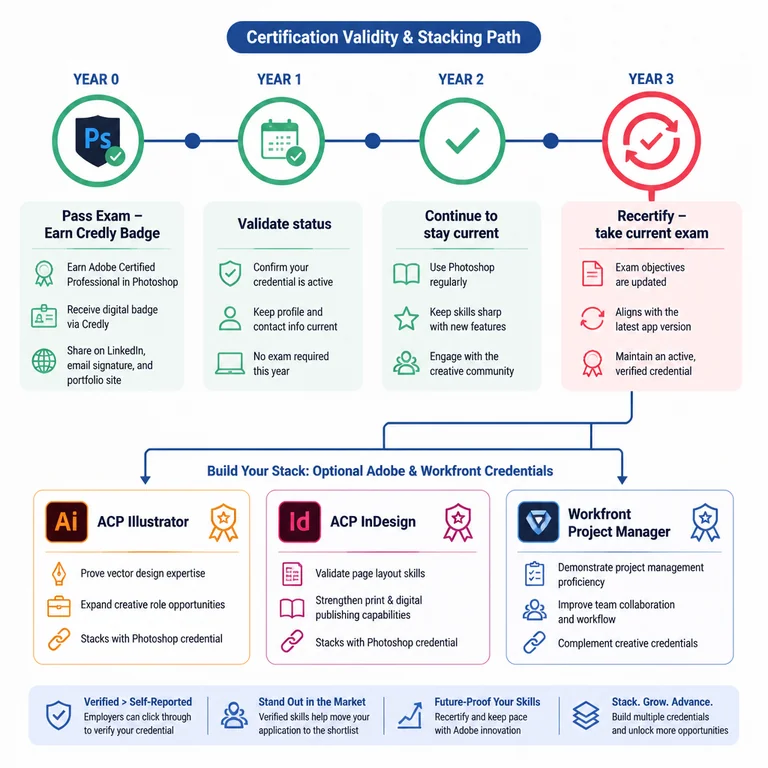
Once you pass, you receive a digital badge through Credly that you can add to your LinkedIn profile, email signature, and portfolio site. Employers and clients can click through to verify the credential, which carries more weight than a self-reported certificate. In a job market where creative roles receive dozens of applicants, a verified badge that confirms real Photoshop proficiency can push your application into the shortlist.
If you want to keep building, Adobe offers specialty credentials that stack across multiple applications. Earning certifications in Photoshop, Illustrator, and InDesign, for example, demonstrates a broader visual design competency that agencies and in-house creative teams value. You could add an Adobe Campaign Business Practitioner certification or expand into marketing automation tools—the same Certiport delivery model makes each additional credential a smoother lift.
The June 2026 update cycle brought meaningful changes to the Adobe ecosystem. Photoshop version 27.8 introduced expanded AI model options in Generate Image, including Firefly Image 5, Flux.2 Pro, and Gemini integration. While these new features aren’t yet reflected in the current certification exam objectives, they signal where the application—and likely future exam versions—are heading. Staying current with feature releases helps you anticipate what might show up on the next version of the exam.
The most efficient way to build exam readiness is to practise in the same environment you’ll be tested in. [Learn more →] If you want to start with a practice test that mirrors the real LITA experience—complete with timed sessions, domain-level feedback, and detailed answer explanations—browse the relevant exam page and purchase a practice test bundle.
Questions Candidates Ask Before They Book
How many hours do I really need to prepare?
Adobe recommends 150 hours of hands-on experience. If you’re already a working designer using Photoshop daily, you might need only 20–30 hours of focused exam preparation—reviewing the objectives guide, taking practice tests, and closing specific gaps. If you’re newer to the application, budget a full 8–12 weeks of structured study with plenty of applied exercises.
Is the exam different on Mac and Windows?
No. The Compass testing client runs on both operating systems, and the exam tasks are platform-agnostic. Photoshop’s core functionality is consistent across Mac and Windows, so your muscle memory transfers. The one platform-specific detail to note is the keyboard shortcut differences (Option vs. Alt, Command vs. Ctrl), but the exam tasks don’t penalise you for using either set.
What happens if I fail?
You can retake the exam. Certiport’s retake policy typically requires a waiting period—often 24 hours for a first retake and longer for subsequent attempts. Each retake requires a new exam voucher purchase. This is why investing in practice tests upfront saves money: a practice test voucher is cheap insurance against a much larger exam retake fee.
Do I need the latest Photoshop version installed?
Yes. The exam runs on a supported version of Photoshop matching the current exam objectives. For the 2025 exam objectives, you’ll need a compatible Creative Cloud version. The Certiport system check tool confirms whether your installed version meets the requirement before you begin.
Keep Building Your Adobe Certification Stack
- Adobe Experience Manager certification practice tests
- Adobe Workfront Project Manager exam prep resources
- Adobe Campaign Developer practice tests and study tools
browse the relevant exam page and purchase a practice test
Learn more
Discussion
Question Comments
0 comments·0 participantsSign in to leave a comment and access more free questions.