

For VCP exam cancellation and refund rules, start with the terms attached to your specific VMware Certified Professional appointment. I can’t confirm a current universal cancellation deadline or refund processing window here. If you booked through Pearson VUE, check your appointment’s cancellation conditions before assuming you’ll recover the fee. The practical task is to establish your deadline, complete the correct booking action, and confirm what happens to your payment or voucher. Cancelling an appointment and receiving a refund are separate outcomes.
Which terms should you check for your VCP appointment?
Start with your booking confirmation and the cancellation conditions it identifies. Match those conditions to the appointment you actually intend to change.
Have your exam code, appointment reference, delivery method and scheduled time available. An exam’s familiar certification name is useful context, but the booking details identify the transaction you need help with.
Check these records together:
- Your appointment confirmation and any subsequent booking changes.
- The cancellation and rescheduling terms associated with that appointment.
- Your payment receipt or voucher purchase conditions.
- Any instructions supplied by an employer or training provider that arranged the booking.
Treat a general article as guidance for checking those records, rather than evidence of your individual refund entitlement. If two documents appear to conflict, ask the booking provider to identify the applicable condition in writing.
Exam preparation information answers a different question. Our article on 2026 VCP exam changes concerns preparation context; it does not establish your cancellation deadline. Keep the appointment confirmation alongside your payment receipt when you contact support.
How far in advance must you cancel a VCP exam?
Use the notice period stated for your appointment. Without verified current terms, a specific number of hours would be an unsupported answer.
Read the full condition, including how the deadline is measured. Look for an exact timestamp, a notice period before the scheduled start, or wording that uses calendar days or business days. Those descriptions need different calculations.
Record the time zone as well. If you’re travelling or taking an online exam from another country, your local clock may differ from the time displayed on the booking. Resolve that difference before calculating the cutoff.
If the condition gives a minimum notice period, leave room to complete the transaction. Starting a cancellation request close to the deadline creates an avoidable problem if you encounter an account error or need assistance.
A useful interactive deadline calculator would accept the appointment time, its time zone and the confirmed notice period. It should display the calculated cutoff without supplying an assumed VCP policy.
Until you have an unambiguous deadline, ask support for the latest permitted cancellation date, time and time zone for your appointment reference.
How do you cancel and confirm that it worked?
Follow the cancellation instructions attached to your booking, then verify the appointment’s status. Opening a cancellation screen or submitting a support request does not establish that the cancellation is complete.
Use this sequence without relying on particular menu names:
- Sign in to the account associated with the appointment.
- Locate the booking and check its exam code, date, time and delivery method.
- Read the cancellation conditions presented before submitting a change.
- Complete the cancellation process through the channel specified for that booking.
- Save the resulting confirmation and any transaction or case reference.
- Reopen the appointment record and check that its status reflects the change.
Read any payment message separately. A confirmation that the exam appointment has been cancelled may leave the refund question unresolved.
If the account gives an error, capture the message and timestamp. Use the support channel identified in your booking confirmation, especially if the deadline is approaching.
Keep a copy of the original appointment details. If several bookings appear in your account, compare the cancelled appointment reference with the one you intended to change before closing the record.
Should you reschedule instead of cancelling?
Rescheduling is worth considering if you still intend to take the same VCP exam and mainly need more preparation time. First, establish the conditions for changing your existing appointment.
Ask whether rescheduling preserves the payment or voucher attached to the booking. Confirm any change deadline, charge, expiry restriction and limit on the replacement date. Don’t assume that cancellation and rescheduling have identical conditions.
The replacement appointment also needs to fit your practical constraints. Check your work rota, travel arrangements and testing environment before committing to another date.
If readiness is the reason for moving the exam, use evidence from your preparation. Reviewing exam simulator analytics can help you identify which topics need another study session.
Choose a date that gives you time to address those gaps. Simply moving the appointment to the next available slot may leave the same preparation problem unresolved.
After submitting a reschedule, save the new confirmation. Check that the replacement appointment has the intended exam code, date, time, location or delivery method, and that the original slot has been replaced.
Does cancelling your appointment guarantee a refund?
A cancellation confirmation alone does not establish that a refund is due or has been paid. You need a separate answer about the financial result.
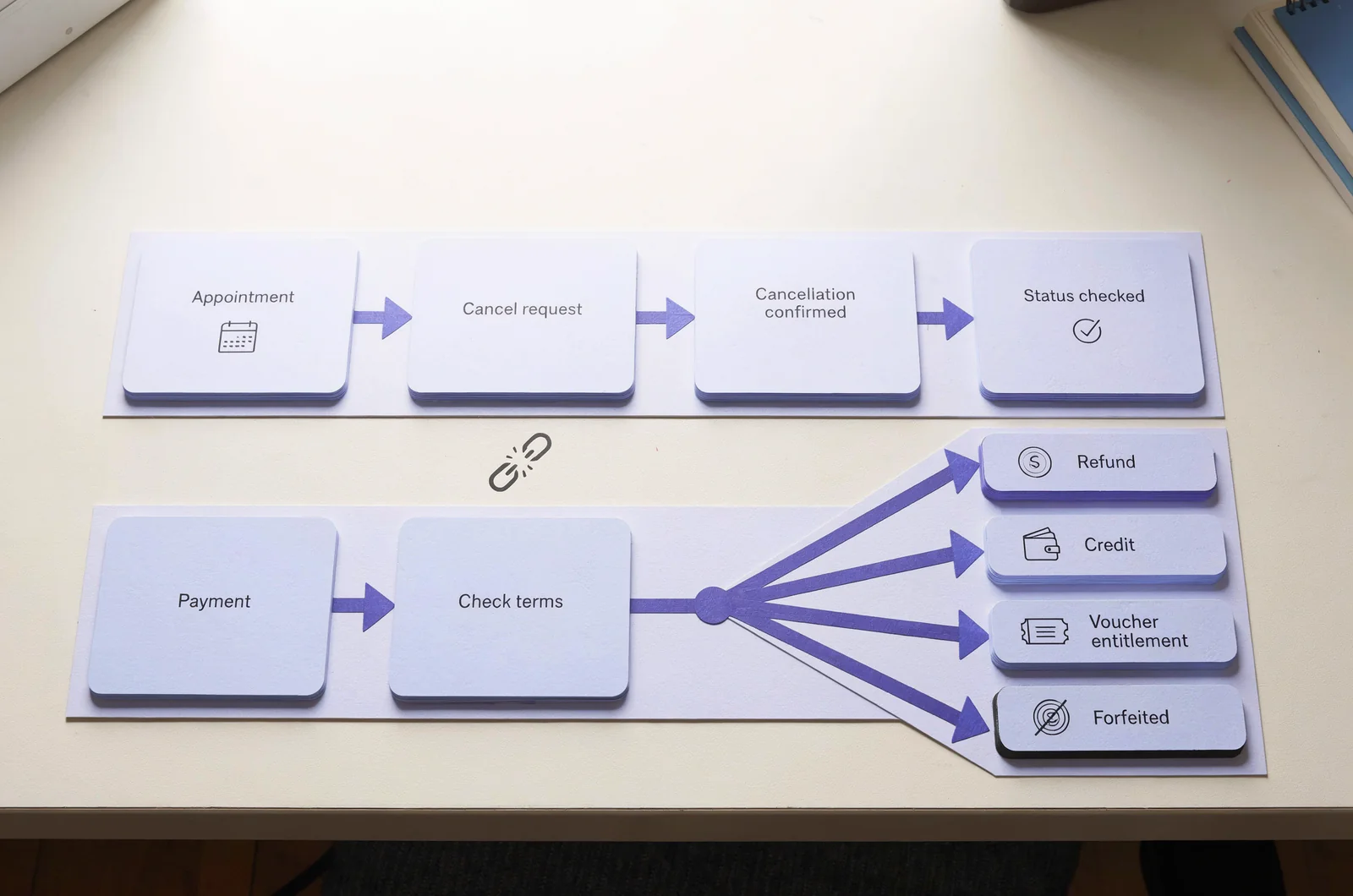
Check whether the applicable terms describe a refund, credit, restored voucher entitlement or fee forfeiture. Treat those as different outcomes when deciding whether to proceed.
Before cancelling, establish:
- Whether your appointment qualifies for a refund under its terms.
- Whether any charge or deduction applies.
- Who receives the returned payment.
- Whether you must make a separate refund request.
- What written confirmation you should expect.
Keep the amount paid and the expected amount returned in the same record. If they differ, request an explanation tied to the applicable condition.
Where an employer or training provider paid, ask who is authorised to handle the financial enquiry. You may need to provide appointment details while another party supplies the purchase receipt.
If you paid for preparation materials separately, keep that transaction separate from the exam booking. Cancelling your exam does not answer whether another purchase is refundable; check the conditions attached to that purchase.
What happens if you used a voucher or employer funding?
Establish what happens to the funding attached to the appointment. A voucher booking needs a different set of questions from a booking you paid for directly.
For a voucher, ask whether cancellation restores its use, whether its original expiry remains applicable, and whether any restriction affects rebooking. A cancelled appointment should not be treated as proof that the voucher is reusable.
Keep the voucher purchase reference available, but avoid posting the full code in public support discussions or screenshots.
If your employer arranged or paid for the exam, tell the relevant administrator which appointment you want to change. Ask whether they need to approve or complete the transaction under their purchasing arrangements.
For a booking included in a training package, distinguish the exam appointment from the wider purchase. Ask the organisation that sold the package which conditions govern the exam component.
You’re trying to establish a concrete result: an amount returned, an entitlement restored, or a restriction that remains in place. Request written confirmation of that result before relying on the funding for another appointment.
How long should a VCP exam refund take?
There is no verified standard processing window to state here. Ask the organisation handling your payment for the timeframe that applies to your transaction.
Separate the stages of the enquiry. First, establish whether a refund has been approved. Then ask whether it has been issued and what information is available to trace it. Checking your account balance alone cannot answer all three questions.
A useful refund record contains the cancellation reference, payment reference, approved amount, issue date and any transaction reference supplied. Keep the stated processing period with those details.
If support gives a timeframe, clarify when it starts and whether it uses calendar days or business days. Ask what to do if the payment has not appeared by the end of that period.
If the original payment method is no longer available, explain that when raising the enquiry. Request instructions for your specific transaction rather than assuming how the payment will be handled.
Follow up against the timeframe you were actually given. Include the existing case reference so the payment question remains connected to the cancelled appointment.
What if you miss the cancellation deadline or cannot attend?
Contact the booking provider promptly and ask how the appointment will be treated. Don’t assume that an unused appointment automatically produces a refund.
Explain whether you are requesting a late cancellation, reporting a missed appointment or asking for an exception. State the scheduled start time and when you first became unable to attend.
If an emergency caused the problem, ask whether there is an applicable review process and what evidence it requires. An exception request needs an explicit outcome; submitting one does not establish approval.
Keep the request concise and factual. Include the appointment reference, a short timeline and the remedy you are requesting. Provide sensitive supporting information only through the channel specified for the case.
If your online cancellation failed before the cutoff, preserve the error message and timestamp. Ask support to consider that record when reviewing the appointment.
Before paying for another attempt, clarify the status of the original booking and its payment. If you choose to make a new booking while the case remains open, keep the two appointment references distinct.
What if Pearson VUE cancels or your online session fails?
Ask the booking provider to confirm how the event has been recorded and what remedy applies. A provider cancellation or delivery problem needs to be described accurately in your case.
For a cancellation notice, save the message and read its instructions before making another transaction. If the notice is unclear, ask whether you should await rebooking instructions, request a refund or take another specified action.
For an online delivery problem, document permitted operational details:
- The appointment reference and scheduled start time.
- When the problem occurred.
- The error message or connection symptom.
- Any support or proctor case reference.
- The instructions you received during the incident.
Keep exam questions and other protected exam content out of screenshots and correspondence. Describe the delivery failure using technical symptoms and timestamps.
Ask for written confirmation of the appointment status, payment status and authorised action. That distinction matters if you are deciding whether to book again.
Avoid opening several unrelated cases for the same event unless instructed. Preserve the original reference and add new information to the existing enquiry where the support process allows it.
How can you decide whether to keep your VCP date?
Make the readiness decision early enough to act within your confirmed booking conditions. Use your recent work to identify what you can realistically improve before the appointment.
If you use PlanetCert’s exam simulator, review your latest timed attempt alongside the explanations. A score by itself gives you less direction than a record of the objectives you misunderstood and the questions you could not finish.
Look for repeated gaps rather than reacting to one disappointing session. Ask whether you can explain the reasoning behind your answers and complete the work within the allotted time.
Then compare the remaining preparation with your actual calendar. Account for work, sleep and existing commitments. A plan that depends on several uninterrupted evenings may be unrealistic if those evenings are already occupied.
PlanetCert’s flashcards can support short revision sessions for facts you keep missing. Where a gap requires practical understanding, allocate study time suited to that task.
Write down the topics still to cover and the sessions available before the exam. Compare that plan with the confirmed cancellation or rescheduling deadline, then complete any booking change while it remains available under your terms.
What should you ask support before closing the case?
Ask for an explicit answer about both the appointment and the payment. A response that addresses only one can leave you unsure whether you still need to act.
For a cancellation enquiry, request confirmation of the applicable cutoff, whether your cancellation was accepted, and the resulting payment or voucher position. Include your appointment reference in the request.
For a refund enquiry, ask for the approved amount, processing status and applicable timeframe. If a refund is declined, request the condition that explains the decision.
For a reschedule, confirm that the replacement appointment is active and that the original booking has been replaced. Check any unresolved charge or voucher question at the same time.
Keep your correspondence focused on the decision you need. A clear request such as “Please confirm whether this cancellation restores my voucher and what expiry applies” is easier to resolve than a general request for help.
Save the final response with your receipt and appointment confirmation. Before considering the matter complete, check that the account record and the written response describe the same outcome.
What can help you prepare for a revised VCP date?


Discussion
Question Comments
0 comments·0 participantsSign in to leave a comment and access more free questions.