

CCNA 200-301 Official Cert Guide Library 2nd Edition: Every Chapter Listed
Last week I watched a colleague open his new library and immediately jump to the OSPF chapters because he’d heard the exam leans heavily on routing. He missed the subnetting deep dive in Volume 1 and ended up stuck for three days when the ACL tasks hit. If you own the CCNA 200‑301 Official Cert Guide Library, 2nd Edition, you’re holding around 1,800 pages across two books. Knowing where every chapter lives, which ones carry the most marks, and which ones demand real lab time keeps you from making the same mistake.
I’ll walk through the full chapter inventory for both volumes, map them to the v1.1 exam domains, call out the configuration-heavy chapters, and suggest a study order that respects how the topics build on each other. A quick note on exam versions: the v1.1 blueprint remains the live test through 2 February 2027. Cisco announced a major v2.0 update in May 2026, and Wendell Odom confirmed new Official Cert Guides are planned for early 2027. The second‑edition library you’re reading still matches today’s exam — so let’s put every chapter to work.
Volume 1 breaks ground on networking and routing
The Volume 1 table of contents spans 26 chapters across seven parts. It covers everything from TCP/IP basics to IPv6 routing. Here’s the line‑up, part by part:
Part I – Introduction to Networking
- Chapter 1: Introduction to TCP/IP Networking
- Chapter 2: Fundamentals of Ethernet LANs
- Chapter 3: Fundamentals of WANs and IP Routing
Part II – Implementing Ethernet LANs
- Chapter 4: Using the Command‑Line Interface
- Chapter 5: Analyzing Ethernet LAN Switching
- Chapter 6: Configuring Basic Switch Management
- Chapter 7: Configuring and Verifying Switch Interfaces
Part III – Implementing VLANs and STP
- Chapter 8: Implementing Ethernet Virtual LANs
- Chapter 9: Spanning Tree Protocol Concepts
- Chapter 10: RSTP and EtherChannel Configuration
Part IV – IPv4 Addressing
- Chapter 11: Perspectives on IPv4 Subnetting
- Chapter 12: Analyzing Classful IPv4 Networks
- Chapter 13: Analyzing Subnet Masks
- Chapter 14: Analyzing Existing Subnets
- Chapter 15: Subnet Design
Part V – IPv4 Routing
- Chapter 16: Operating Cisco Routers
- Chapter 17: Configuring IPv4 Addresses and Static Routes
- Chapter 18: IP Routing in the LAN
- Chapter 19: Troubleshooting IPv4 Routing
Part VI – OSPF
- Chapter 20: Understanding OSPF Concepts
- Chapter 21: Implementing OSPF
- Chapter 22: OSPF Network Types and Neighbors
Part VII – IP Version 6
- Chapter 23: Fundamentals of IP Version 6
- Chapter 24: IPv6 Addressing and Subnetting
- Chapter 25: Implementing IPv6 Addressing on Routers
- Chapter 26: Implementing IPv6 Routing
Most chapters in Parts II, III, and V–VII include built‑in lab exercises that pair with the companion website’s Packet Tracer activities. You’ll want to keep those open as you read.
Volume 2 covers wireless, security, services, and automation
The Volume 2 contents run 20 chapters through five parts. It fills the blueprint areas that a working engineer deals with day to day.
Part I – Wireless LANs
- Chapter 1: Fundamentals of Wireless Networks
- Chapter 2: Analyzing Cisco Wireless Architectures
- Chapter 3: Securing Wireless Networks
- Chapter 4: Building a Wireless LAN
Part II – IP Access Control Lists
- Chapter 5: Introduction to TCP/IP Transport and Applications
- Chapter 6: Basic IPv4 Access Control Lists
- Chapter 7: Named and Extended IP ACLs
- Chapter 8: Applied IP ACLs
Part III – Security Services
- Chapter 9: Security Architectures
- Chapter 10: Securing Network Devices
- Chapter 11: Implementing Switch Port Security
- Chapter 12: DHCP Snooping and ARP Inspection
Part IV – IP Services
- Chapter 13: Device Management Protocols (SSH, NTP, Syslog, TFTP/FTP)
- Chapter 14: Network Address Translation
- Chapter 15: Quality of Service (QoS)
- Chapter 16: IP Services for Voice and Video
Part V – Network Management and Automation
- Chapter 17: Network Management Fundamentals
- Chapter 18: Network Automation and Programmability
- Chapter 19: SDN and Network Programmability
- Chapter 20: Troubleshooting Network Connectivity
Together, the two volumes cover the full 200‑301 blueprint. The library product page lists the same chapter inventory — the bundle ISBN is 9780138221393, and you get both the print and eBook editions plus access to the companion practice test engine.
Every chapter mapped to the six exam domains
The v1.1 blueprint splits into six weighted domains. The table below shows which chapters feed each domain so you can allocate study time where it counts.

| Exam Domain (v1.1) | Weight | Key Chapters |
|---|---|---|
| Network Fundamentals | 20% | Vol. 1 Ch 1–3, 4, 11–15 |
| Network Access | 20% | Vol. 1 Ch 2, 4–7, 8–10; Vol. 2 Ch 1–4 |
| IP Connectivity | 25% | Vol. 1 Ch 3, 16–19, 20–22, 23–26; Vol. 2 Ch 20 |
| IP Services | 10% | Vol. 2 Ch 13, 14, 15, 16 |
| Security Fundamentals | 15% | Vol. 2 Ch 5–8, 9–12 |
| Automation & Programmability | 10% | Vol. 2 Ch 17–19 |
A few chapters cross boundaries — Volume 2 Chapter 5 introduces TCP/UDP and feeds both the security and IP services domains, so don’t skip it. Volume 2 Chapter 20 is a capstone troubleshooting chapter that pulls together routing, switching, and wireless skills. The “Part Review” sections after each part contain exam‑preparation tasks you can use as chapter‑end checkpoints. When you want to simulate a full domain block, a CCNA 200‑301 practice exam gives you the timing and question style of the real thing.
The lab chapters that demand extra bench hours
Reading alone doesn’t build the muscle memory the exam tests. Some chapters lean heavily on configuration and need dedicated lab time. In Volume 1, prioritise:
- Ch 4–7 (switch basics: VLAN databases, interface settings, show commands)
- Ch 8–10 (VLANs, spanning‑tree, EtherChannel — build a two‑switch topology and break the root bridge intentionally)
- Ch 16–19 (router boot sequence, static routes, IPv4 routing table troubleshooting)
- Ch 21–22 (OSPF neighbour relationships, network types, and LSA types)
- Ch 25–26 (IPv6 addressing, router advertisements, and IPv6 static routes)
In Volume 2, set aside extra time for:
- Ch 2–4 (wireless architectures and WLAN setup — a virtual wireless LAN controller in CML or Packet Tracer will work)
- Ch 6–8 (building and applying standard, extended, and named ACLs)
- Ch 10–12 (device hardening, port security, DHCP snooping, and ARP inspection)
- Ch 14 (NAT — static, dynamic, and PAT)
- Ch 18–19 (RESTCONF, NETCONF, and basic Python/Ansible scripting)
Priya, a helpdesk engineer I worked with, tackled every lab chapter exactly once — then took a set of 200‑301 sample questions after each block. She found that her VLAN and DHCP snooping scores dropped on the second practice test, so she rebuilt the topologies from scratch. By the third pass she was fixing misconfigurations on sight. That rhythm of lab → test → re‑lab caught weak spots early and saved her from a retake.
Cisco Packet Tracer is free and covers nearly all Volume 1 labs plus the ACL and DHCP snooping tasks in Volume 2. For wireless controller features and API work, Cisco Modeling Labs Personal gives you a 20‑node licence. Whichever tool you use, type every command yourself — the exam simlets expect you to know the syntax cold.
A study sequence that respects topic dependencies
You can follow the printed order, but I’ve watched too many learners stall on subnetting when it’s left until Part IV. The order below front‑loads IP addressing so every later routing and ACL topic feels easier.
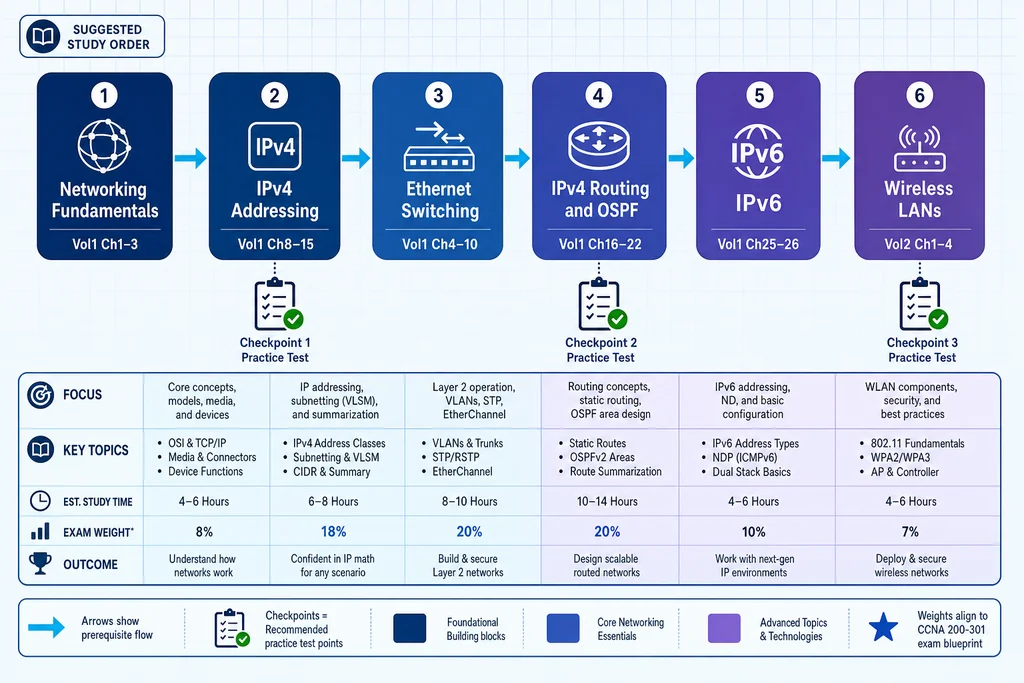
- Networking fundamentals — Volume 1 Part I (Ch 1–3). Two or three sessions. Build a solid mental model of the TCP/IP stack, Ethernet framing, and basic packet forwarding.
- IPv4 addressing — Volume 1 Part IV (Ch 11–15). Master subnetting here. The book’s “magic number” method is fast once you’ve drilled it, but if it doesn’t click, practise with a subnet calculator in reverse until you can do /27 and /30 in your head.
- Ethernet switching — Volume 1 Parts II & III (Ch 4–10). Set up a small switched network, add VLANs, and then introduce spanning tree. When you can read
show spanning-treeand explain the blocking ports, you’re ready to move on. - IPv4 routing and OSPF — Volume 1 Parts V & VI (Ch 16–22). Start with static routes, then dive into OSPF. When you hit Chapter 19, deliberately break the earlier labs — the exam loves routing‑table troubleshooting. After the OSPF block, test yourself with a few more sample questions to make sure the neighbour states and LSA types are second nature.
- IPv6 — Volume 1 Part VII (Ch 23–26). By now IPv4 should be routine, so IPv6 feels like a variation — the addressing rules differ, but the routing concepts parallel OSPFv2.
- Wireless LANs — Volume 2 Part I (Ch 1–4). These chapters plug into the network access domain. Don’t skim the architecture diagrams in Chapter 2; the exam asks about controller‑based deployments.
- Security — Volume 2 Parts II & III (Ch 5–12). ACLs are simpler now that you subnet fluidly. Port security (Ch 11) and DHCP snooping (Ch 12) are high‑probability exam topics — build a small topology and test each countermeasure deliberately.
- IP services and automation — Volume 2 Parts IV & V (Ch 13–20). NAT (Ch 14) and QoS (Ch 15) are straightforward once routing is solid. The automation chapters introduce RESTCONF, NETCONF, and basic Python; if scripting is new to you, budget an extra five days. Chapter 20 doubles as a final blueprint review — run through it as your last lap.
Checking your progress with practice tests
You’re reading the Official Cert Guide because it’s thorough, but no book can recreate the pressure of a timed exam. After each major topic block, set aside 45 minutes for a focused practice session. That gives you a signal on whether you’re ready to move on or need to circle back.
A complete practice run — 120 minutes, 100‑plus questions — tells you where your weak spots cluster. If you find IP Connectivity questions dragging down your score while Network Fundamentals stays strong, you know to double back on OSPF neighbour states and routing tables before you schedule the real test.
When you’ve finished the study sequence and want to see how the whole blueprint holds together, check the 200‑301 practice exam page for timed simulations that match the v1.1 format. Each question includes an explanation that ties back to the book’s chapter content, so you can flip to the right page and repair gaps without hunting.
Learn more → — browse the CCNA 200‑301 exam page and pick up a practice test that mirrors the current blueprint.
Questions about the CCNA 200‑301 Cert Guide Library
Do I need to read both volumes cover to cover? Not necessarily, but you should work through every exam topic at least once. The library is structured so you can study chapter by chapter, and the Part Reviews after each section help you decide whether to skip or revisit. Most candidates read every page but spend proportionally more time on lab‑heavy chapters.
Is the second edition still valid for the upcoming v2.0 blueprint? It covers everything on the current v1.1 exam through 2 February 2027. For v2.0, Cisco and Wendell Odom have announced new Official Cert Guides due in early 2027. If you’re testing before the transition, the second‑edition library is the right resource. If you’re testing after, you’ll want the upcoming editions — but the second‑edition books will still teach you the foundational skills that carry over.
How do I register the book for the companion practice tests? Each book includes an access code inside the cover or on a card. Go to the Pearson IT Certification website, create an account, and enter the code. You’ll get access to the practice test engine, the eBook edition, and the lab exercise companion files.
Can I skip the wireless chapters if I don’t work with wireless day to day? I wouldn’t. The Network Access domain accounts for 20% of the v1.1 exam, and the wireless chapters (Volume 2 Ch 1–4) are the primary source for that material. Even if your current job is pure routing, the exam expects you to understand controller‑based architectures and basic WLAN security.
CCNA 200‑301 practice resources
browse the relevant exam page and purchase a practice test
Learn more
Discussion
Question Comments
0 comments·0 participantsSign in to leave a comment and access more free questions.