
CCNA 200-301 V2.0 Exam Topics: Blueprint Domains, AI Labs, and 2026 Weights
When Cisco published the CCNA 200-301 v2.0 exam topics on May 20, 2026, it wasn't a minor revision. It's the first major blueprint overhaul since 2019, and it reshapes what "job‑ready" means for network engineers. If you're planning to take the exam after the transition date of 3 February 2027, you'll need to recalibrate your study plan around a restructured domain set, a brand‑new AI literacy section, and a clear push toward hands‑on configuration and troubleshooting skills.
I'll walk through every domain as it appears in the official blueprint, compare the new weights against v1.1, and pinpoint the skills Cisco expects you to demonstrate now that used to be optional. By the end, you'll have a clear picture of which topics deserve the most lab time and where to find practice that matches the updated exam format.
The v2.0 blueprint at a glance: six domains, fresh priorities
The official exam guide on the Cisco Learning Network breaks the exam into six weighted domains for the first time in the 200-301 series. The weight percentages signal Cisco's emphasis, and the 25% share given to the first two domains alone tells you where the exam's difficulty concentrates.
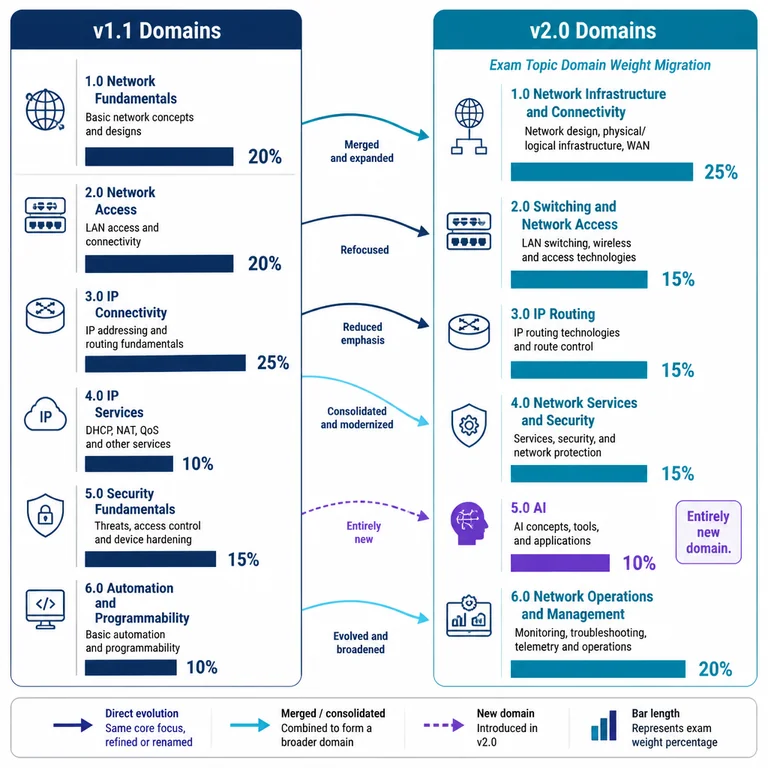
Here's the full domain list with their published exam percentages, straight from the CCNA v2.0 Exam Topics page:
- 1.0 Network Infrastructure and Connectivity — 25%
- 2.0 Switching and Network Access — 25%
- 3.0 IP Routing — 20%
- 4.0 Network Services and Security — 15%
- 5.0 AI — 10%
- 6.0 Network Operations and Management — 5%
Two things jump out immediately. First, the AI domain is entirely new — you won't find anything like it in CCNA 200-301 v1.1. Second, the traditionally weighty IP Routing domain has been dialled back from 25% in v1.1 to 20%, while the foundational infrastructure and switching domains now share the spotlight as the heaviest sections.
This reshuffling matters for how you allocate study time. Spending weeks deep‑diving OSPF while skimming the material on network access and infrastructure will no longer serve you as well. The exam expects a broad, balanced base and then specific depth in troubleshooting and AI‑assisted workflows.
Weight migration from v1.1 to v2.0
If you studied for the current exam, you'll remember that v1.1 used a five‑domain structure: Network Fundamentals (20%), Network Access (20%), IP Connectivity (25%), IP Services (10%), Security Fundamentals (15%), and Automation and Programmability (10%). The v2.0 remapping is significant, and it's not just a relabelling exercise.
| Domain (v1.1) | Weight | Domain (v2.0) | Weight |
|---|---|---|---|
| Network Fundamentals | 20% | 1.0 Network Infrastructure and Connectivity | 25% |
| Network Access | 20% | 2.0 Switching and Network Access | 25% |
| IP Connectivity | 25% | 3.0 IP Routing | 20% |
| IP Services | 10% | 4.0 Network Services and Security | 15% |
| Security Fundamentals | 15% | (merged into 4.0) | — |
| Automation and Programmability | 10% | (absorbed into AI and 6.0) | — |
| — | — | 5.0 AI | 10% |
| — | — | 6.0 Network Operations and Management | 5% |
Many of the old fundamentals topics — like OSI model concepts, cable types, and IPv4 addressing — now live inside the first domain. That's natural. But Cisco also took the opportunity to raise the bar across the board. In his deep‑dive breakdown of the blueprint, Wendell Odom points out a crucial shift:
"The biggest change in the CCNA V2.0 blueprint, compared to the previous one, is how much Cisco bumped up the challenge level across many topics. Topics that required only an explanation or description now require configuration. Some that required configuration now require troubleshooting." — Wendell Odom, CCNA Version 2.0: Blueprint Deep Dive
That means you can't just memorise definitions. The exam will ask you to configure VLANs, to troubleshoot why an interface is down, and to interpret show command output in a scenario, not in isolation. The days of relying on recall alone are over — the blueprint demands you can make a network work and fix it when it breaks.
AI literacy arrives as a standalone domain
When I first saw “AI” listed as a CCNA domain with a 10% weight, I'll admit I was curious how much of the exam would feel like a data science primer. But after reading the sub‑topics, it's clear Cisco isn't asking you to train models. The AI domain focuses on how AI‑enhanced features work inside Cisco networking environments — things like AI‑driven network analytics, predictive monitoring, and the principles of using AI to automate repetitive troubleshooting.
The syllabus in the official blueprint includes:
- Describing AI and machine learning concepts relevant to network management
- Using AI‑powered network analytics tools (Cisco DNA Center and Meraki cloud, for instance)
- Identifying AI‑driven security features such as Encrypted Traffic Analytics
- Explaining the role of AI in predictive maintenance and proactive support
- Distinguishing between AI‑generated recommendations and static threshold alerts
For a candidate who's spent the last year labbing OSPF and STP, this domain will feel unfamiliar. But it's not unapproachable. Most of the content translates to understanding how existing Cisco tools — many of which are already covered in the curriculum — now incorporate AI. For example, Cisco DNA Center's assurance dashboard uses machine learning to baseline normal network behaviour and flag anomalies. You won't be expected to write the algorithm, but you should know what the platform does and how to interpret its output.
The key is to spend a few weeks getting comfortable with the AI‑driven dashboards in Cisco DNA Center, exploring how telemetry data feeds into recommendations, and knowing the vocabulary well enough to answer multiple‑choice and drag‑and‑drop questions. Look for hands‑on walkthroughs that demonstrate how Encrypted Traffic Analytics detects malware in encrypted flows without decryption — a typically tested concept.
Ryan Rose, who leads Cisco's learning portfolio, put the rationale simply when the updates were announced:
"In just a few years, AI has become an integral part of how networks are designed, managed, and secured — driving a shift in the skills most critical to IT professionals. Instead of being network operators, network engineers now need to be orchestrators, bringing together various forms of automation and AI." — Ryan Rose, Built for What's Next
That shift from operator to orchestrator is exactly what the certification exam will test. You don't need to be an AI expert, but you do need to know how AI assists the network roles you'll be hired to perform.
Lab requirements and the troubleshooting ramp‑up
One of the quietest but most important changes in v2.0 is how the exam handles practical skills. Cisco is increasing the number of performance‑based questions (labs) and pushing harder on troubleshooting. The v1.1 exam already had lab simulations, but v2.0 expects you to configure, verify, and troubleshoot in a timed environment — and the word “troubleshoot” now appears in over a dozen explicit blueprint sub‑topics.
The lab emphasis shows up most clearly in the “Switching and Network Access” and “IP Routing” domains. Tasks like configuring VLANs, enabling port security, verifying Spanning Tree, and troubleshooting OSPF neighbour states now carry verbs like “configure,” “troubleshoot,” and “verify” rather than the older “describe.” That's a meaningful jump. You'll need more than a conceptual understanding; you'll need muscle memory at the CLI.
Take a typical OSPF adjacency issue as an example. In v1.1, you might have been asked to describe the OSPF hello packet fields. In v2.0, you could be handed a console session with two routers that refuse to become neighbours and asked to identify the mismatched network type or incorrect hello interval — and then fix it. That demands lab time, not just reading. I've seen students who could recite the OSPF states freeze when a real link doesn't come up, because they'd never debugged a mismatch on a live console.
That's why a study plan built entirely around reading a book or watching videos will hit a wall. You'll need a lab environment — whether that's physical kit, Cisco Modeling Labs, or a simulator like Packet Tracer — and you'll need to spend deliberate time breaking things and fixing them. If you can confidently resolve a misconfigured trunk link or a mismatched OSPF network type within a few minutes, you're heading in the right direction.
One resource worth bookmarking early: the CCNA 200-301 exam overview page, which links to the official topics and provides a registration walkthrough. It's helpful to see how the exam is structured on the registration side while you plan your preparation.
Navigating the exam logistics and question formats
The v2.0 exam keeps the same basic logistics that candidates know: 120 minutes, $300 USD, and available in English and Japanese. Results usually appear within 48 hours, and the exam can be used toward Cisco recertification.
Question formats will include multiple‑choice, drag‑and‑drop, and performance‑based simulations. The official exam topics page notes that an exam tutorial is available, so if you're new to Cisco's testing environment, it's worth spending a few minutes on that before your session begins.
Because the blueprint introduces fresh content across AI and troubleshooting, early adopters should be cautious about relying heavily on question sets that were built against v1.1. Many of the technical facts will overlap, but the context and scenario framing will shift. Look for practice materials that are explicitly updated for the new objectives — or, at minimum, verify that the explanations align with the updated domain weights. A set of sample questions that mirrors the new verb levels (configure, troubleshoot, verify) will give you an honest gauge of where you stand before you schedule the real exam.
How to build a study sequence that respects the new weights
With the exam domains and percentages in front of you, the smartest approach is to weight your study time proportionally — but with a twist. Start with the heaviest domains (1.0 and 2.0), but also schedule early exposure to the AI domain because it's likely to feel the most foreign.
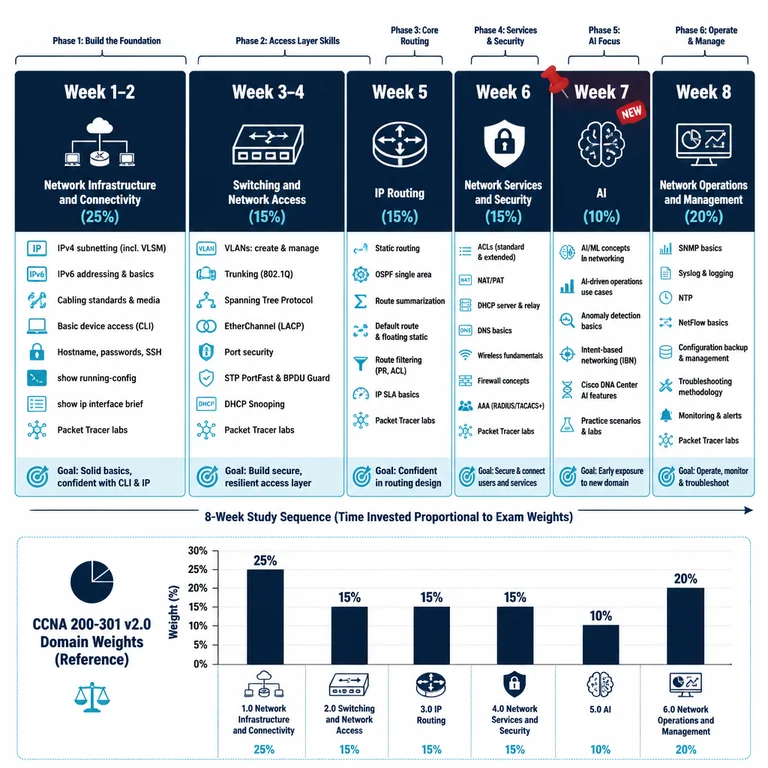
A rough eight‑week sequence might look like this:
Weeks 1–2: Network Infrastructure and Connectivity (25%)
Nail down IPv4 subnetting (including VLSM), IPv6 addressing, cabling standards, and basic device access. Use Packet Tracer to configure hostnames, passwords, and SSH, then practise show running-config and show ip interface brief until reading output feels natural. Don't underestimate the basics — a surprising number of lab tasks fail because candidates rush past the initial device setup.
Weeks 3–4: Switching and Network Access (25%)
VLAN creation, trunking, Spanning Tree, EtherChannel, and wireless fundamentals. Don't skip the verification steps. Lab every show command that relates to these topics — show vlan brief, show spanning-tree, show etherchannel summary. Intentionally misconfigure a trunk allowed-VLAN list and work through the resulting connectivity problem.
Week 5: IP Routing (20%)
Focus on OSPF (single‑area and multi‑area), static routes, first‑hop redundancy, and routing table interpretation. Make time to break your OSPF configuration intentionally and fix it, because v2.0 will test your ability to do exactly that under a timer. Use debug ip ospf hello and show ip ospf neighbor until you can spot a mismatched timer in seconds.
Week 6: Network Services and Security (15%)
DHCP, DNS, SNMP, access lists, port security, VPN basics, and security fundamentals with an emphasis on Cisco's secure access approach. This domain carries less weight but feeds directly into the AI and troubleshooting scenarios. Practise writing and applying extended ACLs, then verify them with show access-lists and test traffic.
Week 7: AI (10%)
Learn the AI‑related vocabulary, explore Cisco DNA Center's assurance and analytics dashboards, understand Encrypted Traffic Analytics, and work through the predictive maintenance use cases Cisco highlights. A week of concentrated study is enough if you've already touched automation concepts earlier. Focus on the “what it does and why” rather than implementation details.
Week 8: Network Operations and Management (5%)
Device monitoring, Syslog, NetFlow, configuration management, and a full‑scale review of all domains. Use this week to knock out several timed, mixed‑topic practice sessions. Pay attention to how the domains connect — a Syslog message in the monitoring domain might point to a routing problem you'll need to troubleshoot.
Inside each block, drill labs that force you to configure and troubleshoot. Don't skip the verification steps; they're often the difference between a pass and a fail. When you wrap up a domain, take a set of CCNA 200-301 sample questions that align with those topics to gauge your readiness. It's tempting to leave practice exams until the very end, but mixing them in weekly gives you the feedback loop you need to adjust your focus.
What the changes mean for current v1.1 candidates
If you're already studying for the v1.1 exam, you're not automatically behind. Cisco has set the last date to test for v1.1 as 2 February 2027, so you have a clear window. If you can sit the exam before that date, you don't need to master the AI domain or worry about the escalated troubleshooting verbs.
However, if your timeline pushes you past February 2027, I'd recommend pivoting sooner rather than later. The risk isn't that v1.1 knowledge becomes irrelevant — it's that the v2.0 exam will test overlapping topics with a different style, and you'll want to practise under the new verbs. By gradually integrating the new blueprint topics into your study routine now, you'll avoid a rushed scramble in the final weeks before your test date.
For candidates who already hold a CCNA certification, the v2.0 update doesn't affect recertification directly — your credential remains valid until its normal expiration. But if you're planning to recertify by taking the exam again, you'll be sitting v2.0 once v1.1 retires, so staying current with the new topics is prudent.
Questions candidates are voicing as the transition nears
Is the AI domain heavily technical, or mostly conceptual?
Mostly conceptual and tool‑oriented. You won't be asked to write a Python script or build a neural network. Instead, expect questions about how AI features in Cisco DNA Center interpret telemetry, what Encrypted Traffic Analytics does, or how predictive maintenance models help avoid outages. Treat it as a product‑knowledge domain wrapped in AI vocabulary.
Do I need a physical lab, or is Packet Tracer enough for v2.0?
Packet Tracer covers the basics of VLANs, STP, routing, and ACLs, but the AI and advanced troubleshooting features may not be fully represented. Cisco Modeling Labs (CML) or access to real kit will better prepare you for the performance‑based questions that involve multiple interrelated tasks. If a full lab isn't possible, supplement Packet Tracer with video walkthroughs of the AI dashboards and CLI debugs.
Will the exam cost change with v2.0?
The $300 price tag remains the same, according to Cisco's official exam page. Always verify when you register, but as of now there's no planned increase tied to the blueprint update.
How long should I expect to study for v2.0 versus v1.1?
Because the AI domain and the heightened troubleshooting depth add about 10–15% more preparation effort, a realistic estimate is 8–12 weeks of consistent study for someone with basic networking knowledge. For those starting from scratch, 12–16 weeks is safer.
If you're ready to test your knowledge against exam‑style questions that match the updated blueprint, Learn more — browse the relevant exam page and purchase a practice test.
Practice resources aligned with the new blueprint
browse the relevant exam page and purchase a practice test
Learn more
Discussion
Question Comments
0 comments·0 participantsSign in to leave a comment and access more free questions.