

Can you go back on Cisco exam questions after submitting them? No. For Cisco written certification exams such as CCNA and CCNP, once you advance past a question, you cannot return to revise your answer. Your checking time belongs before you move forward.
That changes a familiar exam strategy. Answering the straightforward questions, leaving uncertain ones for later and reviewing everything at the end won't work with forward-only navigation. You need to make each decision while that question is still available.
This is a policy explainer, with no claim of a newly announced change. For your booked appointment, read the current exam instructions and on-screen tutorial carefully. The practical issue is immediate: your preparation should include committing to an answer, managing uncertainty and continuing without a second pass.
What becomes final when you move forward
Cisco's navigation rule concerns your access to an earlier question after you leave it. The distinction between selecting an answer and advancing matters: complete your checks while the current question remains open.
Check the response before leaving the screen
Before advancing, compare your selected response with the question's actual request. Check whether it asks for one answer or several, whether a negative changes the meaning, and whether your selection addresses the stated requirement.
For a configuration or troubleshooting scenario, make sure you've answered the problem presented. Recognising a familiar command or symptom can tempt you to solve a slightly different problem.
Once you move forward, you should treat that response as closed. Spare time later doesn't give you another opportunity to inspect it.
Keep the scope of the rule clear
This explainer concerns written certification exams, including CCNA and CCNP exams. Don't extend its description of question navigation to every Cisco assessment, practical lab or other delivery format.
The instructions attached to your particular exam remain the authority. Read them even if you've already taken another Cisco exam.
The navigation restriction also doesn't establish why Cisco designed the exam this way. It isn't evidence, by itself, of adaptive testing, question weighting or a particular scoring method. Those are separate matters requiring their own documentation.
For test-day planning, the useful fact is narrower: perform your answer review before advancing to the next question.
Why a review-later habit creates trouble
Forward-only navigation affects candidates who have learnt to manage uncertainty through a review screen. If that is your usual approach, change it during practice.
On an exam that permits returning, you might make a provisional selection and expect to reconsider it after completing easier questions. With Cisco's navigation constraint, that provisional answer becomes your final response when you advance.
The same issue applies to accidental selections. A rushed click followed immediately by advancing removes the chance to notice the error during a later sweep. A brief check on the current screen therefore has a clear purpose.
Candidates moving between certification vendors should keep each exam's rules separate. Familiarity with the Microsoft exam format doesn't establish what navigation will be available on a Cisco exam.
I would replace the habit of saving difficult decisions for later with a smaller decision cycle: read, reason, check and commit. That cycle should happen on every question, although the time it takes will vary.
It also helps to distinguish uncertainty from unfinished work. You may understand the question, eliminate weaker options and still feel unsure. Waiting for complete confidence can consume time without producing additional evidence.
Before advancing, ask whether another look is likely to change your reasoning. If you've found a specific issue to check, check it. Otherwise, make the strongest supported selection and continue.
Give each answer its check before you submit
The inability to return makes a short, purposeful check more useful than repeated rereading. Your aim is to catch a concrete error while correction is still possible.
Match the answer to the requirement
Start with the instruction. Identify what the question requires you to select, configure, explain or troubleshoot.
Then check the constraints in the scenario. A response might describe a technically possible action while failing to meet the stated requirement. Pay attention to conditions that limit the acceptable answer.
Suppose a practice question asks you to select two configuration changes. Before advancing, check that you've selected two responses and that each addresses the requested outcome. This is a hypothetical reading check, not a description of a particular live exam item.
Techniques for reading scenario questions can help you separate the requirement from surrounding detail. Keep any vendor-specific scoring advice separate from that transferable reading skill.
A useful final scan checks:
- The required number of selections.
- Any negative or limiting wording.
- Whether the selected response matches your reasoning.
- Whether you've considered the relevant exhibit or output.
Keep this scan short enough to repeat consistently.
Change an answer for an identifiable reason
While the question is still open, you can reconsider your response using the available controls. Make that reconsideration evidence-led.
A missed condition, an overlooked line of output or a misunderstood instruction gives you a reason to change your selection. General discomfort doesn't identify an error.
Avoid adopting either extreme as a rule. Your first answer isn't automatically correct, and continued hesitation doesn't automatically make it wrong.
For example, if you notice that the question asks for the exception, revisit your selection. If you've simply read the same options again without finding new information, further repetition may add little.
Make the correction you can explain, check the selection and advance.
Keep a flexible time budget for the remaining questions
Cisco's forward-only navigation means your time plan must support decisions throughout the exam. A reserve can absorb difficult questions, but it cannot become a final review period for earlier answers.
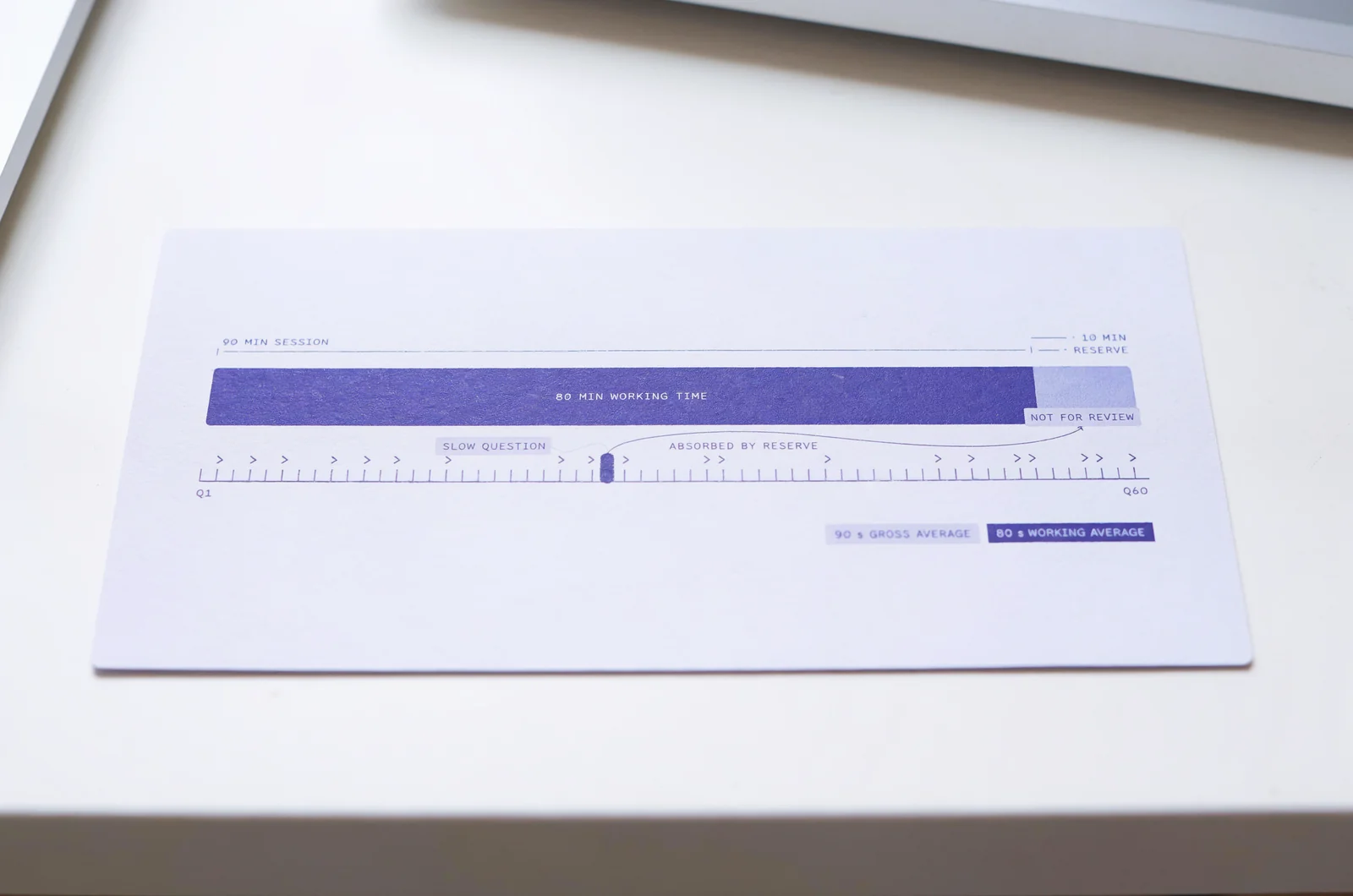
Use an average as a reference
Use the duration and information confirmed for your own exam when planning. Don't borrow a question count or time allowance from another certification.
For illustration, imagine a practice session with 60 questions and 90 minutes. The gross average is 90 seconds per question. Keeping ten minutes as a contingency leaves an average of 80 seconds across the questions.
Those numbers describe a hypothetical practice session. They aren't a statement about CCNA or CCNP exam duration or question count.
An average also isn't a rigid limit for every item. A question you can resolve quickly may free time for a longer scenario. What matters is whether your overall progress remains workable.
Check the timer at sensible intervals. If the interface provides a remaining-question count, compare that with the time remaining. Use the information actually displayed rather than assuming every exam presents progress identically.
Recover from a slow question without rushing the next
A difficult question can create two losses: the time spent on it and the attention spent regretting it afterwards.
Once you've advanced, the previous response is closed. Bring your attention to the new question's requirement before selecting anything.
If you're behind your intended pace, shorten unproductive hesitation. Preserve the reading and selection checks that prevent avoidable errors.
Practising with timed practice exams can help you distinguish genuinely demanding questions from questions where you keep rereading without making progress.
A useful pacing calculator would accept your confirmed available time, a remaining-question count where available, and a chosen contingency. It could show an average working pace without assuming that every question deserves equal time.
During the real exam, use the timing information and controls provided by the exam interface.
Make practice reflect the point of commitment
Preparation for a forward-only Cisco exam should include the act of leaving an answer behind. A practice score alone doesn't show whether you've developed that habit.
Separate explanation review from exam rehearsal
During learning sessions, pause to inspect explanations, revisit concepts and compare alternatives. That work helps you understand why an answer fits.
During a timed rehearsal, delay explanation review until the session ends. If the practice platform allows backwards navigation, impose your own forward-only rule: once you've advanced, leave that response unchanged.
This is a practice method, not a claim that a third-party interface reproduces every Cisco exam control.
If you're using PlanetCert practice tests, decide before each session whether you're studying explanations or rehearsing timed decisions. Keeping that purpose clear makes the result easier to interpret.
Record your original answer before reviewing it. Otherwise, a correction made after reading the explanation can blur the difference between what you knew during the session and what you learnt afterwards.
Identify why the commitment was difficult
After the rehearsal, examine uncertain answers as well as incorrect ones. Ask what prevented you from reaching a decision efficiently.
Was there a knowledge gap? Did you miss a condition? Could you interpret the output but struggle to compare the options? Each problem calls for different follow-up work.
A knowledge gap needs targeted study. A selection error needs a more reliable final scan. Slow interpretation may call for practical work with the relevant configuration or output.
For lab preparation, understand Cisco Packet Tracer limitations before choosing exercises. Match the practice environment to the task you need to understand.
PlanetCert flashcards can support short refreshers on concepts you've already studied. Use them alongside practice that requires you to apply those concepts to a question.
On your next rehearsal, check whether the same cause of hesitation appears again. Keep your original responses available for that comparison.
Handle technical trouble while the question is open
If a technical problem prevents you from reading or answering a Cisco exam question, report it through the support process for your delivery method.
At a test centre, alert the administrator. For a remotely proctored appointment, use the instructed support channel. Follow the procedure explained for your session.
Describe the observable problem clearly. An exhibit that won't open, an unresponsive control or missing content is more specific than saying the question doesn't work.
Avoid advancing simply to see whether the problem disappears. Moving forward may remove your access to the affected question.
You also shouldn't assume that reporting a problem will reopen an earlier item, pause the timer or produce a particular adjustment. Those outcomes depend on the applicable process and circumstances.
Regretting an answer after advancing is a different situation from an interface failure. A proctor isn't there to assess your reasoning or tell you whether a response is correct.
Read the support instructions before the scored portion begins so you know how to raise an issue while it is happening.
Details to confirm for your booked Cisco exam
Candidates usually have several closely related questions about returning to earlier items. Resolve these before your appointment so they don't compete for attention during the exam.
Can I flag a difficult question and return later?
Don't build your Cisco written-exam strategy around a flag-and-return cycle. Forward-only navigation means that advancing closes your opportunity to revisit that question.
Deal with the uncertainty while the item is open. Read the requirement, eliminate responses you can rule out, check your selection and commit within your time budget.
Can I skip an unanswered question and come back?
You should not expect a later opportunity to complete an earlier question. Whether the interface permits advancing without a response is a separate matter governed by its instructions.
Make your intended response before leaving the item. Don't treat moving forward as a temporary skip that you can reverse at the end.
Does finishing early let me review previous answers?
Extra time doesn't remove the navigation restriction. You cannot turn unused minutes into a second pass through questions you've already left.
During practice, use any spare time to assess your pacing after the session. On exam day, follow the completion instructions shown by the interface.
Do online and test-centre appointments have different rules?
Don't assume that choosing a delivery location gives you a different review option. Check the rules for your specific exam and appointment.
The delivery setting affects how you obtain support. It isn't a reliable basis for expecting backwards navigation.
Does this mean I should rush my decisions?
No. The rule makes deliberate checking before submission more valuable.
Give a question enough attention to understand and answer it, while protecting time for the remaining exam. Rehearse that balance before test day: make your selection, perform a brief check and continue without reopening it.
Check your readiness for a forward-only exam


Discussion
Question Comments
0 comments·0 participantsSign in to leave a comment and access more free questions.