
How to Use Wireshark to Pass Network Certification Labs Faster
A practical walkthrough for CCNA 200-301 and CompTIA Network+ candidates who need to turn packet captures into correct answers under exam pressure.
You've got 90 minutes to diagnose a network fault from a PCAP, hunt down a rogue DHCP server, or explain why a TCP handshake cratered. The exam screen shows a Wireshark packet list and four answers that all sound plausible. Your heart kicks up because you've analyzed thousands of packets on the job, but the ticking clock turns every click into a gamble. That's the gap between knowing Wireshark and actually passing certification labs that test it.
Most candidates install the tool, capture some home network traffic, and call it done. The exams don't reward that kind of casual exposure. They reward structured, repeatable workflows that surface the right evidence in under 60 seconds. This guide maps those workflows to the exact lab objectives on CCNA 200-301 and Network+ N10-009, then shows you how to drill them until they become muscle memory.
What Certification Labs Actually Test with Wireshark
The vendors don't hide what they're after. Cisco lists "Analyze network traffic using a protocol analyzer" under CCNA 200-301 Domain 4. CompTIA Network+ N10-009 dedicates section 2.4 to "Given a scenario, analyze traffic and performance using appropriate tools." Both expect you to open a capture, apply a display filter, read protocol fields, and draw a conclusion. The WCA-101 exam from the Wireshark Foundation tests the same skills at greater depth.
The real difference is time pressure and context. In production, you might spend 20 minutes chasing an anomaly. In a certification lab, you get 2-3 minutes per item. That compression demands a decision tree, not exploration.
Labs cluster around five repeatable tasks:
- TCP handshake validation — spotting SYN, SYN-ACK, ACK sequences and catching resets or timeouts
- ARP inspection — mapping MAC to IP, detecting gratuitous ARP or poisoning attempts
- DHCP sequence analysis — confirming DORA flow or identifying rogue servers
- DNS query tracing — reading query types, response codes, and recursive vs. iterative behavior
- ICMP diagnostics — interpreting echo request/reply patterns and unreachable codes
Each task ties to a specific Wireshark feature set. Master the feature, master the lab. The rest of this guide breaks each cluster into a mini-workflow with setup, execution, and verification steps.
Build Your Lab Environment in 15 Minutes
Random home traffic won't cut it for practice. You need reproducible captures that mirror exam scenarios. The fastest path is a virtual lab with three nodes: client, router, server. Use Cisco Packet Tracer, GNS3, or EVE-NG for CCNA-aligned topologies. For Network+, any two Linux VMs plus a Windows client on VirtualBox works fine. The point is generating clean, labeled traffic you control.
Install Wireshark 4.2 or later on your host or a dedicated analysis VM. Enable tcpdump or dumpcap alongside the GUI — exams sometimes throw CLI output at you, and the syntax is identical. Grab the sample PCAP repository from the Wireshark Go Deep certification page. These captures target WCA-101 study but cover the same protocols CCNA and Network+ hit. If you want curated academic sets, the Wireshark Foundation maintains public captures at the Go Deep documentation hub.
Set up a folder structure that tracks with your study schedule:
~/lab-captures/ tcp-handshake/ arp-inspection/ dhcp-rogue/ dns-troubleshoot/ icmp-diagnostics/
Name every capture descriptively: tcp-syn-timeout-2026-05-10.pcapng. The timestamp prevents chaos once you've got 50+ files. Good naming pays off when the exam throws eight tabs at you and asks for a comparison between two captures.
For reproducibility, drop a simple text file in each folder documenting your topology. Note OS versions, IP addresses, and any intentional misconfigurations. This saves hours when you revisit a capture after two weeks and can't remember why that third packet looks off.
TCP Handshake Workflow for Exam Speed
CCNA labs love TCP. It's stateful, visual, and brutally unforgiving. One missing flag or wrong sequence number kills the whole connection. Your job: read the three-way handshake, spot the failure mode, pick the root cause.
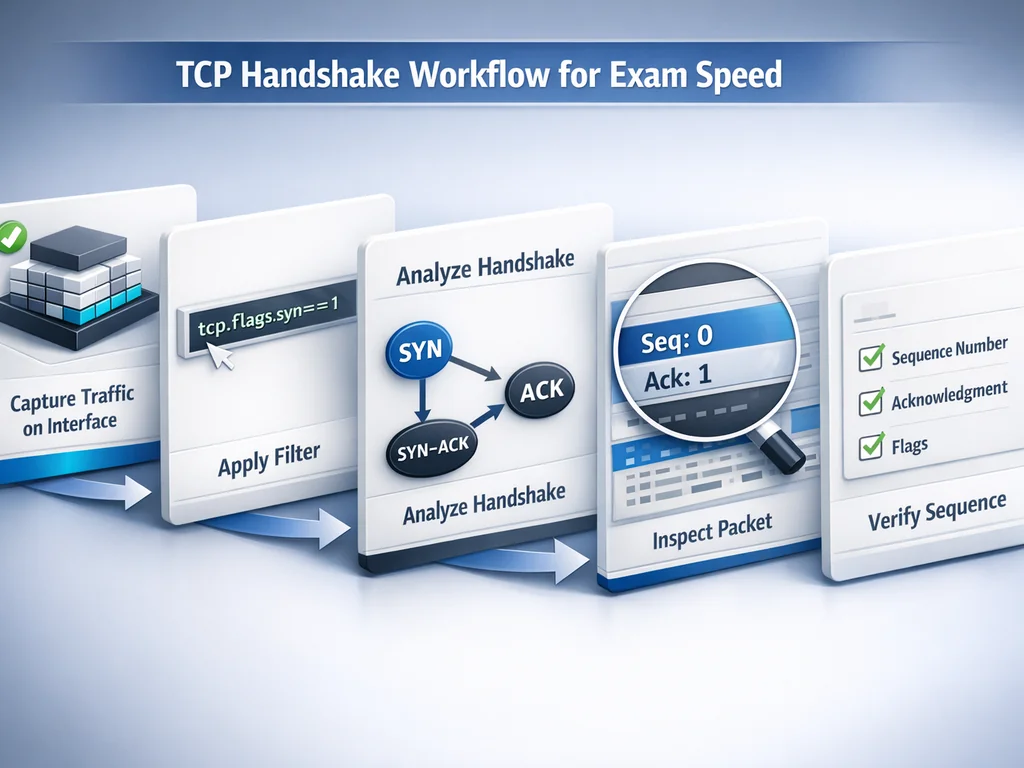
Step 1: Isolate the conversation. Open the capture. Right-click any TCP packet in the list, select Conversation Filter > TCP. This auto-applies tcp.stream eq N. The exam usually gives you pre-filtered captures, but knowing how to apply the filter proves you understand the logic underneath.
Step 2: Read the flags. Expand the TCP layer in the packet details pane. Watch for:
- SYN (0x002) — initial request
- SYN-ACK (0x012) — server response with acknowledgment
- ACK (0x010) — client finalizes the handshake
SYN followed by RST means the port's closed or filtered. SYN with no response means the server's unreachable or a firewall's dropping packets. SYN, SYN-ACK, but no final ACK means the client isn't responding — usually asymmetric routing or a host-based firewall blocking the return.
Step 3: Check window scale and MSS. Expand TCP > Options. The Maximum Segment Size flags path MTU issues. A low window scale paired with high latency hints at performance problems, though this shows up more in WCA-101 than CCNA.
Step 4: Verify with expert info. Open Analyze > Expert Information. Watch for warnings like "Previous segment not captured" or "Duplicate ACK" — signs of packet loss or retransmission, classic distractors in lab questions. Expert info is your sanity check when the packet list looks clean but the application's failing.
Mini-story: Elena, a network tech in Austin, spent three weeks memorizing TCP flag values for her CCNA. On exam day, a lab showed SYN, SYN-ACK, then a rapid RST from the client. She knew the flags cold but froze because the reset came from the client side, not the server. She applied the conversation filter, confirmed the client IP, and recognized the pattern: a host firewall rejecting the connection post-handshake. She picked "Client-side firewall blocking outbound connection" and moved on. The hesitation cost her 45 seconds, but the workflow kept her from guessing wrong.
ARP Inspection and MAC-to-IP Mapping
ARP looks deceptively simple. Two packets: request and reply. Labs exploit that simplicity by testing whether you can detect poisoning, spot duplicate IPs, or map Layer 2 to Layer 3 when the pressure's on.
Step 1: Filter for ARP. Type arp in the display filter bar. For large captures, add || icmp to catch unreachable messages that often tag along with ARP failures.
Step 2: Read the opcode. Expand the ARP layer. Opcode 1 is request; opcode 2 is reply. Gratuitous ARP (opcode 2 with identical sender and target IP) is normal for some operating systems but suspicious in clusters. Exams may present a gratuitous ARP flood as a rogue gateway or man-in-the-middle attempt.
Step 3: Correlate with the Ethernet header. Check the source MAC in the Ethernet frame against the sender MAC in the ARP payload. A mismatch screams spoofing. CCNA labs occasionally frame this as "what is wrong with this capture?"
Step 4: Use the address resolution table. Open Statistics > Resolved Addresses for a clean mapping without scrolling through hundreds of packets. For quick verification, Statistics > Endpoints shows MAC and IP pairings with packet counts.
Network+ often frames ARP as troubleshooting scenarios: "Users report intermittent connectivity. Given this capture, what's the most likely cause?" Usually it's an IP conflict visible as duplicate MAC claims or a gratuitous ARP from an unauthorized device.
Mini-story: Marcus, studying for Network+ after a helpdesk promotion in Chicago, drilled ARP analysis every evening for two weeks. On his exam, a lab showed three ARP replies for the same IP with different MAC addresses. He checked the Ethernet headers immediately, spotted mismatched source MACs, and identified the duplicate IP assignment. The correct answer: "IP address conflict caused by misconfigured static assignment." He finished the lab in 90 seconds, banking time for a tougher routing simulation.
DHCP Sequence Analysis and Rogue Server Detection
DHCP is a four-step dance: Discover, Offer, Request, Acknowledge (DORA). Labs test whether you can read this sequence, catch missing steps, or spot multiple servers responding.
Step 1: Filter for DHCP. Use dhcp or bootp as your display filter. Wireshark still labels DHCP as BOOTP in some versions, so bootp is safer for backward compatibility.
Step 2: Follow the transaction ID. Each DORA exchange shares a 32-bit xid. Sort by this column or add it to your packet list view. Multiple offers with different xids means separate client requests. Multiple offers with the same xid means multiple servers — the classic rogue DHCP scenario.
Step 3: Read the options. Expand Bootstrap Protocol > Options. Option 53 is the message type (1=Discover, 2=Offer, 3=Request, 5=ACK). Option 54 is the server identifier. Two different Option 54 values for the same xid means competing servers. The rogue typically pushes a different subnet mask or gateway, visible in Options 1, 3, and 6.
Step 4: Check the lease time. Option 51 shows lease duration. A rogue server might offer absurdly short leases to disrupt the network, or skip the lease entirely if it's just a simple responder tool.
For exam speed, memorize those option numbers. You won't have time to expand every packet. The packet list view shows message type and server ID if you customize columns — worth a 30-second setup during practice.
DNS Query Tracing and Response Code Reading
DNS labs test your ability to distinguish recursive from iterative queries, read response codes, and identify record types. The filter is dns, but the skill is reading flags and sections fast.
Step 1: Filter and sort. Apply dns filter. Add a DNS response time column if you're analyzing performance, though most certification labs focus on correctness, not speed.
Step 2: Read the flags. In the DNS layer, check the Flags field. Recursion Desired tells you if the client asked for full resolution. Recursion Available tells you if the server supports it. A query with RD=1 and RA=0 to an external server suggests a misconfigured resolver.
Step 3: Check the response code. RCODE 0 is NOERROR. RCODE 3 is NXDOMAIN (name doesn't exist). RCODE 2 is SERVFAIL. Labs often show a capture with NXDOMAIN and ask whether the issue is DNS resolution, routing, or application failure. The answer is DNS if you see the query reach the server and the server respond authoritatively.
Step 4: Read the answer section. Expand Answers. TTL, record type, and data fields are all fair game. A CNAME chain that loops or points to a non-existent A record is a common troubleshooting scenario.
WCA-101 goes deeper into DNS over HTTPS and TCP transport for large responses, but CCNA and Network+ stick to UDP/53 with standard query types. Know your A, AAAA, CNAME, MX, and PTR records cold.
ICMP Diagnostics for Path and Policy Verification
ICMP is the troubleshooting protocol everyone knows and few read carefully. Labs exploit this with subtle type/code combinations that separate "host unreachable" from "administratively prohibited."
Step 1: Filter for ICMP. Use icmp or icmpv6 depending on the scenario. Most labs are still IPv4-focused, but Network+ N10-009 bumped up IPv6 weighting.
Step 2: Read type and code. Expand the ICMP layer. Type 8, Code 0 is echo request (ping). Type 0, Code 0 is echo reply. Type 3 is destination unreachable, and the codes matter:
- Code 0: Network unreachable
- Code 1: Host unreachable
- Code 3: Port unreachable
- Code 13: Administratively prohibited (firewall)
A ping returning Type 3, Code 13 means the path works but a security policy blocks the traffic. A ping with no response and no ICMP error suggests routing failure or silent dropping.
Step 3: Check the payload. Echo requests carry a data pattern; the reply must mirror it exactly. A mismatch suggests NAT translation errors or middlebox interference, though this appears more in advanced labs than entry-level certs.
Step 4: Use the flow graph for visual confirmation. Open Statistics > Flow Graph with "Limit to display filter" checked to see request-response pairs. Gaps jump out immediately. This is your backup when the packet list starts swimming.
Build Exam Stamina with Timed Drills
Knowing the workflows isn't enough. You need to execute them under real exam fatigue and time pressure. The best drill: a 20-minute block, five captures, four minutes each, one specific question per capture.
Track your performance in a simple spreadsheet:
| Date | Capture Type | Question | Time | Correct | Notes |
|---|---|---|---|---|---|
| 2026-05-10 | TCP handshake | Why did the connection reset? | 3:20 | Yes | Hesitated on RST source |
| 2026-05-10 | DHCP rogue | Which server is unauthorized? | 2:45 | Yes | — |
Aim for sub-3-minute averages with 90% accuracy before you schedule your exam. The PlanetCert exam simulator replicates this pressure with timed question banks that include PCAP analysis items. If you prefer self-directed study, use the WCA-101 practice test to validate your protocol depth, then cross-reference with CCST Networking sample questions for Cisco-specific framing.
Vary your drill sources to build adaptability. Mix your own lab captures, the Wireshark sample repository, and third-party challenge sets. Each source uses slightly different labeling conventions and noise levels. The exam won't match your home setup exactly, so train for variability.
Common Mistakes That Burn Time and Points
Even seasoned network engineers trip on certification labs because the format rewards speed over thoroughness. Watch out for these traps:
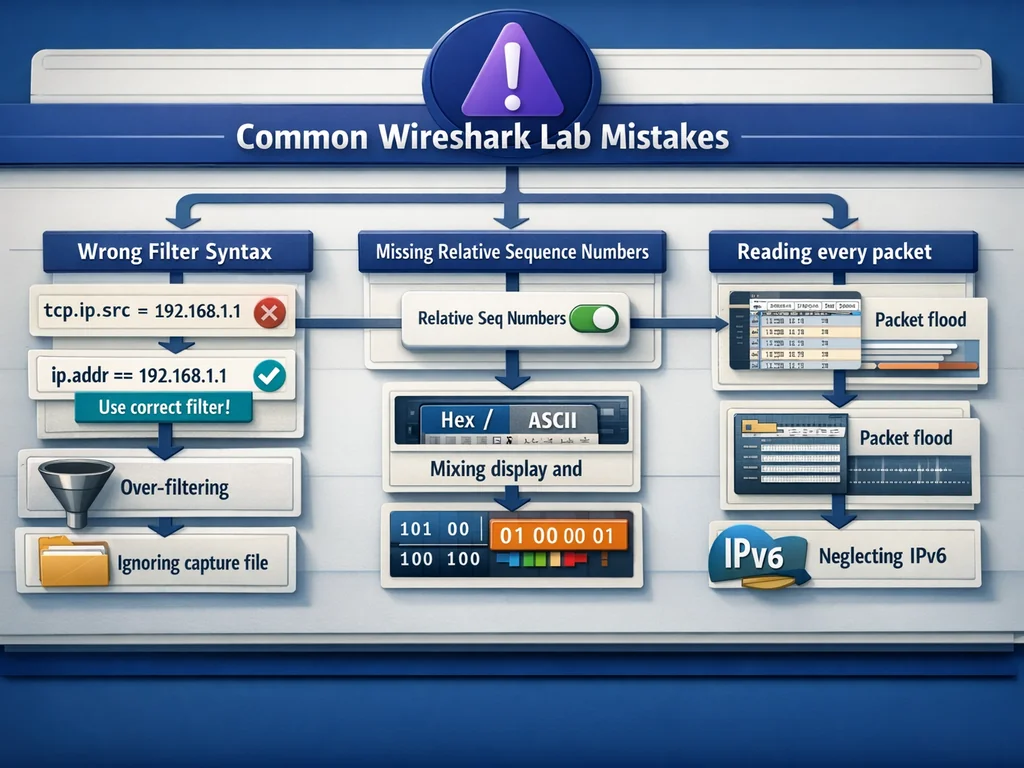
Over-filtering. Applying
tcp.port == 80when the question asks about the entire conversation can hide the ICMP unreachable that explains the failure. Start broad, then narrow.Ignoring capture file comments. Some vendors embed scenario hints in file metadata. Check Statistics > Capture File Properties before diving into packets.
Reading every packet. A 10,000-packet capture doesn't require scrolling. Use Conversation and Endpoint statistics to find the relevant flow, then apply the stream filter.
Mixing display and capture filters. Display filters (
ip.addr == 10.1.1.1) don't change what's in the file. Capture filters (host 10.1.1.1) do. Exams present pre-captured files, so display filter logic is what matters.Forgetting byte order. Some protocol fields are big-endian in the packet but little-endian on the host. Wireshark handles the display, but hexadecimal reading questions may test your awareness.
Neglecting IPv6. Network+ N10-009 significantly increased IPv6 weighting. Practice with
icmpv6anddhcpv6captures. The type/code structure differs from IPv4, and the addresses are harder to scan quickly.Trusting default column layouts. The exam interface may show different columns than your practice setup. Learn to read the packet details pane even when the summary view looks unfamiliar.
From Lab Practice to Exam Day
Your final pre-exam week should shift from learning to pattern recognition. Review your drill spreadsheet. Find your slowest capture type. Run three more timed sessions on just that type. Sleep on it. You're not chasing perfection — you want reliable execution at 85% speed, leaving buffer for the unexpected.
On exam day, read the lab question before opening the capture. Know what you're hunting. Apply the workflow. Verify with a second feature if time allows — expert info for TCP, address table for ARP, transaction ID for DHCP. Then commit and move on. Second-guessing kills completion rates.
If you're pursuing the Wireshark Certified Analyst credential itself, the WCA-101 exam validates these skills at a professional level. The exam runs $349 per attempt according to the Wireshark Go Deep certification FAQ, delivered through Kryterion's Webassessor platform with both testing center and online proctoring options. For broader network certification prep, browse the Wireshark vendor page to see how practice tests align with your study timeline.
Further Reading
- Study Planning Guide for Passing Tech Certification Exams
- Certification Exam Prep Checklist: 15 Steps Before Test Day
- Organizing IT Study Material with Chunking
Ready to test your packet analysis speed under exam conditions? Browse the relevant exam page and purchase a practice test to run timed simulator sessions that mirror the lab format you'll face on test day.

Discussion
Question Comments
0 comments·0 participantsSign in to leave a comment and access more free questions.