

Your final week certification exam revision checklist should start with the exam version attached to your booking. For Microsoft, AWS and CompTIA candidates preparing in 2026, the immediate question is whether an announced change actually applies to that sitting.
Specific 2026 objective changes, release dates and retirements remain unverified here: no dated vendor announcement is available to substantiate them. The plan below is conditional on a confirmed notice. It explains how to establish its scope, adjust your remaining revision and decide whether your exam date still makes sense.
You’ve already invested time in preparation. Before replacing that work with a new study plan, identify exactly what your booked exam requires.
Confirm which 2026 notice applies to your booking
An objective update belongs in your final-week plan once you can connect it to your exam identifier, objective document and sitting date. Keep those details together.
Match the announcement to the exam
Start with your booking confirmation. Record the exam name and identifier exactly as shown, then compare them with the vendor’s corresponding exam information.
Use these checks for the vendor you’re studying with:
- For Microsoft, match the booked exam identifier to its skills outline. Identify the date attached to any relevant revision.
- For AWS, match the exam name and code to the applicable exam guide. Check the scope of any announcement you’ve encountered.
- For CompTIA, compare the booked code with the code on your objectives document. Keep the document’s version information with your notes.
These are verification tasks. They establish which material you need without assuming that every certification from a vendor has changed.
I’d keep a single record containing the booking details, objective revision, applicable date and location of the official notice. If two details conflict, resolve that conflict before replacing your materials.
The outdated study guide checks provide a useful starting point for comparing your existing resources with the outline you need.
Separate the dates before changing your plan
Record an announcement date and an effective date separately. Establish which date controls the objectives for your sitting.
Treat an objective revision, a replacement exam and a retirement notice as separate issues. Read the scope of the notice before deciding what action it requires.
If the wording leaves your booking unclear, ask the vendor or booking provider to confirm which exam applies. Keep the response with your revision record.
Until that question is resolved, mark affected topics as uncertain. Continue working on objectives clearly shared by the materials you’re comparing.
Turn confirmed changes into a revision list
Once an update is confirmed, compare objectives individually before rearranging your remaining study time. A course title or publication year gives you too little detail for that decision.
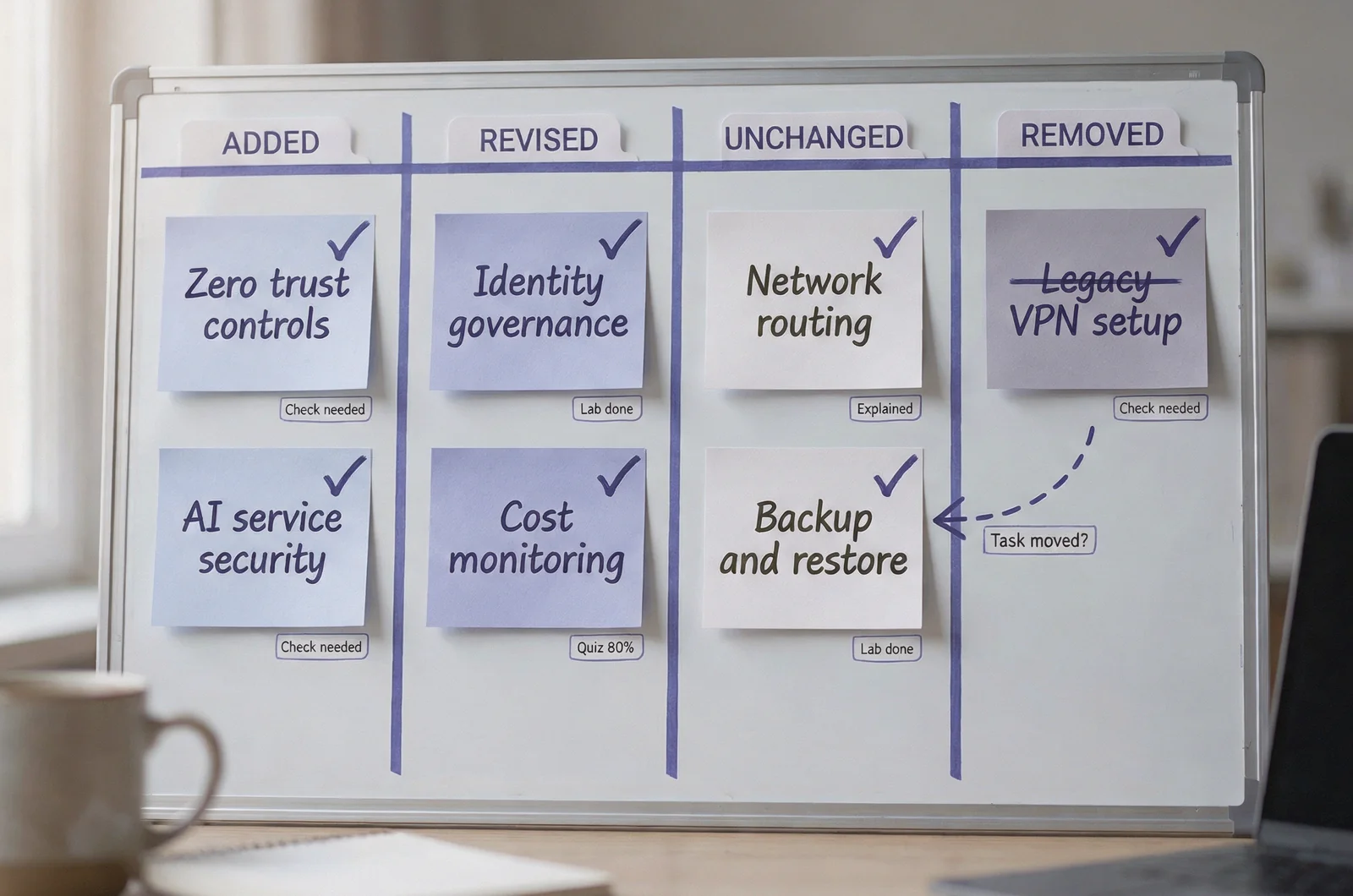
Create a working list with four categories:
- Added objectives need an initial knowledge check and a suitable learning resource.
- Revised objectives need a comparison of the old wording, new wording and expected task.
- Unchanged objectives need attention according to your remaining weaknesses.
- Explicitly removed objectives can leave your exam-focused queue once you confirm the removal applies to your sitting.
Check apparent removals carefully. Look for the same task under a different heading or broader objective before crossing it out.
Next, attach evidence of your readiness to each relevant objective. Use a question you answered with a sound explanation, a completed configuration task or a short explanation you can reproduce without notes.
For example, if a revised objective asks you to troubleshoot a configuration, record the diagnostic step you would take and the result you expect.
If you’re using PlanetCert practice tests, map the sets you select to this list. Use exam simulator analytics to organise errors by objective, then inspect the questions and explanations behind each result.
A useful interactive checklist would accept your exam code, sitting date and objective revision, then let you mark each objective as added, revised, unchanged or removed.
Check what your practice results actually cover
After a confirmed objective change, assess each practice result against the coverage of that attempt. Keep the score beside the version and topics it represents.
A result from material you can’t map to the applicable objectives leaves an unanswered question: what did that attempt assess? Resolve that before using the percentage to judge readiness.
For the next set, record:
- Which objectives the questions address.
- Whether you’ve seen those questions before.
- Which correct answers involved guessing.
- Which errors came from knowledge gaps, interpretation or pacing.
Review guessed answers alongside incorrect ones. Explain the governing concept, why your answer fits and why the alternatives fail. If you need the answer wording to reconstruct the explanation, return to the underlying topic.
The discussion of practice scores after objective updates is relevant when deciding how much confidence to place in an existing result.
For a changed objective, use a question or task that directly addresses the revised requirement. Check it again later without referring to your previous explanation.
For unchanged content, retain useful evidence from earlier preparation, then test any weaknesses that remain. There’s no need to discard your entire revision record because one part of the outline changed.
End each review with a specific repair task, such as explaining a service-selection constraint or correcting a configuration sequence.
Fit the response into your last seven days
A confirmed update needs a place in your remaining calendar. The schedule below is a suggested allocation, so adjust it to your working hours and the size of the verified change.
Seven and six days out: establish the scope
Use the first available study block to finish the version check and objective comparison. Keep it bounded. Your output should be a usable revision list.
Choose the gaps that most need attention using the applicable objective wording, any published domain weighting and your own evidence of weakness. Avoid assigning extra time simply because a topic sounds new.
Find a resource that addresses each selected gap. Check its contents against the objective before committing to a long video series or chapter.
For a hypothetical 50-minute evening, you could spend 15 minutes checking the change, 25 minutes studying one affected objective and 10 minutes explaining it without notes.
Finish by writing the exact task for your next session. That might be selecting a diagnostic command, interpreting an output or comparing two implementation choices.
Five and four days out: repair the gaps
Work through changed objectives in manageable blocks. Use the verb in the objective to choose the activity.
If it asks you to configure something, practise the configuration in a suitable environment. If it asks you to troubleshoot, work through a fault and justify the diagnostic sequence. For an explanation task, describe the mechanism without copying your notes.
Check the result against the applicable requirement. Keep an error log with the objective, your misunderstanding and the correction you need to remember.
Then return to an older weak area. A confirmed addition deserves time alongside unresolved content that remains in scope.
Keep flashcards narrow. One card might ask for the condition that changes a service choice; another might test the next diagnostic step after a particular result.
Retest the repaired objective in your following session using a different question or task where available.
Three and two days out: test coverage and pacing
Plan a timed attempt using material you can map to the applicable outline. Confirm the stated duration and format for your booked exam before setting up the session.
A PlanetCert simulator session can fill this practice block when the selected material matches your confirmed coverage. Follow it with a separate review period.
The distinction between timed practice exams and slower study sessions helps you give each activity a clear purpose. Use the timed attempt to examine pacing; use the review to explain decisions.
Classify the questions you missed or guessed. Check whether each problem needs concept revision, closer reading, a practical exercise or a different time allocation.
If you repeatedly miss a constraint, write it beside the affected objective. For a hypothetical cloud scenario, that constraint might be recovery time, access scope or an operational requirement.
Recheck confirmed changes with a short targeted set. Leave enough time to inspect every explanation.
The day before: settle the remaining decisions
Use the final day for a bounded review of corrected errors and changed objectives. Set a stopping time before you begin.
Revisit tasks you can now explain or complete, then check any unresolved item against the objective wording. Give it a specific action or record it as a remaining gap.
Verify the booking time, time zone, identification requirements and delivery arrangements from your booking instructions. For remote delivery, complete any required system checks using the provider’s instructions.
Confirm rules about breaks, permitted materials and reviewing earlier answers. Use the rules attached to your sitting.
Prepare a short revision sheet containing the details you still confuse. Keep it separate from anything you plan to bring into the exam.
Decide whether the booked date still fits
A confirmed objective change should trigger a readiness review. Compare the remaining gaps with the time available before deciding whether to keep or move the exam.
Keep the date under consideration when you can map your preparation to the applicable outline, explain the changed tasks and complete relevant practice within the stated time.
Consider moving it when an affected area remains substantially unstudied, the applicable version is unresolved or you lack suitable material to assess the new requirements.
I’d write down the evidence before making that decision. Include what remains, how you’ll assess it and the study time you can realistically protect.
For example, a candidate who needs one targeted troubleshooting session has a different planning problem from someone who has yet to study an entire applicable domain. Treat both as individual cases.
Use the comparison of official versus third-party practice tests to frame questions about coverage and explanations. Check the specific resource you intend to use.
If rescheduling becomes your preferred option, read the terms attached to your booking before acting. Confirm the deadline, any charge and the availability of a suitable replacement date.
For the readiness record, replace broad impressions with specific gaps: for example, unable to explain two applicable objectives without notes. Assign each one a study and retest block.
Resolve the questions an objective update leaves behind
The final revision plan should answer any uncertainty that could change what you study or when you sit.
Should I stop studying a topic removed from the outline?
Remove it from your exam-focused queue once you establish that the removal applies to your booked version. First check whether its tasks remain elsewhere in the outline.
You may still want that knowledge for work, but give your remaining exam preparation a clear boundary. Record the objective comparison behind the decision so you don’t repeatedly revisit it.
If the official wording remains ambiguous, retain the topic provisionally and request clarification. Set aside a bounded review block while you wait for an answer.
Can I rely on practice tests bought before the update?
Assess their coverage objective by objective. Retain useful questions that still address the applicable requirements, and identify material for additions or revisions they don’t cover.
Check any stated version or update information. Where coverage is unclear, ask the provider a specific question about the affected objective.
Keep results from different coverage sets separately labelled. Before comparing percentages, inspect which topics each attempt contained and whether you had already seen its questions.
What if the notice arrives during my final week?
Start with its effective date, scope and connection to your booking. Work out whether it requires action for this sitting before changing the calendar.
If it applies, identify affected objectives and assess your current knowledge of each one. Reallocate study time using that evidence.
Where a notice leaves the booked version uncertain, seek confirmation and continue with clearly applicable content. Set a decision point for your booking, with enough time to check the rescheduling terms before their stated deadline.
Study spacing, AWS answers and Microsoft retakes

Discussion
Question Comments
0 comments·0 participantsSign in to leave a comment and access more free questions.