
Running Wireshark Labs as CCNA 200-301 Practice
Packet captures do not lie. When you watch an OSPF adjacency form or see a VLAN tag pop out of a trunk frame, the protocol behavior sticks in memory far longer than any flashcard definition. This guide walks you through building Wireshark lab scenarios that map directly to every major domain of the 200-301 CCNA exam, turning abstract objectives into visual proof you can analyze.
What you need before your first capture
Your lab setup does not require expensive hardware. A laptop with 8 GB of RAM, a copy of Wireshark (free, available at wireshark.org), and a network emulator are enough. Cisco Packet Tracer works for basic switching labs, but GNS3 or EVE-NG gives you real IOS images to capture against. If you already run a home lab with physical switches and routers, connect one NIC in promiscuous mode and you are set.
Install Wireshark on your host machine, then verify the Npcap driver recognizes your virtual or physical adapters. On Windows, launch Wireshark as administrator so it can bind to loopback and bridged interfaces. On Linux, add your user to the wireshark group with sudo usermod -aG wireshark $USER, then log out and back in.
For a first sanity check, open a capture on your loopback adapter and ping 127.0.0.1. You should see ICMP echo request and reply frames immediately. If that works, your environment is ready for the domain-specific labs below.
Network fundamentals: seeing Ethernet and IP in action
Domain 1.0 of the CCNA blueprint covers 20% of the exam, and it starts with frame and packet structure. A quick practice exercise for the CCNA exam is to generate two types of traffic and compare the captures side by side.
ARP vs. ICMP: From a workstation, ping a neighbor on the same subnet, then clear the ARP cache (
arp -d *on Linux ornetsh interface ip delete arpcacheon Windows) and ping again. In Wireshark, filterarp || icmp. You will see an ARP request and reply before the ICMP echo. Note the Ethernet type field:0x0806for ARP,0x0800for IPv4.IPv6 neighbor discovery: If your network has IPv6, filter
icmpv6and observe Router Solicitation and Router Advertisement messages. The CCNA exam expects you to recognize ICMPv6 message types 133-137. Seeing them in a real capture cements those numbers.Frame sizes: Use the display filter
frame.len > 64to isolate frames above the minimum Ethernet size. Jumbo frames will not appear on a standard lab, but you will spot frames carrying full TCP segments at 1514 bytes. Compare that to 64-byte ARP frames and 42-byte ARP replies. These numbers show up in exam questions about MTU and encapsulation overhead.
Aim for 30 minutes on this lab. By the end, you should be able to identify Ethernet headers, IPv4 headers, and ARP exchanges without pausing.
Switching labs: VLANs, trunking, and STP on the wire
Switching questions make up roughly 20% of the CCNA. Here is where Wireshark earns its place alongside your CCNA prep materials.
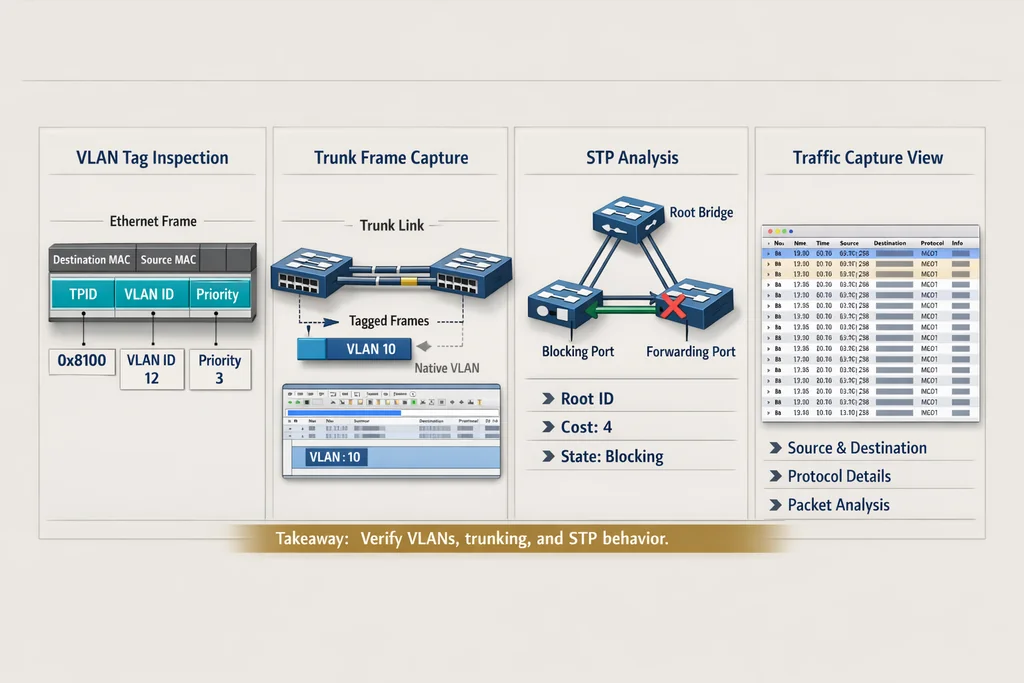
VLAN tagging exercise. Set up two VLANs (10 and 20) on a switch in GNS3 or Packet Tracer. Connect a trunk port to your capture interface. Apply the Wireshark filter vlan.id == 10 and generate traffic from a VLAN 10 host. You should see 802.1Q tags in the Ethernet header. Switch to vlan.id == 20 and verify the tag changes. Now send traffic from an access port and note the absence of a tag.
Spanning Tree observation. Start a capture on a link between two switches, filter stp. You will see Configuration BPDUs every 2 seconds (default hello timer). Identify the Root Bridge ID, Root Path Cost, and Port ID fields. If you change bridge priorities with spanning-tree vlan 10 priority 4096, you can watch the Root Bridge election happen in real time. A new Root ID appears in the BPDU, and non-root ports shift between Blocking and Forwarding states.
This is the kind of hands-on understanding that separates candidates who memorized STP states from those who actually understand the convergence process. When exam questions ask what happens when a root bridge fails, you will have seen the BPDU timeout and TCN flood in your capture.
Routing and IP services: OSPF and DHCP under the microscope
Domain 3.0 (IP Connectivity) and Domain 4.0 (IP Services) together carry 35% of exam weight. These two labs target the highest-value topics.
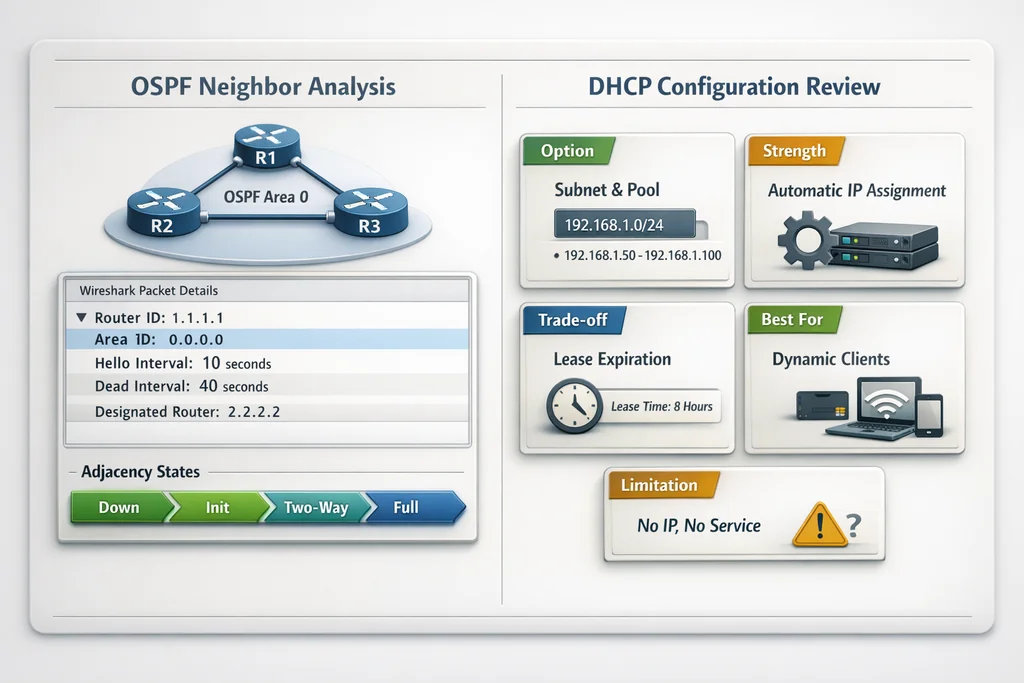
OSPF adjacency walkthrough. Configure OSPF on two routers in GNS3. Before enabling the protocol, start a capture on the connecting interface. Filter ospf. When you enable OSPF, you will see Hello packets (destination 224.0.0.5) first, then Database Description packets as routers exchange LSA headers, then Link-State Request and Update packets as they sync databases. The full adjacency moves through Init, 2-Way, ExStart, Exchange, Loading, and Full states. Watching this sequence in Wireshark maps directly to the CCNA Exam and Training blueprint for OSPF neighbor adjacency.
DHCP four-packet lease. Set up a DHCP server on your router. From a client, request a lease while capturing on the client-facing interface. Filter bootp (Wireshark uses this filter name for DHCP). You will see Discover (broadcast), Offer (unicast), Request (broadcast), and Acknowledgment (unicast). Check the DHCP options field for lease time, DNS server, and default gateway. The CCNA exam tests DHCP relay concepts as well: add an ip helper-address command on a router interface and watch the relay agent field populate in the forwarded packets.
NAT translation. If your router performs PAT, capture on both the inside and outside interfaces. Filter ip.addr == [inside_host] on the inside interface, then watch the source address change on the outside capture. The source port also changes under PAT. Seeing the translation happen removes any ambiguity about how overload NAT works.
Automation and programmability: RESTCONF and NETCONF basics
Domain 6.0 covers network automation, and Cisco has made it clear that candidates should understand API-driven configuration. You will not be writing code on the exam, but you need to recognize the protocols.
Enable RESTCONF on a Cisco IOS-XE device (or use the DevNet sandbox). Capture traffic on port 443. Filter http2 or tcp.port == 443. Send a GET request to /restconf/data/Cisco-IOS-XE-native:native/hostname using curl or Postman. In Wireshark, you will see the encrypted TLS session, but if you enable HTTPS decryption (add the server's private key under Preferences > Protocols > TLS), you can read the YANG-modeled XML payloads. This exercise covers the RESTCONF section of the Implementing and Administering Cisco Solutions curriculum.
For NETCONF, filter on TCP port 830. A NETCONF session starts with an SSH handshake, then the client and server exchange <hello> messages listing supported capabilities. After that, you can send <get> or <edit-config> RPCs. Watching the XML framing in a capture gives you a mental model for how network automation actually talks to devices.
Building your own capture library for review
After running each lab, save the .pcapng file with a descriptive name (e.g., ospf-adjacency-full.pcapng, vlan10-trunk-tag.pcapng). Organize them into folders by CCNA domain. Before your exam, revisit these files with fresh eyes. Apply different display filters, expand protocol headers, and quiz yourself on field meanings.
Useful review filters to keep on hand:
| Purpose | Display filter |
|---|---|
| ARP only | arp |
| OSPF Hellos | ospf.msg == 1 |
| STP BPDUs | stp |
| VLAN-tagged frames | vlan |
| DHCP packets | bootp |
| TCP SYN only | tcp.flags.syn == 1 && tcp.flags.ack == 0 |
| ICMP echo request | icmp.type == 8 |
| DNS queries | dns.flags.response == 0 |
| HTTP requests | http.request |
| SSH sessions | ssh |
Studying these captures between practice exams helps you connect what you read in a textbook with what the protocol actually does on the wire. If a question describes a scenario where a switch port is stuck in the Blocking state, you will remember seeing that exact BPDU configuration in your STP capture.
Common mistakes when using Wireshark for CCNA study
Capturing on the wrong interface. If you are running GNS3 on Windows, the cloud adapter is not always the one carrying traffic. Verify by generating known traffic (a ping) and confirming it appears in the capture window before starting a lab.
Overlooking the display filter vs. capture filter distinction. Capture filters (set before you start) use BPF syntax like host 192.168.1.1. Display filters (applied after) use Wireshark's own syntax like ip.addr == 192.168.1.1. Using the wrong one at the wrong time leads to empty capture windows or overwhelming packet floods.
Ignoring protocol decoding. Wireshark sometimes misidentifies traffic on non-standard ports. If you are running OSPF on an unusual interface, right-click a packet and select "Decode As" to force OSPF decoding. Otherwise you will see raw IP packets with no OSPF tree expansion.
Spending too long on captures. A focused 45-minute lab session is more productive than two hours of aimless browsing. Pick one domain per session, run the exercise, review the key frames, and stop. Then take a timed CCNA practice exam to test whether the visual knowledge transfers to exam-style questions.
When Wireshark alone is not enough
Wireshark shows you what happens on the wire, but it does not tell you why a configuration command produces that traffic. Pair your capture sessions with a structured study plan. Run the lab first, then read the relevant chapter in your cert guide. When you encounter a concept you do not fully understand, go back to the capture and expand the header fields until the behavior makes sense.
For candidates who want to validate their readiness after building this hands-on foundation, timed question sets with detailed explanations help close the gap between lab knowledge and exam performance. The CCNA 200-301 practice exam on PlanetCert mirrors the 120-minute format and covers all six domains, so you can measure whether your Wireshark labs translated into exam-ready understanding.
Further Reading

Discussion
Question Comments
0 comments·0 participantsSign in to leave a comment and access more free questions.